Confluent Message Browser vs. Infrared360: Two Protobuf Inspection Workflows
This is Part 4 of a 5-part series exploring The Protobuf Visibility Gap in Kafka Operations | Previous Article | Next Article
A useful product comparison starts by acknowledging the overlap. Confluent Cloud’s message browser and Confluent Platform Control Center can display, filter, validate, download, and produce Kafka messages. They support schema-based workflows that include Protobuf.1 Infrared360 can also decode supported Protobuf records, display their fields, and support message-oriented administration and testing.
The difference is not “one product supports Protobuf and the other does not.” Both do. The difference is how each product obtains and applies the definition that makes the binary record readable.
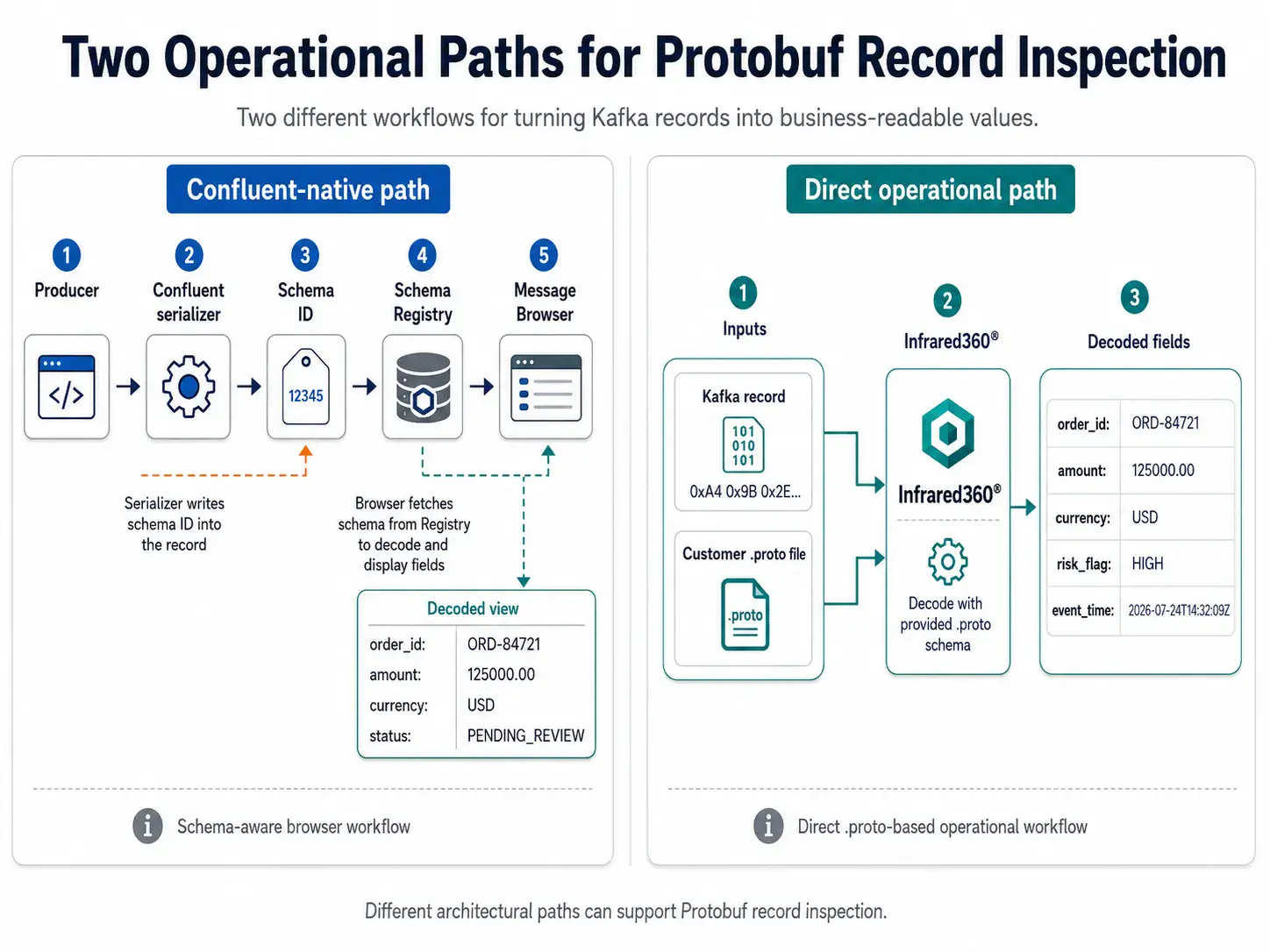
Different architectural paths can support Protobuf record inspection.
How Confluent’s workflow works
Confluent Schema Registry provides a REST service for storing, retrieving, and validating schemas and supplies serializers and deserializers for Kafka clients.[2] In the typical Protobuf flow, a producer uses Confluent’s serializer, the schema is registered under a subject, and the serialized record includes information that enables the deserializer to identify the schema.
The Confluent Cloud message browser is tightly integrated with that environment. It can browse records across partitions, jump to an offset or timestamp, filter displayed results, download data, and produce new messages. When a schema is associated, the browser can generate a sample, validate input, and produce a schema-based message.[1]
That integration is an advantage for teams that want one Confluent-native path from schema governance through development and administration. The same platform can manage schema versions, compatibility, contexts, data contracts, and message browsing.
The TopicNameStrategy boundary
Confluent supports TopicNameStrategy, RecordNameStrategy, and TopicRecordNameStrategy for naming Schema Registry subjects. TopicNameStrategy is the default and derives the subject from the topic name. The other strategies support scenarios such as multiple record types within a topic.[3]
Confluent’s documentation states that the Cloud Console and Control Center user interfaces use only TopicNameStrategy to associate schemas and topics. The message browser therefore uses TopicNameStrategy schemas for deserialization.[1] This is an interface limitation, not a statement that Confluent applications cannot use the other strategies.
The practical question is whether the organization’s records match the message browser’s lookup model. When they do, the experience is direct. When they do not, the team may need another client, a custom SerDe, a different tool, or an alternative inspection workflow.
How Infrared360’s workflow differs
Infrared360 does not currently connect to Confluent Schema Registry for Protobuf decoding. It uses the customer-provided .proto definition directly. An authorized operator selects or applies the appropriate definition to inspect a supported record.
This creates flexibility in environments where the schema exists outside Schema Registry, the producer did not use Confluent’s serializer, the Kafka platform is not Confluent, the subject naming strategy does not fit the UI lookup, or the support team has the approved definition but not Registry access.
Infrared360’s role is broader than a message browser. Avada positions it as a persona-based portal for administration, monitoring, testing, auditing, dashboards, and self-service across Kafka and other middleware technologies.[4] Organizations evaluating it should consider whether cross-platform operations, delegated access, and auditability add value beyond record decoding alone.
Capability and workflow comparison
| Evaluation Area | Confluent Message Browser | Infrared360 |
|---|---|---|
| Protobuf decoding | Yes, through schemas associated with the Confluent Schema Registry workflow. | Yes, for supported records using customer-provided .proto definitions. |
| Schema governance | Strong native capabilities for registration, versions, compatibility, contexts, and contracts. | Not positioned as a replacement for enterprise schema governance. |
| Schema Registry dependency for decoding | The native schema-based browser is integrated with Schema Registry. | No Schema Registry connection is required for the direct .proto workflow. |
| Topic UI naming strategy | Uses TopicNameStrategy for schema association and deserialization. | Does not depend on a topic-to-subject naming lookup; the applicable .proto is selected. |
| Message filtering | Filters columns among records currently displayed; result scope depends on browser settings. | Confirm current filtering and decoded-field search capabilities during evaluation. |
| Produce test messages | Can generate, validate, and produce messages with an associated schema. | Can support creation and production of Protobuf test records; validate exact workflow in the target environment. |
| Kafka platform scope | Optimized for Confluent Cloud or Confluent Platform. | Designed to manage Kafka alongside other supported middleware environments. |
| Access and audit model | Uses Confluent platform permissions and controls. | Uses Infrared360 groups, roles, delegated administration, and audit trails. |
Where Confluent is likely the better fit
A customer standardized on Confluent Cloud, Confluent serializers, Schema Registry, and TopicNameStrategy may find that the native message browser covers its inspection requirements. The schema is already governed, the UI can locate it, and users remain inside the existing platform.
Confluent is also the natural choice when the primary requirement is schema governance rather than operations across multiple middleware technologies. Compatibility rules, version management, data contracts, and producer integration are central Schema Registry capabilities.[2]
Where Infrared360 can add distinct value
Infrared360 becomes more differentiated when an enterprise has mixed Kafka implementations or exceptions to the standard Confluent workflow. Examples include raw Protobuf records, standalone .proto files, alternate subject strategies, acquisitions with different Kafka practices, migration periods, and operations teams that need controlled visibility without direct Registry access.
It can also add value when the organization wants Kafka administration in the same governed portal used for IBM MQ, ActiveMQ, application servers, web services, and other middleware. The business case then includes operational consistency, delegated access, and auditability rather than Protobuf decoding as an isolated feature.
Questions to ask in a proof of concept
Use representative data rather than a simple demonstration schema. Include records produced with the organization’s actual serializer and subject strategy. Test topics with multiple record types if they exist. Confirm nested message handling, imported definitions, keys, values, headers, offsets, timestamps, and message sizes.
For Confluent, verify that the browser resolves the subjects used in production and that permissions align with the support model. For Infrared360, verify the direct .proto process, how definitions are managed, and whether the record framing is supported. Test read-only inspection separately from message production.
Also evaluate operational search carefully. Confluent’s browser can filter across available columns, but it only filters results currently displayed.[1] If the requirement is to scan large topic ranges by decoded business fields, request a live demonstration from every vendor. Do not assume that opening one decoded record and searching thousands of decoded records are the same capability.
A fair conclusion
Confluent has comprehensive Protobuf support within its schema ecosystem. Infrared360 should not be positioned as proving otherwise. Its advantage is optionality: an additional route to business-readable record content when Schema Registry association is unavailable, unsuitable, or outside the operator’s access boundary.
The best architecture may use both. Confluent can remain the system for schema governance and native Kafka platform controls, while Infrared360 supplies cross-middleware operations, delegated visibility, direct .proto inspection, and workflows that span organizational or technology boundaries.
The takeaway
Compare the products at the workflow level. Ask where the definition lives, how the UI locates it, what serialization framing is expected, which naming strategies are supported in the browser, and who needs access. Those questions reveal the Protobuf difference more accurately than a checkbox labeled “supports Protobuf.”
FAQ
Endnotes
- Confluent Documentation, “Use Message Browser in Confluent Cloud.” https://docs.confluent.io/cloud/current/topics/messages.html
- Confluent Documentation, “Schema Registry for Confluent Cloud.” https://docs.confluent.io/cloud/current/sr/index.html
- Confluent Documentation, “Formats, Serializers, and Deserializers for Schema Registry on Confluent Cloud.” https://docs.confluent.io/cloud/current/sr/fundamentals/serdes-develop/index.html
- Avada Software, “Infrared360 Product Details.” https://avadasoftware.com/infrared360-product-details/
Related Posts




More Infrared360® Resources
About the Author: Scott Treggiari