On this page
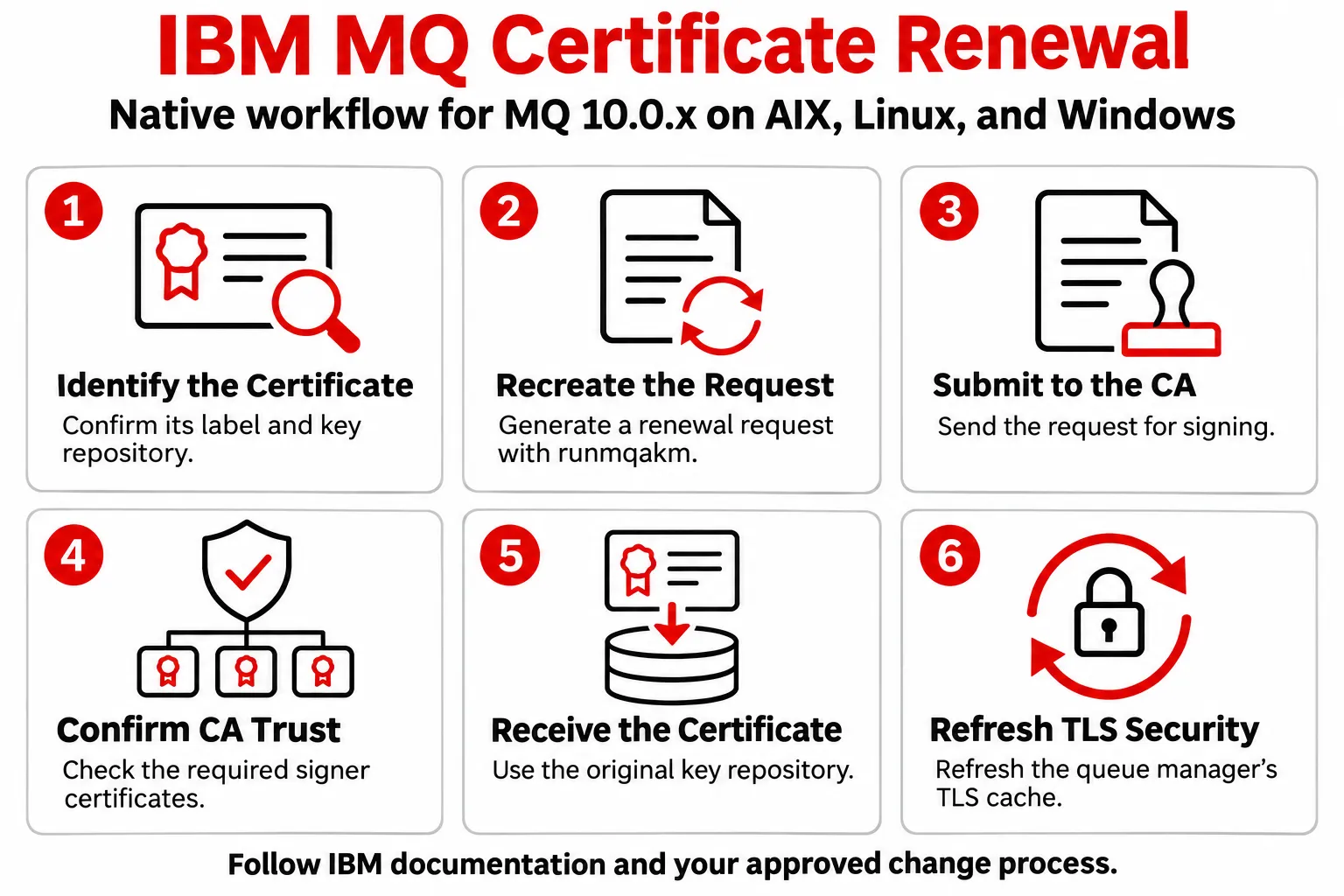
IBM MQ 10.0.x provides the native tools and security controls needed to renew TLS certificates. On AIX, Linux, and Windows, the documented process for an existing personal certificate is to recreate the certificate request with runmqakm, submit the request to the appropriate certificate authority, receive the signed certificate into the same key repository, and refresh the queue manager’s TLS security cache.[1][2]
That process is well defined. The operational challenge usually appears when an MQ team has to repeat it across many queue managers, key repositories, certificate labels, expiration dates, signer certificates, environments, and change windows.
Infrared360 complements the MQ process by helping teams centralize certificate visibility, monitor expiration, manage renewal workflows, distribute signer material, maintain certificate history, and perform authorized MQ administration from one interface. MQ remains responsible for TLS, key repositories, certificate use, and trust. Infrared360 helps make the lifecycle around those controls easier to operate consistently.
What Does IBM MQ 10.0.x Provide for Certificate Renewal?
IBM MQ provides the native certificate and TLS mechanisms that secure MQ connections. That includes key repositories, certificate labels, certificate-request utilities, trusted signer material, TLS configuration, and the security refresh required for queue managers to use updated certificate information.
This article follows IBM’s documented AIX, Linux, and Windows renewal procedure. Other MQ platforms use platform-specific certificate tooling and should follow the corresponding IBM documentation.
1. Identify the Certificate and Key Repository
Before renewing a certificate, confirm the personal certificate being used and the key repository that contains it. Certificate labels matter because they help determine which personal certificate MQ presents during a TLS connection.
On Multiplatforms, certificate selection can be influenced by channel-level CERTLABL, the queue manager CERTLABL, or the applicable default certificate label. IBM MQ 10.0.x documentation should be used to verify the label requirements for the environment being changed.[3]
This identification step is important because renewal must be performed against the correct certificate and repository.
2. Recreate the Certificate Request
IBM documents runmqakm -certreq -recreate for renewing an existing personal certificate on AIX, Linux, and Windows.[1]
The key parameters identify the existing key repository, its password, the certificate label, and the output file for the recreated request.
Recreating the request allows the existing key to be retained. If the organization requires a larger key size, IBM instructs administrators to create a new key and certificate request instead of renewing the existing certificate.[1]
3. Submit the Request to the Certificate Authority
For a CA-signed certificate, the recreated request is submitted to the organization’s approved certificate authority. That may be an internal enterprise CA or an external provider.
The certificate authority remains responsible for signing the certificate. Neither IBM MQ nor Infrared360 replaces that trust function for a CA-signed certificate.
4. Confirm the Required CA Trust Material
Before receiving the renewed personal certificate, make sure the required CA certificates or public trusted certificates are available in the key repository. IBM specifically calls out this step so the certificate chain can be validated when the personal certificate is received.[2]
5. Receive the Renewed Certificate into the Same Repository
After the CA returns the signed certificate, IBM directs administrators to add it to the same key repository from which the certificate request was generated.[2]
A runmqakm receive command follows this pattern:
The certificate file format can be ASCII/Base64 or binary DER depending on what the CA provides. The repository must already exist and must be the same repository associated with the certificate request.[2]
6. Refresh the Queue Manager’s TLS Security Cache
When the renewed certificate is added to a queue manager’s TLS key repository, IBM instructs administrators to issue:
This refreshes the queue manager’s TLS key repository cache so that MQ can use the updated certificate information.[2]
IBM also documents situations in which changes to queue manager certificate-label configuration require REFRESH SECURITY TYPE(SSL).[4]
Why Does IBM MQ Certificate Renewal Become Harder at Scale?
The native renewal procedure is not the problem. The difficulty is operational coordination.
For a small MQ environment, an experienced administrator may be able to track a limited number of certificates and renew each one with native tools and established PKI procedures. In a larger estate, the same process has to be repeated across different queue managers, environments, repositories, certificate types, expiration dates, signer chains, and change windows.
The team has to answer questions such as:
- Which MQ certificates exist today?
- Which queue managers and key repositories are associated with them?
- Which certificates are approaching expiration?
- Which renewals are CA-signed and which are self-signed?
- Which signer certificates or signer bundles must be distributed?
- Which environments should be changed first?
- Has the renewed certificate been applied everywhere it is required?
- Was TLS refreshed and the environment validated after the change?
- Can the team show what was changed during a security or compliance review?
Those questions are where centralized certificate lifecycle management can add value.
How Infrared360 Improves the IBM MQ Certificate Renewal Workflow
Infrared360 does not replace IBM MQ’s TLS implementation, key repositories, certificate labels, or the organization’s certificate authority. It provides an operational layer around those components so MQ teams can manage certificate work more consistently across their environments.
Infrared360’s MQ certificate functions include displaying certificate information, creating KDB key repositories, requesting and receiving certificates, renewing selected certificates, adding signer certificates and signer bundles, monitoring certificate expiration, and maintaining certificate history. The platform also supports CA-signed and self-signed certificate workflows.
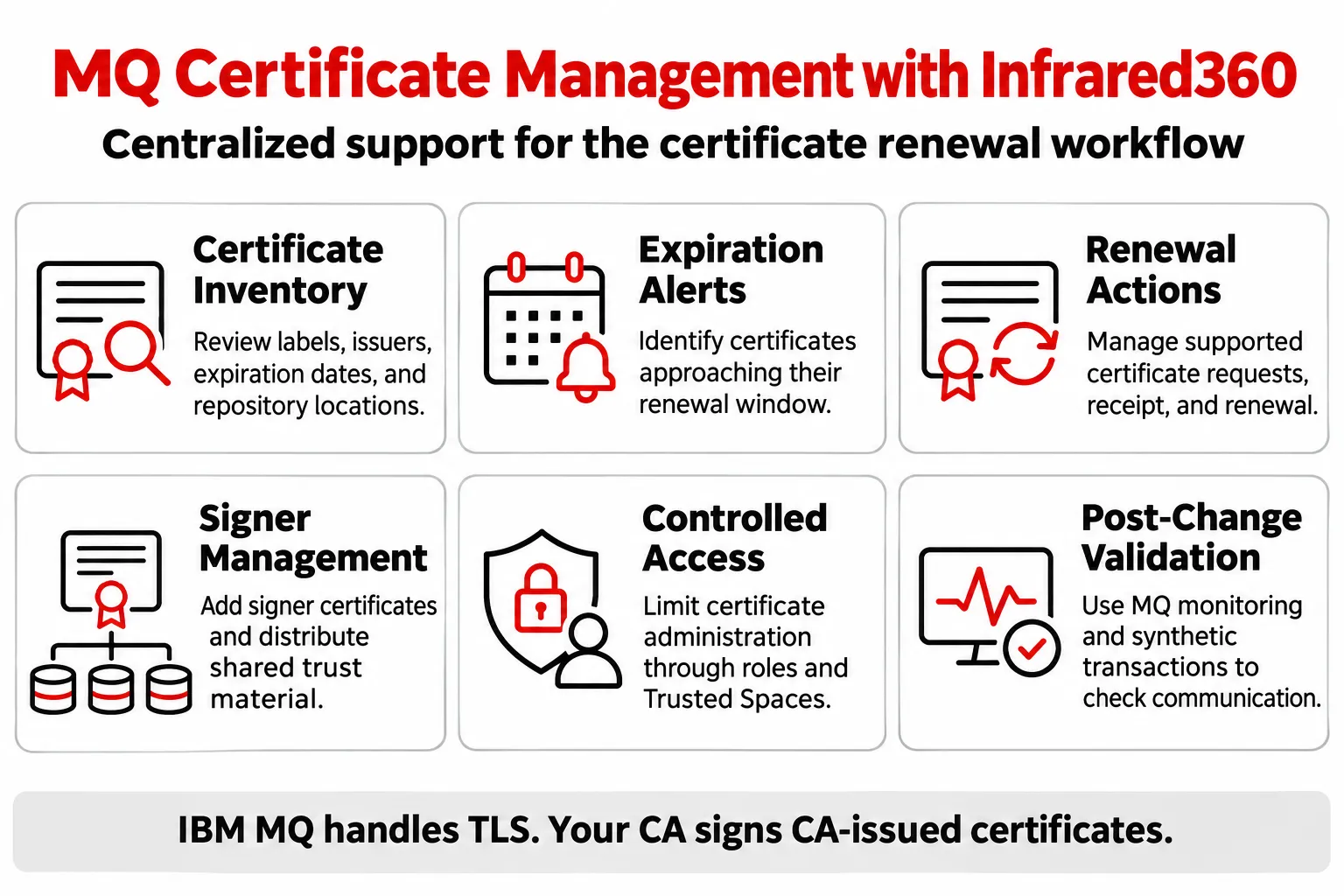
1. Build a Centralized Certificate Inventory
Infrared360 can display certificate details such as certificate label, issuer, type, expiration date, subject, and keystore location. That gives administrators a central place to review the certificate information associated with managed MQ environments.
Renewal work can begin with an inventory rather than with a manual search for the certificate and repository that needs attention.
2. Alert Before a Certificate Reaches Expiration
Infrared360 can monitor certificates in MQ KDBs and alert based on the number of days before a certificate expires. It also supports certificate expiration reporting and certificate history.
This moves the team from reactive discovery to planned renewal:
- Identify certificates approaching expiration.
- Prioritize the queue managers and environments affected.
- Schedule the change before the expiration becomes an availability problem.
- Track renewal activity and certificate history after the change.
3. Manage Renewal as an Administrator-Controlled Workflow
Infrared360 provides certificate renewal functions that allow administrators to select certificates and initiate renewal through the product. The interface also supports certificate requests and certificate receipt.
For CA-signed certificates, the CA still signs the request. Infrared360 helps manage the MQ-side workflow surrounding that process instead of changing the underlying PKI trust model.
For self-signed certificates, Infrared360 provides functions for creating and installing certificates and applying renewed self-signed certificates through the certificate-management workflow.
4. Manage Signer Certificates and Signer Bundles
A personal-certificate renewal can also require trust material to be updated in other repositories. Infrared360 includes functions for adding signer certificates and signer bundles, and Avada’s documented certificate-management capabilities include distributing public certificates and CA signer packages to groups of queue managers.
That can reduce the amount of repetitive work required when the same trust change has to be coordinated across multiple MQ environments.
5. Keep Renewal Access Controlled
Certificate renewal is an administrative action and should remain governed. Infrared360 uses role-based controls and Trusted Spaces to limit which users can see and administer managed resources and functions.
That makes it possible to centralize the workflow without making certificate administration universally available.
6. Validate the Environment After the Certificate Change
Certificate installation is not the end of the change. Teams should verify that the expected MQ communication path still works after the renewed certificate and trust material are in place.
Infrared360 combines MQ monitoring, administration, and synthetic transaction capabilities. Those capabilities can be used as part of a post-change validation process to confirm that the relevant MQ path remains available and to identify issues quickly if the change has an unexpected effect.
IBM MQ and Infrared360 Have Different Roles in the Same Renewal Process
IBM MQ provides the certificate and TLS security mechanics. Infrared360 helps make the lifecycle around those mechanics easier to manage across an MQ estate.
- IBM MQ stores and uses certificates and keys through its supported key-repository mechanisms. Infrared360 provides centralized visibility into managed MQ certificate information.
- IBM MQ provides runmqakm and related native certificate utilities. Infrared360 provides administrator-controlled certificate request, receive, renewal, and related lifecycle functions through a centralized interface.
- The certificate authority signs CA-issued certificates. Infrared360 helps the MQ team request, track, receive, and operationalize the signed certificate.
- IBM MQ uses certificate labels and TLS configuration to determine certificate behavior. Infrared360 helps administrators see certificate details and coordinate the renewal work around those MQ settings.
- IBM MQ requires the appropriate TLS refresh after applicable queue-manager certificate changes. Infrared360 keeps monitoring and administration available in the same operational environment for the follow-up work.
This is why the two approaches are complementary. The goal is not to replace IBM’s certificate controls. The goal is to make repeated certificate renewal easier to plan, execute, validate, and audit.
A Practical IBM MQ Certificate Renewal Methodology with Infrared360
Infrared360 does not replace IBM MQ’s TLS implementation, key repositories, certificate labels, or the organization’s certificate authority. It provides an operational layer around those components so MQ teams can manage certificate work more consistently across their environments.
Infrared360’s MQ certificate functions include displaying certificate information, creating KDB key repositories, requesting and receiving certificates, renewing selected certificates, adding signer certificates and signer bundles, monitoring certificate expiration, and maintaining certificate history. The platform also supports CA-signed and self-signed certificate workflows.
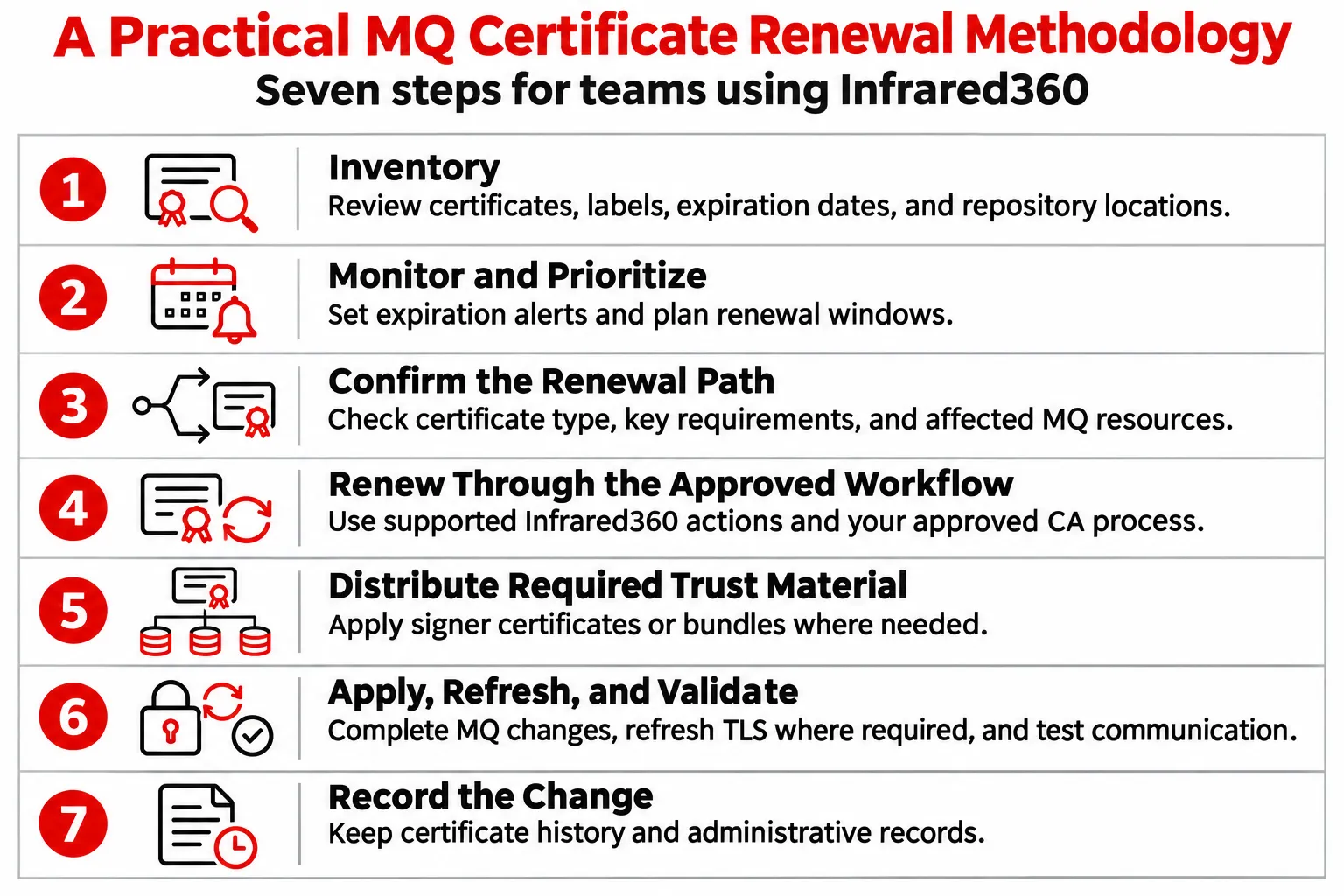
Step 1: Inventory
Review the certificates, labels, expiration dates, certificate types, and keystore locations associated with the MQ estate.
Step 2: Monitor and Prioritize
Set expiration alerts far enough in advance to allow for CA turnaround, approvals, testing, and production change windows.
Step 3: Confirm the Renewal Path
Determine whether the certificate is CA-signed or self-signed, whether the existing key can be retained, and which queue managers, channels, repositories, or signer relationships are affected.
Step 4: Renew Through the Approved Workflow
For a native IBM MQ renewal on AIX, Linux, and Windows, recreate the request with runmqakm, submit it to the CA, receive the signed certificate into the original repository, and follow IBM’s required TLS refresh procedure.[1][2]
When Infrared360 is being used, the administrator can manage supported request, receive, renewal, and certificate lifecycle actions through the centralized certificate interface while preserving the organization’s approved CA process.
Step 5: Distribute Required Trust Material
Apply any required signer certificates or signer bundles to the appropriate MQ environments. When the same trust material is needed across a group of queue managers, use the centralized distribution workflow where appropriate.
Step 6: Apply, Refresh, and Validate
Complete the applicable MQ configuration changes, issue REFRESH SECURITY TYPE(SSL) where required, and validate the expected TLS-enabled MQ communication after the change
Step 7: Record the Change
Keep certificate history and administrative records so the team can verify what was changed and support future troubleshooting, audits, and renewal planning.
When Is Centralized MQ Certificate Renewal Most Useful?
Centralized certificate management becomes more valuable as the number of certificates, queue managers, applications, environments, and administrators increases.
It is especially useful when teams manage:
- Multiple queue managers across development, test, disaster-recovery, and production environments.
- Certificates with different expiration dates and renewal windows.
- A mix of CA-signed and self-signed certificates.
- Signer certificates that must be distributed consistently to multiple queue managers.
- Formal change-management, security, or audit requirements.
- Small MQ teams responsible for a large or distributed estate.
The core question is not whether IBM MQ can renew a certificate. It can. The operational question is how consistently the organization can identify, schedule, renew, apply, validate, and document every certificate change before expiration becomes an incident.
Make IBM MQ Certificate Renewal Easier to Operate
IBM MQ 10.0.x provides a clear native process for renewing TLS certificates. For an individual certificate, the steps are straightforward: recreate the request, have the CA sign it, receive it into the correct repository, and refresh TLS security where required.
The challenge is repeating that process reliably across an enterprise MQ estate.
Infrared360 helps MQ teams move certificate renewal into a more centralized and repeatable workflow with certificate inventory, expiration monitoring, request and receive functions, administrator-controlled renewal, signer management, history, monitoring, and post-change validation capabilities.
Frequently Asked Questions About IBM MQ Certificate Renewal
How do you renew an existing IBM MQ certificate in MQ 10.0.x?
On AIX, Linux, and Windows, IBM documents recreating the certificate request with runmqakm -certreq -recreate, submitting that request to the CA, receiving the returned certificate into the same key repository, and issuing REFRESH SECURITY TYPE(SSL) when the certificate is added to the queue manager’s TLS key repository.[1][2]
Can you keep the existing private key when renewing an IBM MQ certificate?
The documented renewal process recreates the certificate request for the existing personal certificate. However, if a larger key size is required, IBM states that the existing certificate cannot simply be renewed; a new key and certificate request must be created.[1]
Do you need REFRESH SECURITY TYPE(SSL) after renewing an MQ certificate?
IBM states that when the certificate is added to the queue manager’s TLS key repository, REFRESH SECURITY TYPE(SSL) should be issued to refresh the TLS key repository cache.[2] Certain queue-manager certificate-label changes also require an SSL security refresh.[4]
Does Infrared360 replace the certificate authority?
No. For CA-signed certificates, the approved certificate authority still signs the request. Infrared360 helps administrators manage the MQ-side lifecycle around that process, including certificate visibility, expiration monitoring, request and receive functions, renewal, signer management, and certificate history.
Can Infrared360 help with self-signed IBM MQ certificates?
Yes. Infrared360’s documented certificate-management functions support both CA-signed and self-signed certificate workflows, including creating and installing self-signed certificates and applying renewed self-signed certificates.
What is the main benefit of using Infrared360 for MQ certificate renewal?
The main benefit is operational consistency. Infrared360 gives MQ teams a centralized way to see certificate details, receive expiration alerts, manage supported renewal actions, handle signer material, maintain history, and connect certificate work with broader MQ monitoring and administration.