On this page
REST APIs are changing how teams manage enterprise middleware. For IBM MQ teams, that can be a very good thing. REST and Swagger-style API documentation make it easier to script common actions, integrate with change systems, reduce manual work, and give operations teams faster ways to interact with MQ environments.
But there is a catch.
The question is not simply, “Can we manage IBM MQ through REST APIs?” The better question is:
“Can we manage IBM MQ through REST APIs without giving people more authority, visibility, or operational reach than they should have?”
That is where IBM MQ REST API security becomes more than authentication, encryption, and a working endpoint. In large MQ environments, especially in financial services, REST automation also needs role-based access control, scoped visibility, and operational guardrails.
In Infrared360, that role-based control is delivered through Trusted Spaces™, Infrared360’s native RBAC framework. Trusted Spaces™ allows organizations to define which users or teams can see, manage, and act on specific parts of the middleware environment. That means visibility and authority can be scoped by role, responsibility, application, business unit, or operational need rather than granted as broad, all-or-nothing access.
IBM MQ supports REST among its APIs, and OpenAPI/Swagger-style documentation has become a common way to describe and interact with web APIs.[1][2] However, API documentation and API reach are not the same thing as safe operational delegation. Security research around OpenAPI has specifically noted that object-level authorization is not automatically solved by the API specification itself.[3]
That distinction matters.
A REST call can be technically valid and still be operationally dangerous if the identity behind it has too much authority.
The Promise of REST for IBM MQ
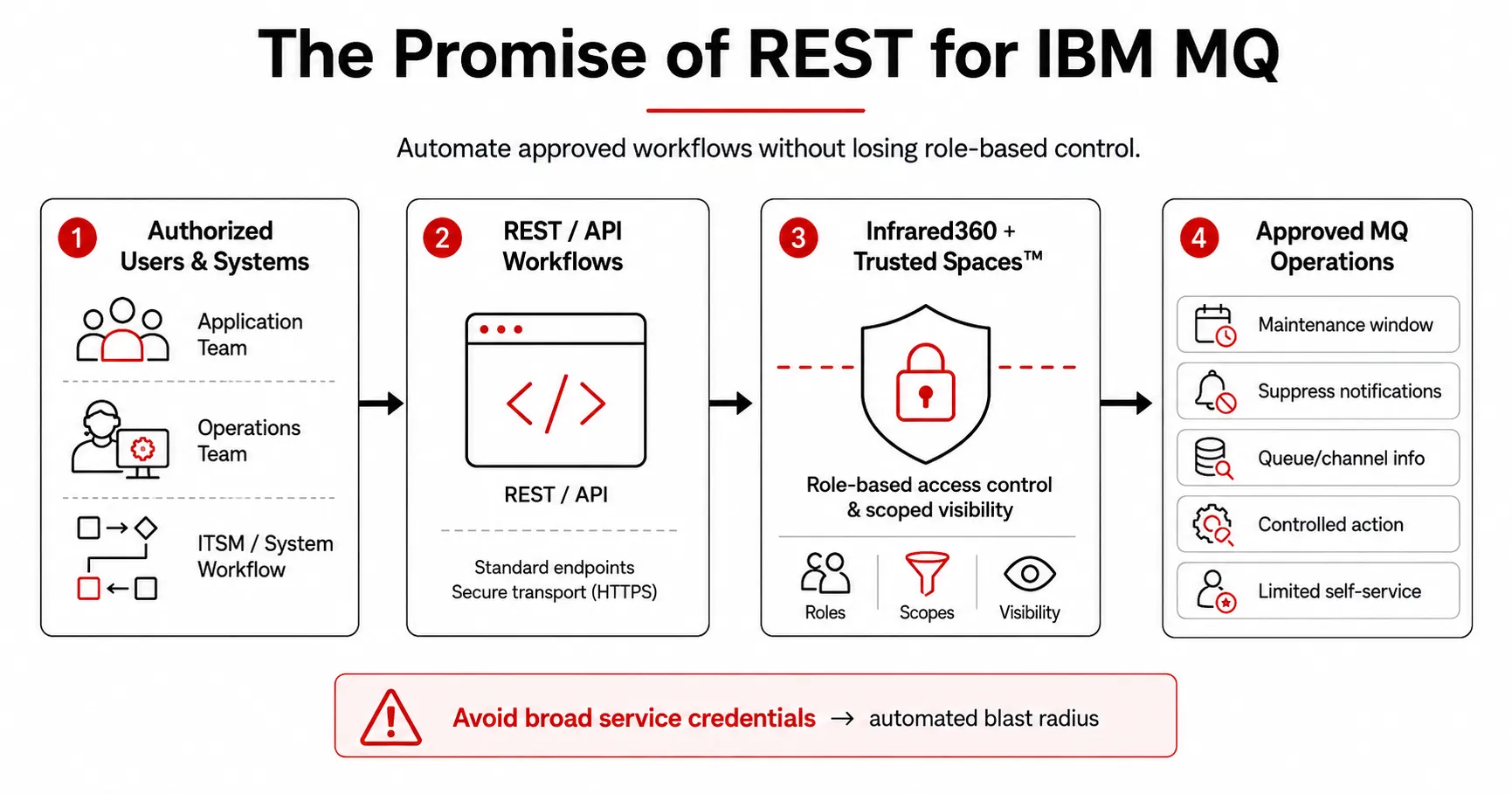
Infrared360 extends REST-driven IBM MQ automation while keeping workflows within role-based access and visibility boundaries.
REST APIs are attractive because they make infrastructure easier to automate. But automation is not the only way to reduce the burden on central MQ administrators. Infrared360’s self-service model is designed to let authorized users perform approved MQ operations within the boundaries of their role, application, team, or business function. REST extends that model by allowing approved workflows to be triggered programmatically, while Trusted Spaces™ helps keep that automation inside the same role-based guardrails.
For example, an organization might want to:
- Schedule a maintenance window.
- Temporarily suppress notifications for a specific queue manager.
- Pull queue or channel information into another system.
- Trigger a controlled operational action from ServiceNow or another ITSM platform.
- Standardize recurring administrative tasks.
- Give application teams limited self-service capabilities.
That is all valuable.
The danger appears when API access becomes a shortcut around governance. A direct API integration may work beautifully in the lab, but if the service account behind it has broad MQ authority, the organization may have replaced a manual bottleneck with an automated blast radius.
The Real Problem: “Can Run” Is Not the Same as “Should Run”
Traditional access discussions often focus on whether a user or system can authenticate. But in middleware administration, authentication is only the front door.
The harder questions are:
- What can this user see?
- What can this user change?
- Which queue managers, queues, channels, alerts, services, or reports are in scope?
- Is the API user bound to the same role-based limits as the human user?
- Can the action be audited back to a person, team, or business function?
- Can the workflow safely reverse itself when the maintenance window ends?
Role-based access control is designed around the idea that permissions are assigned to roles, and users receive authority through those roles rather than through broad, individual permissions.[4] In large organizations, this is not just an IT preference. It is how teams prevent “everyone can do everything” from becoming an operating model.
For IBM MQ environments, the difference is especially important because MQ is rarely just one application. It is often the transport layer for payments, claims, trades, orders, inventory, settlements, customer records, partner integrations, and other high-value business processes.
A user who needs to manage one application’s queues should not automatically have operational reach into every other application’s MQ objects.
IBM MQ Has Security — But That Is Not the Same as Delegated Self-Service
IBM MQ does have native security controls, and those controls are important. MQ authority records, object authorities, channel authentication records, and related security mechanisms help determine who can connect, what they can access, and what they can do. [6][7][8]
But those controls are typically defined and maintained close to the source: on the queue manager, the object, the profile, or the channel. In a small environment, that may be manageable. In a large enterprise MQ estate, it can become difficult to translate those low-level permissions into a clean self-service model for application teams, operations teams, auditors, support users, and business-specific owners.
That is the distinction.
Native MQ security helps protect MQ resources. Infrared360 Trusted Spaces™ helps organizations delegate MQ visibility and operational authority in a way that is easier to align with real-world teams, applications, and responsibilities.
The goal is not to replace IBM MQ security. The goal is to avoid forcing every self-service or API-driven workflow to depend only on broad credentials or queue-manager-by-queue-manager configuration. Trusted Spaces™ gives organizations a governed layer for deciding who can see, manage, and act — while still respecting the underlying MQ environment.
Why Infrared360 Changes the Model
This is where Infrared360’s approach is different.
The value is not merely that users can access Swagger-style documentation or make REST calls into Infrared360. The value is that API-based interaction can still be governed by Trusted Spaces™, Infrared360’s native role-based access control model.
In other words, the REST user is not just an anonymous automation identity with broad MQ power. The user should be an Infrared360 user, governed by the Trusted Spaces™ roles, collections, and access rules defined in Infrared360.
That matters because the same operational boundaries that shape the user experience can also shape API behavior.
If a user is only supposed to see a specific subset of MQ resources, the API interaction should honor that same visibility. If a user is only allowed to perform certain actions, the REST workflow should not become a side door around those permissions. If a business unit only owns certain queue managers, API access should not magically expand that ownership.
This is the difference between:
“Here is an MQ admin credential. Be careful.”
and:
“Here is controlled API access through Infrared360, mapped to the access you are actually supposed to have.”
That second model is much safer for large organizations.
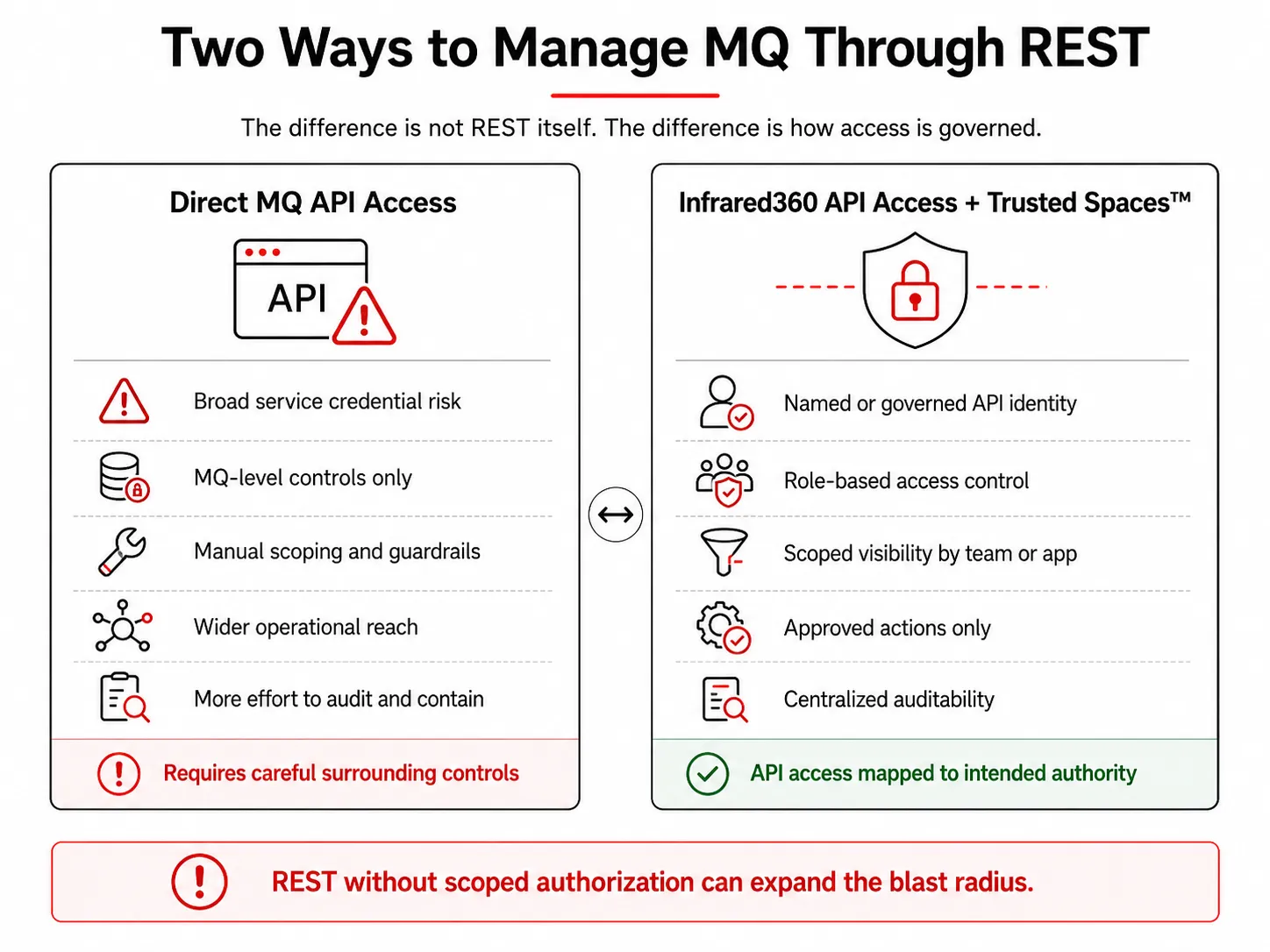
Direct MQ API access requires carefully engineered controls, while Trusted Spaces maps API activity to defined roles, resources, and approved authority.
Direct MQ API Management Still Needs Guardrails
This does not mean direct IBM MQ REST API usage is inherently wrong. REST API access can be useful, powerful, and appropriate.
But direct API usage requires the organization to engineer the surrounding controls carefully. That includes authentication, authorization, object scoping, auditability, credential handling, change approval, and rollback logic.
Direct MQ API access also will not automatically inherit Infrared360’s Trusted Spaces™ model. IBM MQ has native security controls, but those controls are managed at the MQ level — across queue managers, objects, profiles, channels, and related authorities. [6][7][8] If an organization wants a centralized, role-based self-service model that maps access to application teams, operations teams, business units, or delegated support roles, that governance layer needs to be part of the API path.
In many enterprises, especially where MQ supports regulated or high-value workflows, those controls cannot be an afterthought. API access should not be granted simply because a team has a good automation idea.
A secure MQ automation model should answer these questions before the first script goes live:
Who is the API user?
Is it a named user, a team-controlled service identity, or a shared credential no one really owns?
What is the API user allowed to see?
Can it list every queue manager, or only the ones tied to a specific application or business function?
What is the API user allowed to change?
Can it browse, inquire, suppress alerts, clear queues, stop channels, alter objects, or run administrative commands?
Can it act only on approved targets?
Does the tool understand application boundaries, collections, or environment-specific restrictions?
Is there a safe end state?
If the automation suppresses an alert or changes a setting, does it automatically restore the original configuration?
Who gets notified?
Can notifications differ by time, team, severity, or business owner?
Can the action be audited?
Can the organization later prove who did what, when, and against which MQ resources?
Without those answers, automation can become a faster way to make bigger mistakes.
Why This Matters More in Financial Services
Financial companies tend to have complex MQ environments because so many business processes rely on messaging. Payment systems, trading platforms, wealth management applications, fraud detection, customer communications, settlement systems, and batch processing may all depend on MQ in different ways.
That creates two competing needs.
First, teams need speed. They cannot wait for a central MQ administrator to manually handle every request.
Second, teams need control. They cannot let every application team see or touch everything.
That is exactly the tension that role-based MQ administration is supposed to solve.
The goal is not to prevent automation. The goal is to make automation safe enough to use.
Infrared360 Swagger Docs can support that model by giving teams a REST/API path into Infrared360 while Trusted Spaces™ preserves role-based access and scoped visibility. That means organizations can move toward self-service and API-driven operations without abandoning the access boundaries they need for governance.
REST Without RBAC Is Just a Bigger Button
One of the easiest mistakes to make with API automation is to assume that because something is scripted, it is more controlled.
Sometimes the opposite is true.
A manual user might make one mistake slowly. A script can make the same mistake across hundreds of queue managers in seconds.
That is why API design, API documentation, and API authorization have to work together. OpenAPI and Swagger-style tools are useful because they help people understand available API operations and responses. [2][5] But the API description alone does not decide whether a user should be allowed to perform a specific action against a specific object.
That decision belongs in the authorization model.
For MQ administration, the safest model is one where the API does not bypass role-based access. It enforces it.
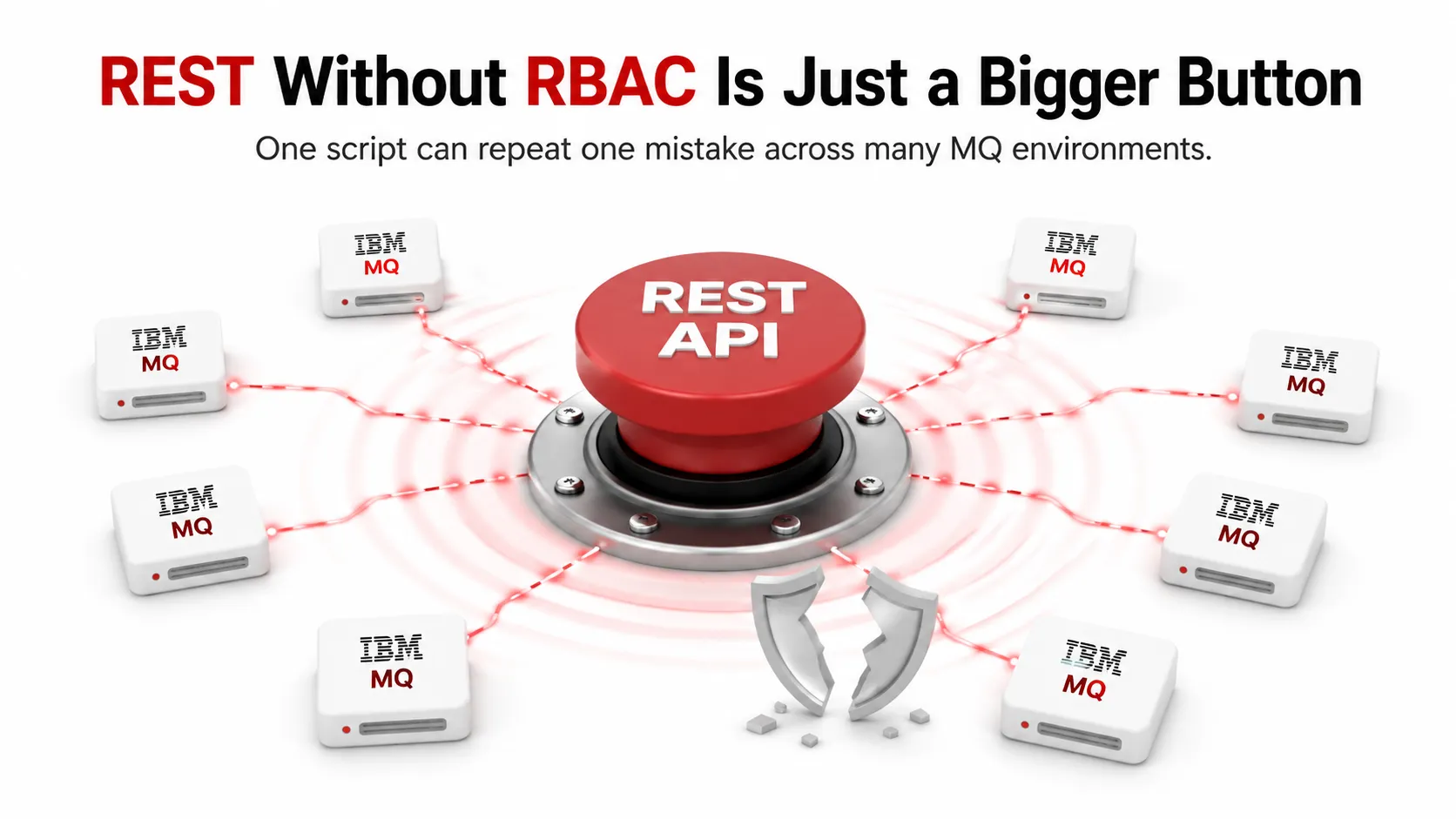
Without scoped authorization, REST automation can repeat one mistake across an entire IBM MQ estate in seconds.
Practical Takeaways for MQ Teams
For organizations looking at IBM MQ REST API security, here are the practical lessons:
Do not treat REST access as automatically safe.
A working API call only proves the endpoint works. It does not prove the access model is appropriate.
Avoid broad shared credentials wherever possible.
Shared admin credentials make automation easier to write but harder to govern, audit, and contain.
Map API users to real operational roles.
The API user should have only the visibility and authority needed for the task.
Scope automation by application, queue manager, and object type.
A script intended for one application should not be able to affect unrelated business systems.
Prefer reversible workflows.
If automation suppresses notifications, changes alert behavior, or modifies operational state, it should restore the prior state automatically.
Keep API documentation accessible, but not authority-free.
Reading Swagger documentation is not the same as being allowed to execute every operation.
Use Trusted Spaces™ to preserve role-based access across UI and REST workflows.
When REST/API interaction goes through Infrared360, Trusted Spaces™ helps ensure automation follows the same role-based visibility and authority model that governs human users.
Conclusion: API-Driven MQ Management Needs Role-Based Control
IBM MQ REST API security is not just about enabling REST. It is about enabling REST safely.
In modern MQ environments, teams need automation. They need integration. They need self-service. They need ways to connect MQ operations with systems like ServiceNow, dashboards, reporting tools, and internal workflows.
But they also need role-based control.
The best MQ automation strategy is not “give the API more power and hope the script is careful.” It is to make sure API-driven operations inherit the same visibility, authority, and operational boundaries that apply to the user.
That is the advantage of managing MQ through Infrared360 Swagger Docs backed by Trusted Spaces™ rather than relying only on direct, broadly privileged MQ API access.
REST gives you speed.
Trusted Spaces™ gives you role-based control.
Infrared360 helps you keep both.
FAQ
Endnotes
[1] IBM MQ overview and supported API list, including REST. URL: https://www.ibm.com/products/mq
[2] OpenAPI Specification, official specification site. URL: https://spec.openapis.org/oas/latest.html
[3] Rami Haddad, Rim El Malki, and Daniel Cozma, “OpenAPI Specification Extended Security Scheme: A method to reduce the prevalence of Broken Object Level Authorization.” URL: https://arxiv.org/abs/2212.06606
[4] NIST Computer Security Resource Center, Role Based Access Control. URL: https://csrc.nist.gov/projects/role-based-access-control
[5] Swagger documentation and tooling overview. URL: https://swagger.io/docs/
[6] IBM MQ Object Authority Manager documentation. URL: https://www.ibm.com/docs/en/ibm-mq/9.2.x?topic=component-object-authority-manager-oam
[7] IBM MQ authority records documentation. URL: https://www.ibm.com/docs/en/ibm-mq/9.3.x?topic=service-authority-records
[8] IBM MQ CHLAUTH access documentation. URL: https://www.ibm.com/docs/en/ibm-mq/9.4.x?topic=records-resolving-chlauth-access-issues