Secure MQ Administration: Why MQ Monitoring Alone Isn’t Enough
For enterprise IT leaders, IBM MQ is often one of the most critical layers in the technology stack. It moves high-value transactions, connects core systems, and supports applications that the business cannot afford to interrupt.
That is why secure MQ administration requires more than another monitoring dashboard.
General-purpose observability and monitoring tools can be useful. They can show performance metrics, alert on availability, and help teams identify symptoms. But IBM MQ teams often need more than symptoms. They need governed visibility, delegated control, auditability, and the ability to take action safely across queue managers, queues, channels, and related middleware infrastructure.
In other words, the question is not simply:
“Can we monitor MQ?”
The better question is:
“Can the right people securely see, understand, and act on MQ issues before they become business problems?”
That is where a purpose-built solution like Infrared360 becomes essential.
Monitoring Is Helpful, but It Is Not the Same as Administration
Monitoring tells you something may be wrong. Administration lets you do something about it.
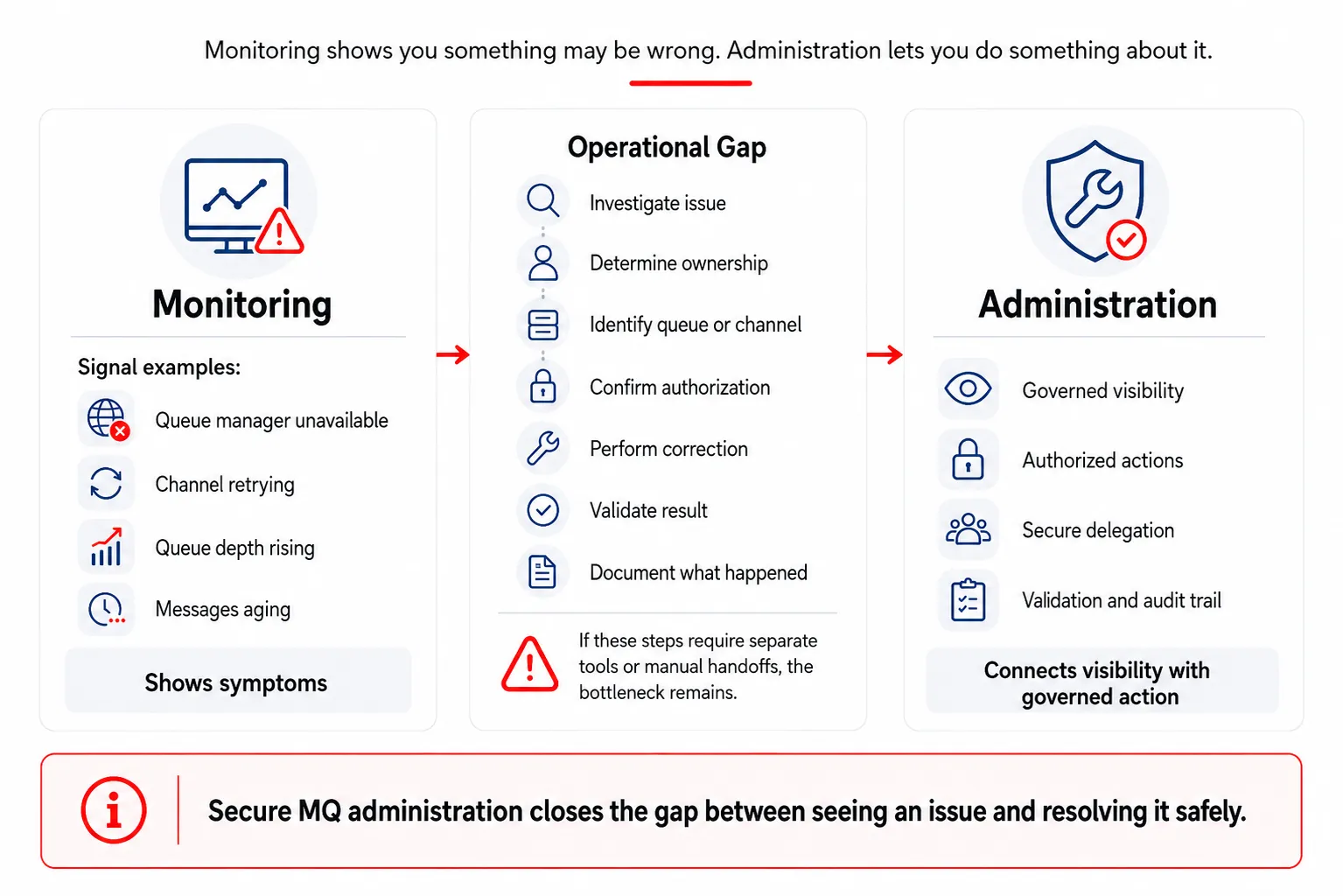
Monitoring shows symptoms. Secure MQ administration connects visibility with governed action.
That distinction matters in IBM MQ environments.
An MQ monitoring tool might show that a queue manager is unavailable, a channel is retrying, queue depth is rising, or messages are aging. Those are important signals. But once the alert appears, the team still has to investigate the issue, determine ownership, identify the right queue or channel, decide who is authorized to act, perform the correction, validate the result, and document what happened.
If those steps require different tools, manual command-line access, separate dashboards, spreadsheets, scripts, or escalation to a small group of MQ specialists, the organization still has an operational bottleneck.
Secure MQ administration closes that gap. It connects visibility with governed action.
The Security Tradeoff With Generic Monitoring Tools
Security teams are right to scrutinize monitoring tools that connect to IBM MQ. MQ is not a casual system. It often supports payment processing, logistics, financial transactions, customer records, and other business-critical workflows.
Any tool that connects to MQ raises practical security questions:
- What identity does the tool use?
- What permissions does it need?
- Does it require access to all queues or channels?
- Does it need OS-level access, agent access, or server-connection channels?
- Who can see the collected data?
- Can users take action, or only view metrics?
Is every action audited? - Can access be limited by application, team, geography, environment, or role?
These questions are not obstacles to modernization. They are part of responsible operations.
IBM MQ provides granular authorization capabilities, including granting or revoking authority to objects and classes of objects. IBM also cautions against granting users authority that provides privileged options unless that authority is specifically required for the command or API call involved. [1]
That principle should guide MQ tooling decisions: give people and systems the access they need, but avoid unnecessarily broad authority.
Why a Dashboard-Only Approach Falls Short
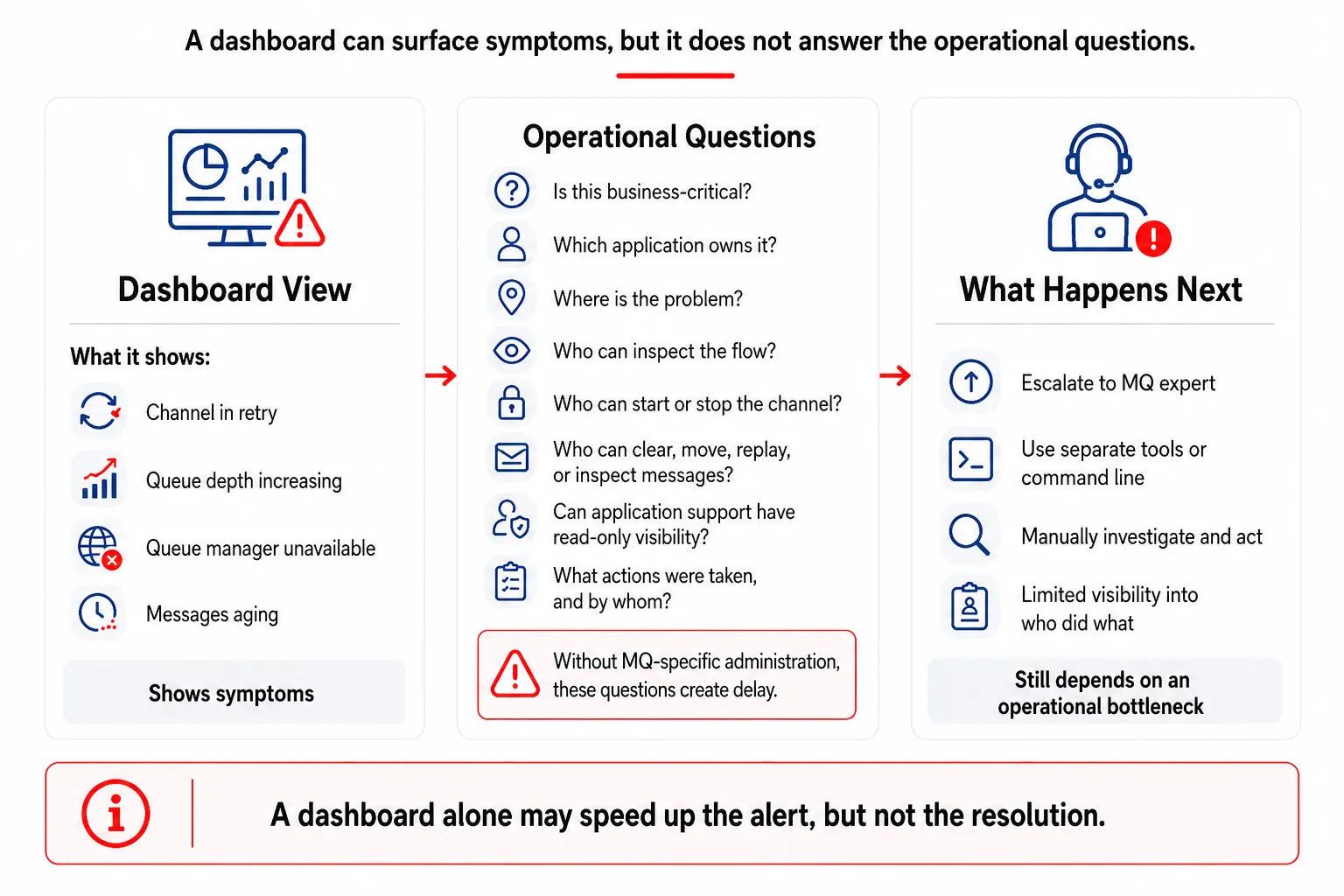
A dashboard can surface symptoms, but it does not answer the operational questions needed to resolve MQ issues.
A dashboard can be valuable, but a dashboard is not an operational model.
For example, a general-purpose monitoring tool may show that a channel is in retry, or that a queue depth is increasing. But the operations team still has to answer several follow-up questions:
- Is this queue part of a business-critical flow?
- Which application owns it?
- Is the problem caused by the sending side, receiving side, channel, queue manager, or downstream dependency?
- Who is allowed to inspect the message flow?
- Who can start or stop the channel?
- Who can clear, move, replay, or inspect messages?
- Is there a safe way to give application support read-only visibility?
- What actions were taken, and by whom?
Without MQ-specific administration, the dashboard may only accelerate the moment when someone realizes they still need to call an MQ expert.
That does not scale.
MQ Teams Need Secure Visibility and Governed Control
IBM MQ administration includes managing queue managers, queues, channels, listeners, services, clusters, authentication information objects, and related resources. IBM’s MQSC documentation explains that MQSC commands can be used to manage many of these queue manager objects. [2]
That administrative scope is why MQ teams need more than generic metrics. They need a way to securely manage the environment.
A purpose-built MQ administration platform should support:
- Real-time MQ visibility
- Queue manager, queue, and channel status
- Queue depth and message age monitoring
- Channel start/stop controls
- Object comparison and configuration visibility
- Role-based access control
- Delegated administration
- Audit trails
- Secure self-service for development and application teams
- Integration with existing alerting, ticketing, and operations processes
- Reporting for operational and management visibility
Infrared360 is designed for this exact problem: helping organizations monitor, manage, delegate, automate, audit, and secure middleware operations from a single platform.
The Problem With “Just Give Everyone Access”
One way to eliminate bottlenecks is to give more people access to MQ. But that can create unacceptable risk.
Application teams may need to view queue depth or channel status, but that does not mean they should be able to alter queue manager definitions. Production support may need to start or stop a channel, but only for specific applications or environments. Developers may need access in test, but not production. Business teams may need visibility into status, but no administrative rights.
This is where secure MQ administration becomes essential.
With Infrared360, organizations can provide delegated visibility and role-based control. Users can be limited to the specific queues, queue managers, channels, topics, flows, or other middleware resources they are responsible for. They can also be limited by what actions they are permitted to take.
That means teams can collaborate without opening the entire MQ environment to unnecessary access.
The Problem With “Just Keep It With the MQ Experts”
The opposite approach is to keep MQ access tightly held by a small group of experts.
That may feel safer, but it creates a different risk.
If every question, alert, change, or troubleshooting request requires escalation to a few MQ administrators, the business becomes dependent on a narrow operational bottleneck. That can increase response time, delay issue resolution, and overload the very experts who should be focused on architecture, modernization, resilience, and higher-value work.
Secure self-service is the better model.
The goal is not to remove MQ experts from the process. The goal is to let them define the rules, permissions, views, and guardrails so other teams can safely help themselves where appropriate.
Infrared360 enables that model.
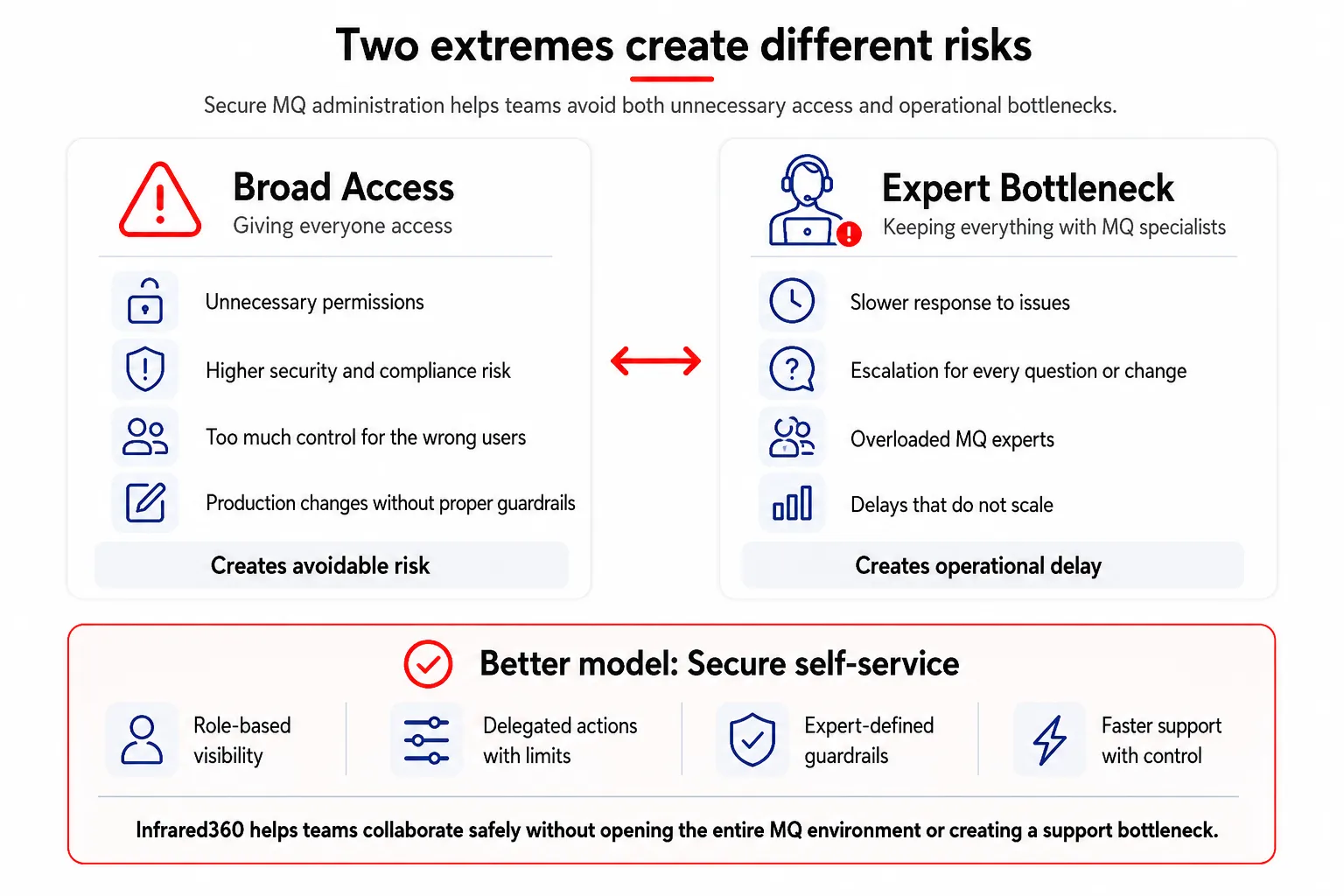
Broad access creates security risk. Expert-only access creates operational bottlenecks. Secure self-service helps balance both.
Why General Observability Tools Still Have a Place
This is not an argument against observability platforms.
Tools such as Dynatrace, Splunk, and other enterprise monitoring platforms can play important roles in broader IT operations. They may collect metrics, support dashboards, identify infrastructure or application performance patterns, and integrate into enterprise observability strategies.
Dynatrace’s IBM MQ extension documentation, for example, describes monitoring MQ infrastructure such as queue managers, queues, channels, topics, and listeners. It also describes deployment models using OneAgent or ActiveGate, plus requirements such as MQ command server availability, server-connection channels for remote monitoring, and permissions for certain metrics. [3]
Those capabilities can be useful.
But they do not eliminate the need for MQ-specific administration, delegated access, governed control, and auditability. They also do not make a generic observability dashboard the right place for every MQ operational workflow.
A better approach is to use broad observability tools for enterprise-wide context and use Infrared360 for deep, secure MQ administration and middleware operations. Infrared360 can also provide MQ-specific data that can be incorporated into larger observability dashboards, giving central IT teams and business stakeholders broader visibility while preserving the governed MQ administration layer that middleware teams need.
Infrared360 Can Feed MQ Data Into Enterprise Dashboards
Using Infrared360 for secure MQ administration does not mean central IT teams, executives, or business users lose the benefit of enterprise dashboards. In fact, the opposite can be true.
General-purpose observability and monitoring platforms are often valuable because they give central IT teams a broader view of applications, infrastructure, services, and business performance. But those tools may not provide the depth of MQ-specific visibility and control that middleware teams need for day-to-day operations.
Infrared360 helps bridge that gap.
Infrared360 can provide MQ-specific operational data that can be used in broader dashboarding and reporting environments. That allows organizations to include MQ health, queue depth, channel status, message age, queue manager status, alert conditions, and other middleware indicators as part of larger IT or business dashboards.
This is important because different audiences need different views.
Central IT leaders may want to see whether critical middleware services are healthy across the enterprise. Business users may want a simple indicator that the systems supporting a key business process are operating normally. Application teams may want visibility into the MQ resources tied to their applications. MQ administrators, meanwhile, need deeper operational control, diagnostics, message management, and secure administrative capabilities.
Infrared360 allows the MQ team to keep the governed administration layer where it belongs, while still making MQ data available for larger observability and reporting strategies.
The result is not “Infrared360 instead of enterprise observability.” The stronger model is:
Use enterprise observability tools for broad dashboards. Use Infrared360 for MQ-specific visibility, administration, governance, and action. Then connect the two where broader visibility is needed.
That gives central IT and business stakeholders the larger operational picture without forcing MQ teams to rely on a generic dashboard as their primary administration tool.
The Better Model: Observe Broadly, Administer Securely
For enterprise MQ environments, the strongest model is not “monitoring versus administration.” It is both.
A mature operating model should allow leaders and teams to:
- Observe broadly across applications, infrastructure, services, and middleware.
- Administer securely with MQ-specific controls, permissions, workflows, and audit.
- Delegate visibility to the teams that need it.
- Automate safely where the rules and remediation steps are well understood.
- Act quickly without bypassing governance.
That is what Infrared360 brings to MQ and broader middleware environments.
It gives teams a secure operational layer that complements enterprise observability rather than competing with it.
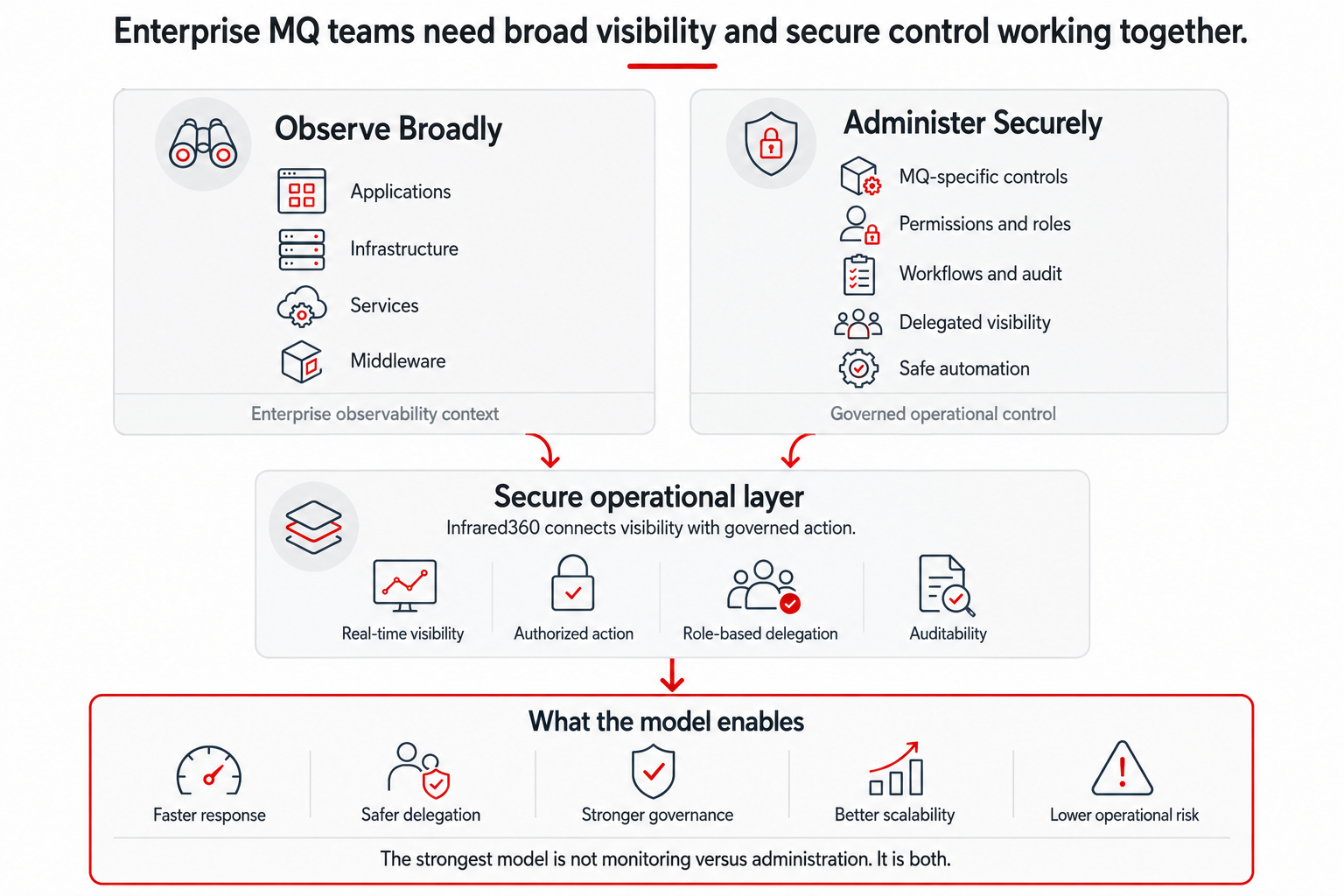
The stronger model for enterprise MQ teams is to observe broadly and administer securely.
Illustrative Use Case: A Channel Is Down
Consider a production support scenario.
A business application starts experiencing delays. A monitoring dashboard shows a symptom: a queue depth is rising, or a channel may be unavailable. The application team opens a ticket. Production support escalates to MQ. The MQ team logs in, checks queue managers, reviews channel status, confirms the issue, starts or resets the appropriate channel, validates message movement, and reports back.
That process may work, but it can be slow and highly dependent on the MQ team.
With Infrared360, the workflow can be more efficient:
- Production support sees the relevant queue and channel status directly.
- The application team can be granted read-only visibility into its own resources.
- MQ administrators retain control over who can take action.
Authorized users can start, stop, or investigate permitted objects. - The action is recorded for audit.
- Teams can confirm whether messages are moving again.
- Leadership has better visibility into the operational process
The result is not just faster resolution. It is a more scalable and secure support model.
Secure MQ Administration Reduces Risk
The value of secure MQ administration is not only operational efficiency. It is risk reduction.
When MQ administration is fragmented across dashboards, command lines, scripts, and tribal knowledge, the organization faces avoidable risks:
- Excessive access granted to the wrong users
- Too much dependency on a few specialists
- Slow response to production issues
- Limited auditability
- Manual errors during repetitive tasks
- Poor visibility for application and support teams
- Inconsistent processes across environments
- Difficulty proving who changed what
Infrared360 addresses these risks by providing secure, centralized, MQ-aware monitoring and administration.
Secure MQ Administration Supports Executive Priorities
For executives and directors, this is not just an MQ tooling discussion. It connects directly to broader IT priorities:
- Operational excellence
- Faster incident response
- Lower MTTR
- Better use of specialized staff
- Reduced dependency on manual command-line work
- Stronger security and compliance
- More effective production support
- Safer delegation to application and development teams
- Better visibility across critical middleware
- Lower operational risk
Executives do not need every MQ detail. But they do need confidence that the organization can manage critical messaging infrastructure securely and efficiently.
A monitoring dashboard alone cannot provide that confidence.
A secure MQ administration platform can.
What to Look For in a Secure MQ Administration Solution
When evaluating MQ tooling, organizations should look beyond dashboard features and ask whether the solution supports the full operational lifecycle.
Key capabilities should include:
- MQ-specific monitoring and administration in one platform
- Role-based visibility and control
- Secure delegated administration
- Audit logging of user actions
- Real-time queue, channel, and queue manager visibility
- Alerting and automated response options
- Ability to manage MQ objects without relying solely on command-line access
- Ability to make MQ-specific operational data available to broader enterprise dashboarding and observability tools
- Reporting and historical analytics
- Secure self-service for application and support teams
Integration with existing enterprise tools - Support for complex, hybrid, and distributed middleware environments
Infrared360 was built around these requirements.
Final Thoughts
IBM MQ is too important to manage with monitoring alone. Enterprise teams need to see what is happening, understand the operational context, take authorized action, and prove what was done.
That requires secure MQ administration.
General observability tools can help identify symptoms. Infrared360 helps MQ teams and the broader IT organization securely manage the middleware environment behind those symptoms.
Infrared360 does not ask organizations to choose between enterprise observability and MQ-specific administration. It helps them do both: share MQ data upward into broader dashboards while giving middleware teams the secure operational control they need to act.
FAQ
Endnotes
[1] IBM documentation for setmqaut explains that MQ authorizations can be granted or revoked for objects and classes of objects, and cautions against granting authority that allows privileged options unless that authority is specifically required. https://www.ibm.com/docs/en/ibm-mq/9.4.x?topic=reference-setmqaut-grant-revoke-authority
[2] IBM documentation states that MQSC commands can be used to manage queue manager objects, including queue managers, queues, channels, listeners, services, namelists, clusters, and authentication information objects. https://www.ibm.com/docs/en/ibm-mq/9.4.x?topic=administering-mq-using-mqsc-commands
[3] Dynatrace documentation describes its IBM MQ extension as monitoring IBM MQ infrastructure, including queue managers, queues, channels, topics, and listeners, and lists requirements and permission considerations for local and remote monitoring configurations. https://docs.dynatrace.com/docs/observe/infrastructure-observability/extensions/ibm-mq-local
Related Posts



More Infrared360® Resources
About the Author: Scott Treggiari