MQ Traffic Switching Visibility: Reducing Risk During Data Center Failover
When enterprises move application traffic from one data center to another, the release or operations workflow may look controlled on the surface. A change window is opened. A runbook is followed. A release orchestration tool launches a workflow. Scripts are executed. Statuses are checked. Teams wait for confirmation that the switch completed successfully.
But in message-based environments, one of the most important questions is often harder to answer:
Is the IBM MQ layer actually ready, healthy, and moving messages as expected?
That is where MQ traffic switching visibility becomes critical.
Traffic switching is not just a networking or release-management event. For organizations that depend on IBM MQ, it is also a middleware resilience event. Queue managers, channels, queues, message backlogs, connection status, and downstream dependencies can all determine whether the traffic switch succeeds cleanly or becomes a production incident.
A release orchestration tool may run the traffic-switching workflow. A Linux script may execute the planned steps. But neither one automatically gives teams the real-time, MQ-specific visibility and governed control they need before, during, and after the switch.
That is why enterprises need a purpose-built middleware monitoring and administration solution like Infrared360 alongside their existing release orchestration and automation tools.
What Is MQ Traffic Switching Visibility?
MQ traffic switching visibility is the ability to monitor, validate, and manage IBM MQ resources before, during, and after traffic is moved between data centers, regions, processing locations, or availability zones.
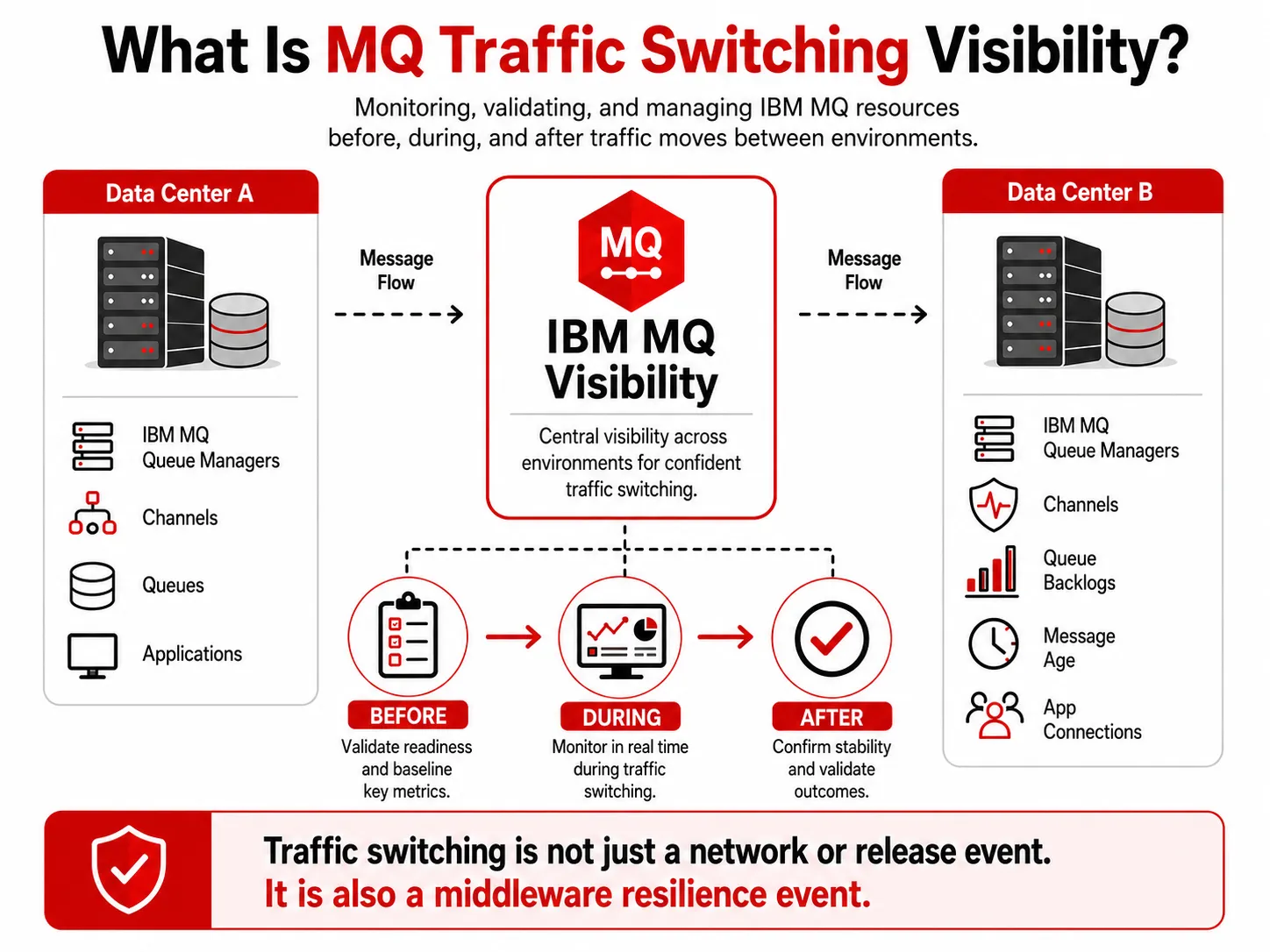
This infographic explains MQ traffic switching visibility by showing how IBM MQ resources such as queue managers, channels, queues, message age, and application connections can be monitored and validated before, during, and after traffic moves between environments.
In practice, that means being able to answer questions like:
- Are the required queue managers running?
- Are the right channels running, retrying, inactive, or stopped?
- Are messages backing up on any critical queues?
- Are old or stale messages accumulating?
- Are applications connected to the expected queue managers?
- Are open handles, readers, and writers behaving as expected?
- Did the switch create unexpected message flow patterns?
- Can authorized teams take corrective action quickly?
- Can leadership confirm that the MQ portion of the switch was healthy?
IBM describes MQ channels as logical communication links used by distributed queue managers to move messages between queue managers or between clients and servers. IBM’s MQ channel documentation is a useful starting point for understanding why channel health matters during traffic movement.
If one of those channels is down, retrying, misconfigured, or pointing to the wrong place, the release workflow may appear to run, while message traffic is delayed, diverted, or backed up.
Why Release Orchestration Alone Is Not Enough
Many large organizations use release orchestration platforms to coordinate production changes. These platforms are valuable. They help teams standardize release processes, enforce approvals, manage handoffs, and execute defined workflows across complex environments.
For example, Digital.ai Release, formerly associated with the XL Release product lineage, is positioned as a release orchestration platform for automating, governing, and providing visibility into software release pipelines. [1]
That kind of tool can be an important part of the operational process.
But release orchestration is not the same as MQ operational intelligence.
A release orchestration workflow might know that a script ran. It may know that a task was completed. It may know that an approval was captured. It may even know that a server command returned success.
But that does not necessarily mean:
- MQ channels are healthy.
- Queues are draining.
- Messages are moving to the correct destination.
- Queue managers are available.
- Application teams have visibility into their part of the flow.
- Production support can safely take MQ-specific corrective action.
- The organization has a single operational view of MQ before and after the switch.
That gap is where risk lives.
The Hidden Risk in Script-Based Traffic Switching
Scripts are useful. They can standardize repeatable steps and reduce manual work. But scripts also create a false sense of confidence if they are treated as proof that the environment is healthy.
A script may successfully execute a traffic-switching command while an MQ channel remains stopped.
A workflow may complete while messages begin backing up on a queue.
A release process may show green while an application team experiences delays because a downstream dependency is unavailable.
A command may run successfully on most systems but fail silently or partially on one important queue manager.
The problem is not the script itself. The problem is relying on scripts without a real-time, MQ-aware operational view.
For high-volume enterprise messaging environments, traffic switching should include MQ-specific validation at three stages:
- Pre-switch readiness
- During-switch monitoring
- Post-switch confirmation
Without those three stages, teams may not know there is a problem until an application owner, customer-facing system, or downstream support team raises the alarm.
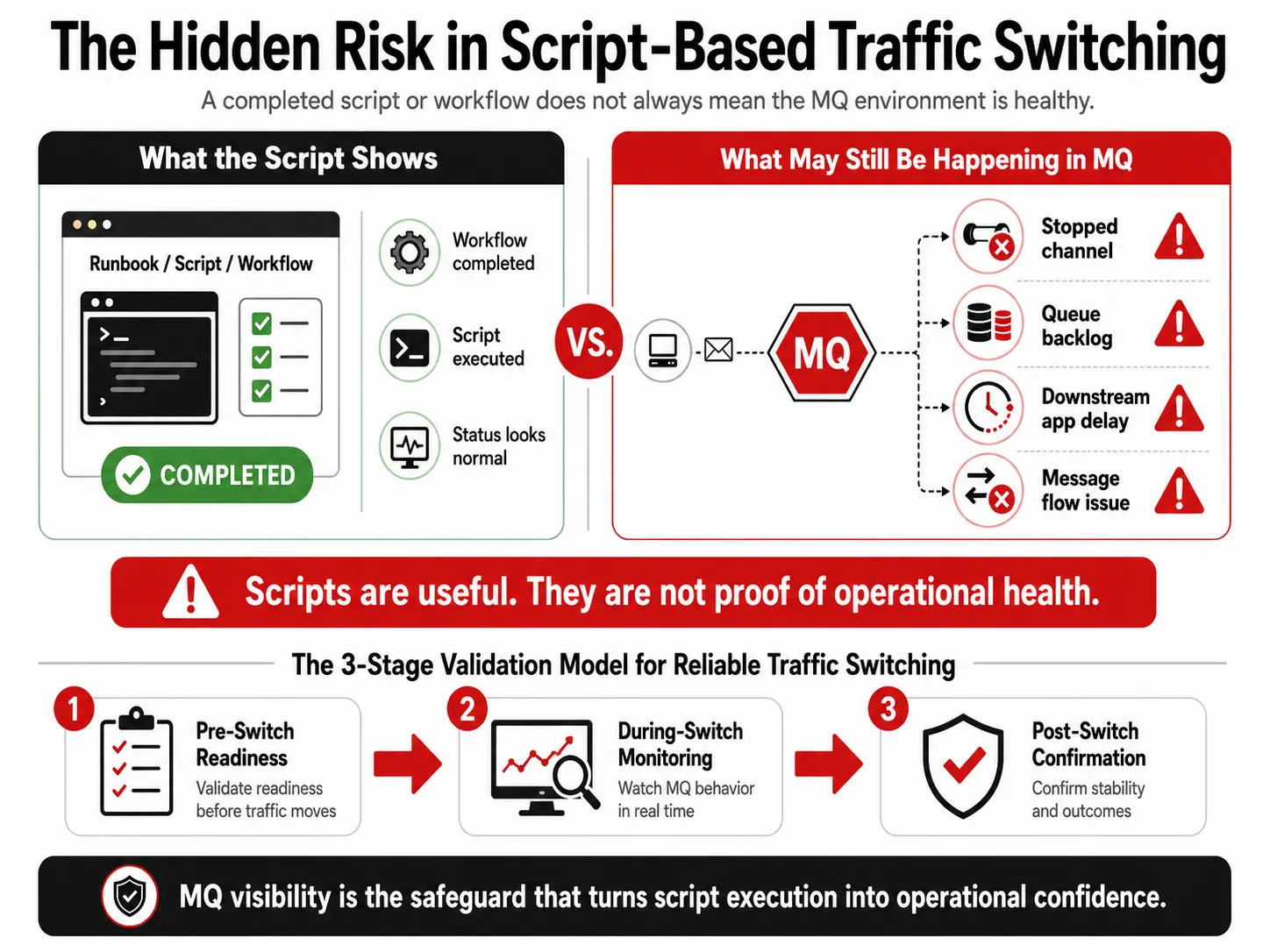
MQ traffic switching visibility helps reveal hidden risks that scripts and workflow completion statuses may not show.
Stage 1: Pre-Switch MQ Readiness
Before traffic is moved, teams should know whether the MQ environment is ready.
That includes validating key conditions such as:
- Required queue managers are available.
- Critical channels are running.
- Important queues are not already backed up.
- No critical message age conditions are present.
- No certificate or security issue is about to interfere.
- Expected applications or services are connected.
- Required listeners and channel initiators are available.
- Recent configuration changes are understood.
This is not just a technical checklist. It is a business continuity safeguard.
IBM states that high availability for MQ is about quickly restoring access to a queue manager and the messages it contains, and IBM also notes that some MQ HA mechanisms support disaster recovery scenarios involving larger failures, including regional loss. [2]
That makes visibility into MQ health a leadership concern, not only an administrator concern.
Infrared360 helps teams validate MQ readiness with real-time monitoring, queue manager and channel visibility, alerting, dashboards, object search, and role-based views for different operational teams.
Stage 2: During-Switch MQ Monitoring
The riskiest moment in a traffic-switching event is often the transition itself.
This is when teams need to see what is happening in near real time:
- Did message volume shift as expected?
- Did any channels stop, retry, or disconnect?
- Did queue depth increase unexpectedly?
- Did any messages become stale?
- Did applications connect to the expected queue managers?
- Are error queues or dead-letter queues receiving traffic?
- Are there signs of downstream dependency failure?
This is where general-purpose dashboards may fall short. A broad observability tool may show infrastructure signals, logs, or application metrics, but MQ teams often need deeper middleware-specific visibility: queue depth, message age, handles, channel instances, queue manager status, and object-level administration.
Infrared360 is built specifically for middleware environments, so MQ teams can see and act on the details that matter during a traffic switch.
Stage 3: Post-Switch Confirmation
After the workflow completes, teams still need to confirm that MQ is healthy.
A traffic switch should not be considered fully successful just because the release task ended. The MQ layer should be validated after the change:
- Are messages continuing to flow?
- Did queues return to normal depth?
- Are channels stable?
- Did any transmission queues build up?
- Did any application teams lose visibility or connectivity?
- Were any manual corrections made?
- Is there an audit trail of what happened?
This post-switch confirmation is especially important for regulated or high-volume environments. It gives operations, BizOps, application teams, and leadership a clearer view of whether the switch actually succeeded from a middleware perspective.
Why Infrared360 Is Better Than Scripts Alone
Scripts and release orchestration workflows can run steps. Infrared360 helps teams understand and manage the MQ environment those steps affect.
That difference matters.
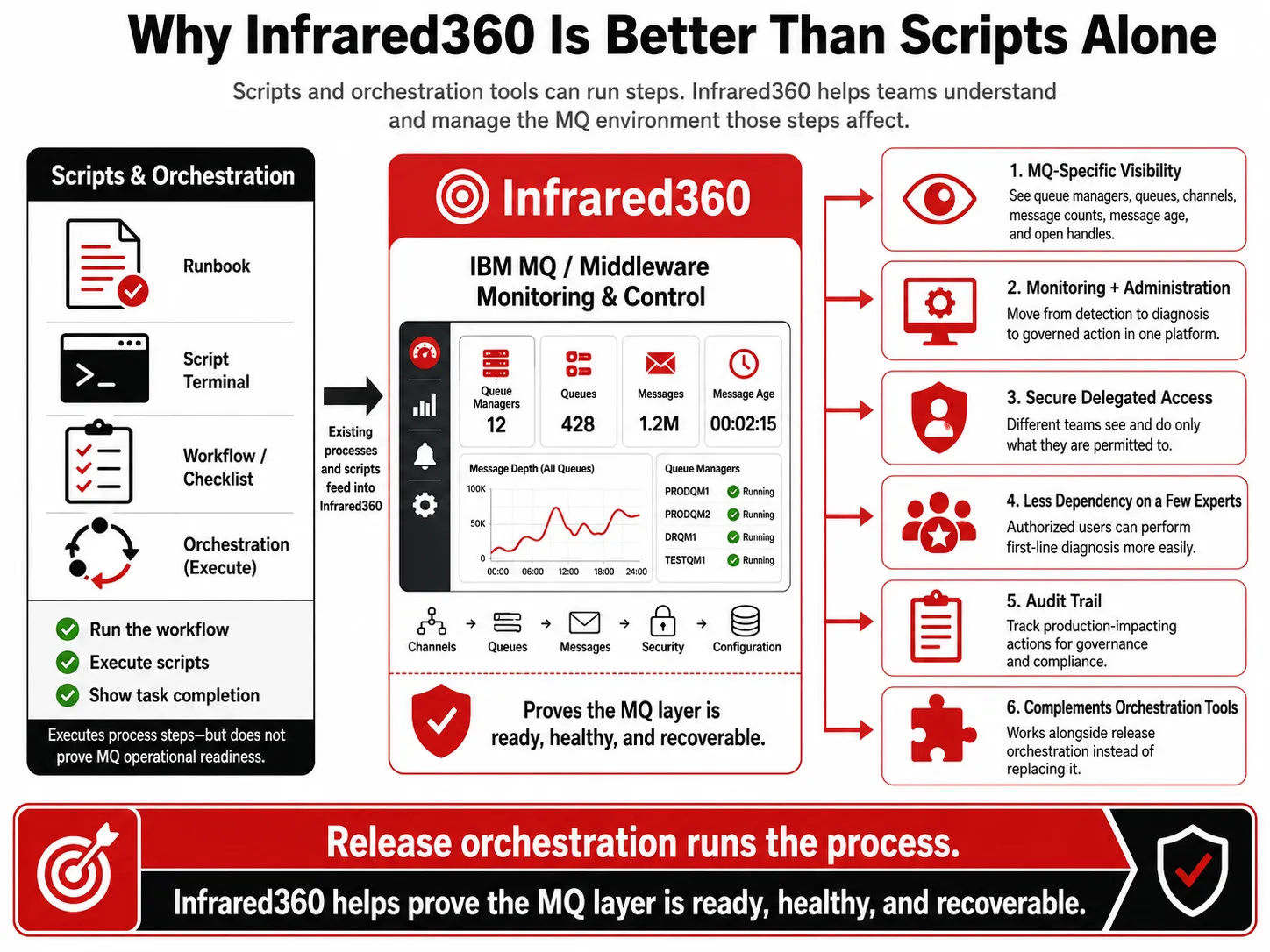
MQ traffic switching visibility with Infrared360 helps prove the MQ layer is ready, healthy, and recoverable beyond script execution alone
Infrared360 Provides MQ-Specific Visibility
Infrared360 gives teams visibility into MQ resources such as queue managers, queues, channels, message counts, message age, open handles, and related operational conditions.
That means teams are not limited to “the script ran” or “the workflow completed.” They can see whether the MQ environment is behaving correctly.
Infrared360 Connects Monitoring With Administration
When monitoring and administration are separate, teams lose time. They detect a problem in one tool, investigate in another, and act somewhere else.
Infrared360 combines monitoring and administration in one platform. That makes it easier to move from detection to diagnosis to governed action.
Infrared360 Supports Secure Delegated Access
Traffic-switching events often involve multiple teams: middleware, BizOps, production support, application owners, development teams, and release managers.
Not all of those teams should have the same level of access.
Infrared360 supports secure, role-based visibility and delegated administration, so users can see and do only what they are permitted to see and do. That helps reduce bottlenecks without opening the environment too broadly.
Infrared360 Helps Reduce Dependency on a Few Experts
Traffic switching can involve production-impacting actions. Teams need to know what changed, who acted, when it happened, and what the result was.
Infrared360’s auditability helps support governance and compliance by keeping records of user activity and administrative actions.
Infrared360 Creates an Audit Trail
Infrared360 gives teams visibility into MQ resources such as queue managers, queues, channels, message counts, message age, open handles, and related operational conditions.
That means teams are not limited to “the script ran” or “the workflow completed.” They can see whether the MQ environment is behaving correctly.
Infrared360 Can Complement Existing Orchestration Tools
The point is not to replace release orchestration. The better model is to complement it.
A release orchestration tool can coordinate the workflow. Infrared360 can provide MQ-specific readiness checks, live operational visibility, controlled remediation, and post-event validation.
In other words:
Release orchestration can run the traffic-switching process. Infrared360 helps prove that the MQ layer is ready, healthy, and recoverable.
An Illustrative Use Case
Consider a financial services organization preparing to move transaction traffic from one data center to another for planned maintenance.
The release team launches the approved workflow through its orchestration platform. A script performs the traffic-switching steps. On paper, the change appears to be progressing normally.
But after the switch, one critical MQ channel is retrying. Messages begin to accumulate. The application team sees delays but does not know whether the issue is in the app, the network, the queue manager, or the downstream system. The MQ experts are pulled in manually, and the team starts checking hosts, queues, channels, and logs under pressure.
Now imagine the same scenario with Infrared360 in place.
Before the switch, the team validates queue manager and channel health. During the switch, they watch MQ-specific indicators in real time. When the channel issue appears, the appropriate team sees the status immediately. Authorized personnel can investigate and take governed action. After the switch, the team confirms that queues are draining and message traffic has stabilized.
The difference is not simply faster troubleshooting. It is lower operational risk.
The Executive Case for MQ Traffic Switching Visibility
For directors and executives, the value of MQ traffic switching visibility is not about technical elegance. It is about operational resilience.
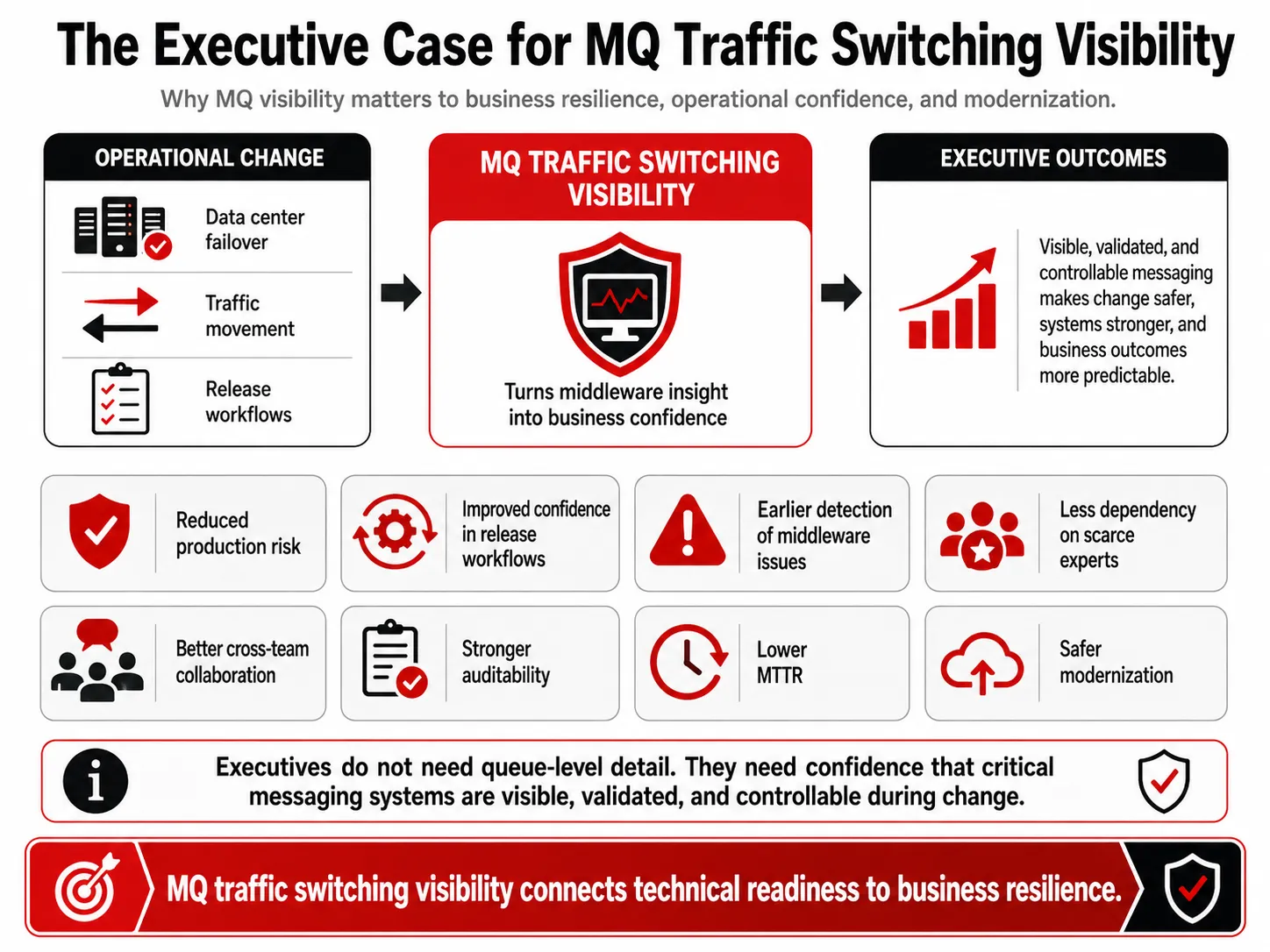
MQ traffic switching visibility connects technical readiness in IBM MQ environments to business resilience and operational confidence.
Better MQ visibility during traffic switching can help organizations:
- Reduce production risk during data center failover or traffic movement.
- Improve confidence in release and operational workflows.
- Detect middleware problems before they become business incidents.
- Reduce manual escalation to a small number of MQ experts.
- Improve collaboration between middleware, BizOps, production support, and application teams.
- Strengthen auditability for production-impacting activity.
- Reduce mean time to resolution when issues occur.
- Support modernization without losing control of critical middleware.
Executives may not need to know every detail of a queue manager or channel. But they do need confidence that the systems moving critical transactions can be monitored, validated, and controlled during operational change.
What to Look For in an MQ Traffic Switching Visibility Solution
Organizations that depend on IBM MQ should look for a solution that provides:
- Real-time MQ monitoring
- Queue manager, queue, and channel visibility
- Message age and queue depth alerting
- Role-based access control
Delegated administration - Audit trails
- Secure self-service for support and application teams
- Administrative action from the same interface as monitoring
- Synthetic transaction testing
- Dashboards and reporting
- Integration with existing ITSM, release, and monitoring ecosystems
- Agentless deployment where possible
- Support for hybrid, distributed, and complex MQ environments
Infrared360 was designed for these kinds of middleware operations. It gives organizations a way to move beyond fragmented scripts, isolated dashboards, and command-line dependency while still working alongside existing enterprise tools.
Conclusion
Traffic switching between data centers is too important to rely only on scripts, manual checks, or general-purpose dashboards. For enterprises that depend on IBM MQ, the middleware layer must be visible, validated, and manageable throughout the entire event.
Release orchestration can help coordinate the process. Infrared360 helps ensure the MQ environment is ready, healthy, and recoverable.
For organizations seeking stronger operational resilience, faster issue resolution, secure delegated visibility, and better control over critical messaging infrastructure, MQ traffic switching visibility should be part of the strategy.
FAQ: MQ Traffic Switching Visibility
Endnotes
[1] Digital.ai describes Release as a platform for orchestrating and automating software releases across hybrid environments, with workflows, governance, visibility, auditability, and release templates. Digital.ai also notes that Digital.ai Release and Deploy were formerly XebiaLabs XL Release and XL Deploy. https://digital.ai/products/release/
[2] IBM describes MQ channels as logical communication links used by distributed queue managers and explains that message channels transfer messages from one queue manager to another. IBM also describes MQ high availability as restoring access to queue managers and messages, with some mechanisms supporting disaster recovery scenarios. https://www.ibm.com/docs/en/ibm-mq/9.3.x?topic=types-channels
Related Posts




More Infrared360® Resources
About the Author: Scott Treggiari