IBM MQ Administration Automation: Why Ansible Alone Isn’t Enough
Automation is a priority for many enterprise IT organizations, and for good reason. Repetitive manual work slows teams down, introduces risk, and consumes valuable engineering time. So when organizations look at IBM MQ administration automation, it is natural for Ansible to enter the conversation.
Ansible is a powerful automation tool. It can help teams standardize repeatable tasks, execute commands across groups of systems, and reduce manual work. But IBM MQ administration is not just a collection of repeatable command executions. It is an operational discipline that requires real-time visibility, role-based control, delegated access, auditability, monitoring, troubleshooting, testing, and fast action across complex environments.
That is where Ansible alone falls short.
For enterprise IBM MQ environments, especially those with large distributed footprints, clustering, production support teams, application teams, and compliance requirements, the better approach is to use a purpose-built middleware administration and monitoring platform like Infrared360.
What Ansible Does Well
Ansible is designed to automate tasks across inventories of managed systems. Playbooks define what should happen, where it should happen, and in what order. That makes Ansible useful for repeatable configuration, deployment, provisioning, and infrastructure automation work. Red Hat describes Ansible playbooks as reusable automation blueprints that can execute the same action across a defined inventory, reducing repetitive manual work. [1]
For IBM MQ, that might mean using automation to install MQ, create a development queue manager, apply a standard configuration, or execute a predefined command sequence across selected systems. IBM community resources also show examples of using MQ-related Ansible playbooks to issue MQ commands through defined automation flows. [4]
That has value.
But the key phrase is predefined command sequence. Ansible is strongest when the task is known, scripted, tested, and repeatable.
Day-to-day MQ administration is often broader and more dynamic than that.
What IBM MQ Administration Really Requires
IBM MQ administration involves much more than running a script. IBM describes MQ object administration as including tasks such as starting and stopping queue managers, creating queues for applications, displaying or altering object attributes, deleting objects, working with channels, and creating clusters of queue managers. [2]
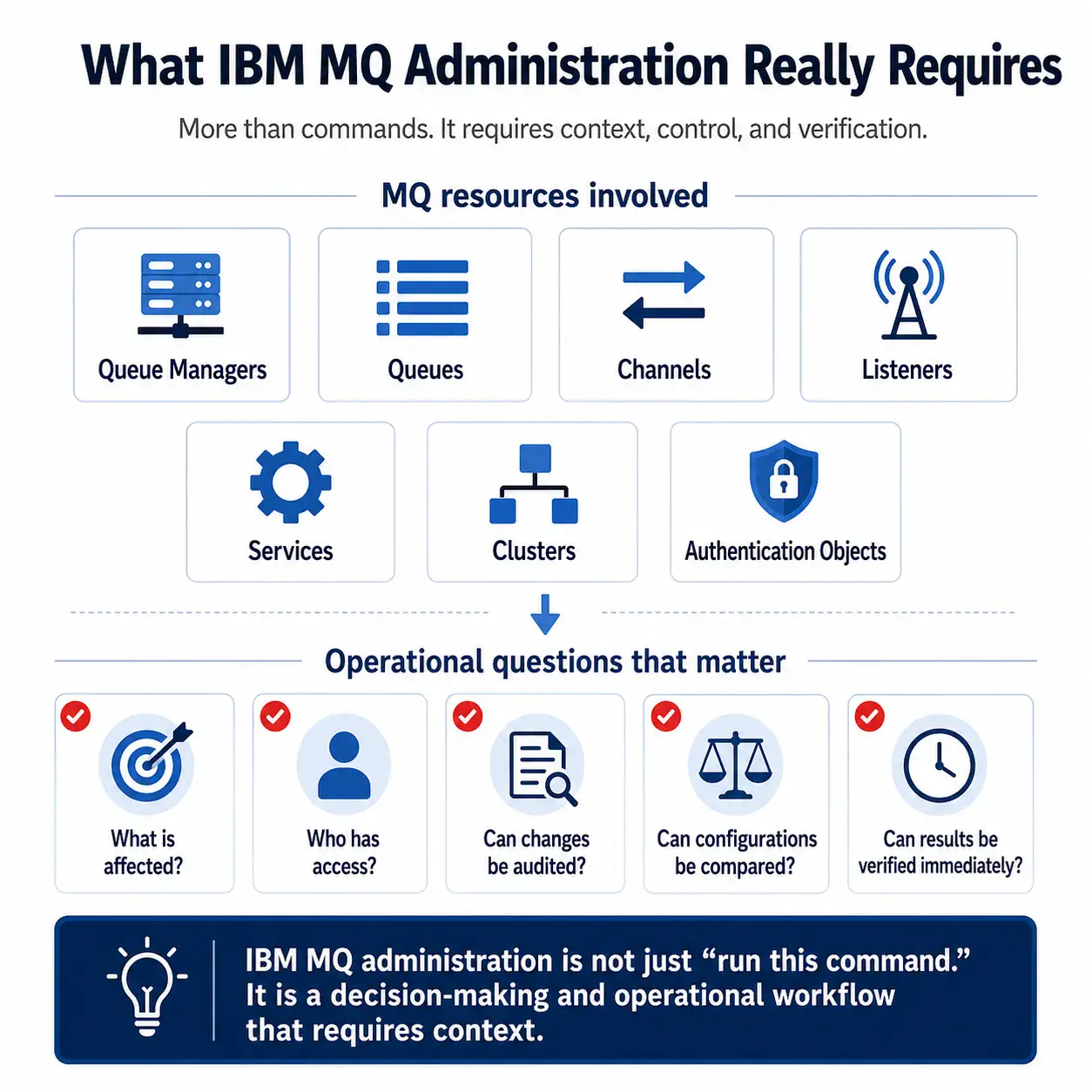
IBM MQ administrators may also use MQSC commands to manage queue managers, queues, channels, listeners, services, namelists, clusters, authentication information objects, and other MQ resources. [3]
In real operational environments, those activities are rarely isolated. An MQ administrator often needs to answer questions like:
- Which queue manager is affected?
- Which queue or channel is causing the issue?
- Is the issue local, clustered, or application-specific?
- Who has authority to see or change this object?
- Should an application team be able to view this resource but not modify it?
- Has this object changed recently?
- Can we compare this object to another known-good configuration?
- Can we safely make this change across many queue managers?
- Can we verify the result immediately?
- Can we audit who performed the action?
Ansible can help execute commands. It does not, by itself, provide the full operational workspace needed to answer those questions and act on them securely.
IBM MQ administration is not limited to creating queue managers, defining queues, modifying channels, or applying configuration changes. In real production environments, teams also need to manage the messages flowing through those MQ objects.
That can include viewing or browsing messages, creating test messages, moving or copying messages, replaying messages, editing messages where appropriate, deleting messages, clearing queues, and handling dead-letter or exception conditions.
These activities are often sensitive. A message may represent a customer transaction, an application event, a payment-related workflow, or another business-critical process. Teams need the ability to inspect and act on messages carefully, with the right permissions and a clear audit trail.
This is another area where Ansible alone is not the right primary interface. A playbook can execute a predefined command, but message management often requires real-time context, human judgment, role-based access, and immediate verification.
Infrared360 gives authorized users a middleware-aware way to manage messages directly within a governed operational framework. Teams can view, create, move, copy, replay, or delete messages according to their permissions, while maintaining the visibility and auditability required for enterprise MQ operations.
The Problem With Using Ansible as the Main MQ Administration Tool
The issue is not that Ansible is bad. It is that Ansible is not designed to be the primary interface for MQ operations.
1. Ansible Executes Tasks, but It Does Not Provide MQ Operational Context
Ansible can run a command or playbook across selected systems. But before an MQ administrator runs that automation, they still need operational context.
They need to know what is happening in the environment, which objects are affected, what the current state is, which teams are impacted, and whether the action is appropriate.
Infrared360 combines monitoring, visibility, administration, testing, and auditing in a single middleware-focused interface. That means teams can see the issue, understand the MQ context, take governed action, and verify results without jumping between scripts, terminals, logs, dashboards, and ticketing notes.
2. Ansible Automation Still Has to Be Built and Maintained
Ansible reduces manual execution, but it does not eliminate technical ownership. Someone still has to write the playbooks, maintain inventories, manage variables, handle exceptions, test edge cases, update scripts when the environment changes, and troubleshoot failed runs.
For MQ, that usually means the most experienced middleware engineers still carry the burden. Their work shifts from manually running commands to building and maintaining automation for everyone else.
That may be better than manual repetition, but it is not the same as giving the organization a purpose-built MQ administration platform.
Infrared360 reduces that burden by providing built-in MQ administration capabilities, delegated access, monitoring, alerting, reporting, and automation options through a controlled interface designed for middleware operations.
3. Ansible Is Not Ideal for Ad Hoc Troubleshooting
Many MQ problems are not solved by running a prewritten playbook. They require investigation.
An application team may report slow processing. A channel may be stopped. A queue may have unexpected depth. A message may be aging. A cluster may behave differently than expected. A team may need to know whether a particular queue has readers, writers, or connected handles.
Ansible can run commands to retrieve information, but the user still has to know what to run, where to run it, how to interpret the output, and what to do next.
Infrared360 is better suited for this kind of operational troubleshooting because it gives users MQ-specific visibility and administrative control in the same place.
4. Ansible Does Not Solve Secure Self-Service
One of the biggest challenges in MQ administration is giving the right people enough access to help themselves without giving them too much access.
Application teams often need visibility into their own queues, channels, or message flows. Production support may need to see status and perform limited actions. Developers may need access in lower environments. Auditors may need records of activity. Executives may need reporting.
Ansible does not naturally solve that access model. Giving more people access to run automation can create new governance challenges. Restricting access too tightly keeps the bottleneck in place.
Infrared360 is designed for delegated administration and secure self-service. Users can be granted access based on their role and responsibilities, so they see and do only what they are permitted to see and do. That is especially important in regulated, high-volume, enterprise environments where direct server access or broad MQ authority may not be acceptable.
5. Ansible Is Not a Monitoring and Administration Platform
Ansible can automate a response, but it is not a real-time MQ monitoring platform. It does not replace the need to monitor queue depth, channel status, message age, connection counts, open handles, stale messages, or other MQ-specific indicators.
It also does not provide the full administrative experience that MQ teams need to act on those signals immediately.
Infrared360 provides monitoring and administration together. That distinction matters. When monitoring and administration are separated, teams detect problems in one place, investigate in another, act somewhere else, and document the result manually. Each handoff adds time and risk.
With Infrared360, MQ teams can move from detection to diagnosis to action in a single workflow.
Example: Creating an MQ Object Across Many Queue Managers
Consider a common MQ administration scenario.
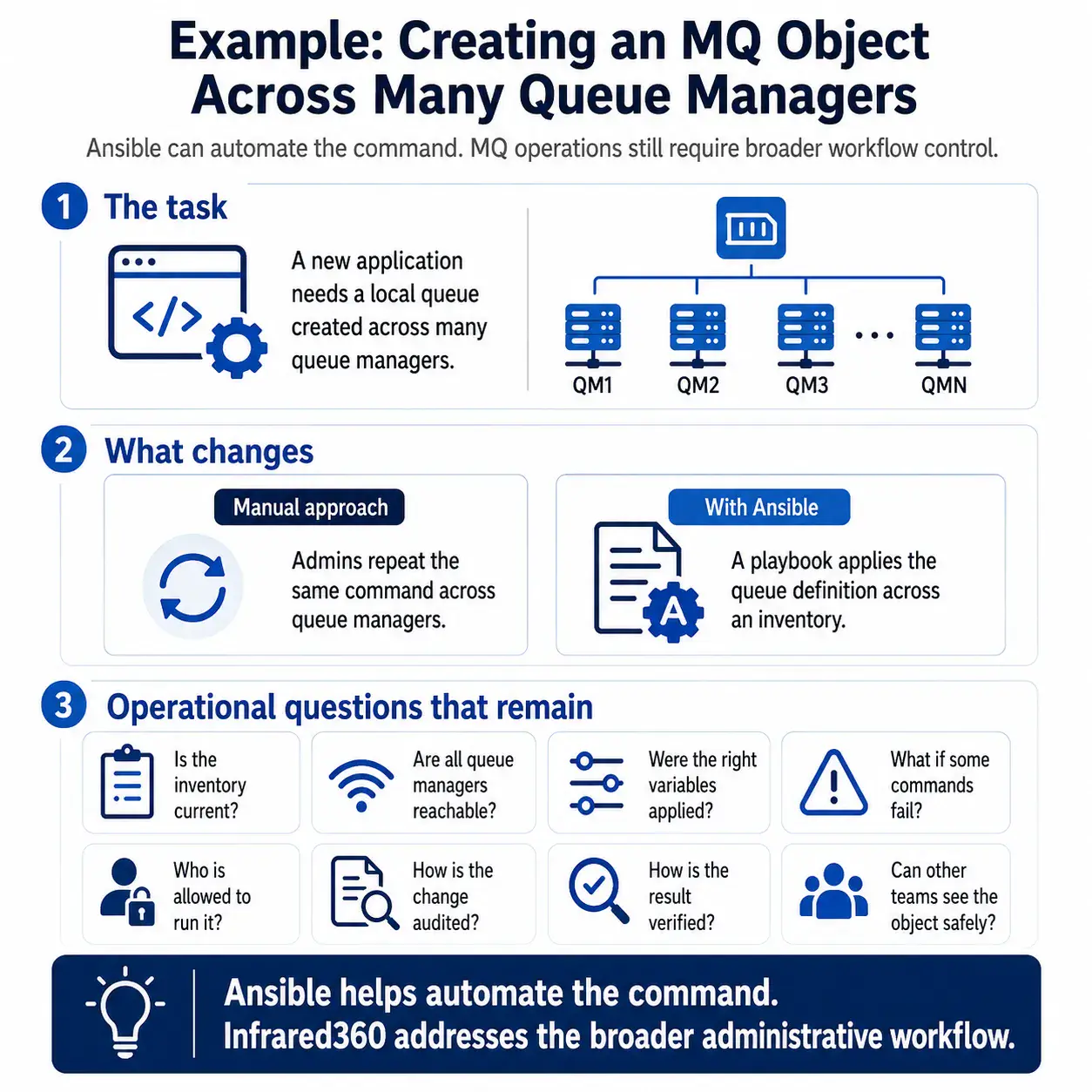
A new application requires a local queue to be created across multiple queue managers. In a manual process, an administrator may need to log into each host or queue manager and run a command repeatedly. That is slow and error-prone.
With Ansible, the team could write a playbook to apply the queue definition across an inventory of systems. That is an improvement over copying and pasting commands.
But the Ansible approach still requires the team to manage several questions:
- Is the inventory current?
- Are all target queue managers reachable?
- Are the right variables being applied?
- Has the playbook been tested for this environment?
- What happens if the command succeeds on some queue managers but fails on others?
- Who is allowed to run it?
- How is the change audited?
- How does the team verify the resulting configuration?
- Can application or support teams see the object afterward without receiving broader access?
Infrared360 addresses the broader administrative problem. It allows authorized users to work with MQ objects through an MQ-aware interface, perform governed administrative actions, maintain auditability, and provide appropriate visibility to other teams.
That is the difference between automating a command and improving MQ operations.
Why Infrared360 Is Better for IBM MQ Administration Automation
Infrared360 Is Purpose-Built for Middleware
Ansible is general-purpose automation. Infrared360 is purpose-built for middleware monitoring and administration.
That matters because MQ operations involve queues, channels, queue managers, object definitions, message viewing, message creation, message movement, message replay, message deletion, status checks, permissions, alerts, audit records, and operational workflows that generic automation tools do not fully understand.
Infrared360 gives middleware teams the capabilities they need in the language and structure of middleware operations.
Infrared360 Combines Visibility and Action
Automation without visibility can be dangerous. Visibility without action can be frustrating.
Infrared360 combines both. Teams can see what is happening and take appropriate action from the same platform. That reduces tool-switching, shortens response time, and helps teams resolve problems before they become larger incidents.
Infrared360 Enables Secure Delegated Administration
Large organizations rarely want every application team, developer, or support user logging into MQ servers or running broad automation jobs.
Infrared360 supports a more controlled model: give users visibility and permissions based on their role. That allows development teams, support teams, and operations teams to collaborate without granting unnecessary access to the broader environment.
Infrared360 Improves Auditability
For enterprise MQ environments, auditability is not optional. Teams need to know who did what, when, and where.
Ansible can produce logs, but MQ administration through scripts and playbooks may still leave organizations stitching together evidence from multiple places. Infrared360 provides administrative control and auditability as part of the same operational platform.
Infrared360 Supports Proactive Operations
The goal of IBM MQ administration automation should not be simply to run commands faster. The goal should be to prevent issues, detect problems earlier, reduce manual intervention, and improve reliability.
Infrared360 supports that broader goal through MQ-aware monitoring, alerting, automated responses, synthetic testing, reporting, and administrative action.
Infrared360 Reduces Dependence on Tribal Knowledge
In many organizations, MQ operations depend heavily on a small number of highly experienced people. That creates risk. When only a few people know how to diagnose issues, make changes, or understand the environment, every incident becomes a bottleneck.
Infrared360 helps distribute safe, governed visibility and action to the right teams. That does not replace MQ expertise. It makes MQ expertise more scalable.
Where Ansible Still Fits
Ansible can still have a place in an MQ strategy.
It may be useful for infrastructure provisioning, standardized deployments, OS-level configuration, repeatable environment builds, or specific command sequences that are well understood and tested.
But Ansible should not be treated as a replacement for MQ administration, monitoring, troubleshooting, security delegation, audit, or operational visibility.
A practical model is:
Use Ansible for infrastructure automation. Use Infrared360 for MQ operations.
That gives the organization the benefits of automation without forcing a general-purpose tool to become a middleware administration platform.
The Executive View: Automation Should Reduce Risk, Not Just Manual Work
For IT executives and directors, the question is not, “Can we automate this command?”
The better question is:
Can we improve MQ reliability, visibility, security, productivity, and cost efficiency at scale?
If the answer depends on building and maintaining more scripts, relying on a small number of experts, and giving teams limited visibility into the systems they support, then the organization has not really solved the MQ administration problem.
It has only moved the manual work into a different layer.
Infrared360 gives enterprises a smarter path: a secure, scalable, MQ-aware platform for monitoring, administration, automation, testing, reporting, and auditability.
Ready to see how Infrared360 can simplify IBM MQ administration automation, improve visibility, reduce manual work, and strengthen secure self-service?
Schedule a no-obligation demo to learn more at https://avadasoftware.com/contact-us/
FAQ
Endnotes
- Red Hat Ansible documentation describes playbooks as automation blueprints that execute actions across an inventory and can be saved, shared, and reused.
- IBM documentation describes MQ object administration as including tasks such as starting and stopping queue managers, creating objects, displaying or altering object attributes, deleting objects, working with channels, and creating clusters.
- IBM documentation states that MQSC commands can be used to manage queue manager objects, including queue managers, queues, channels, listeners, services, namelists, clusters, and authentication information objects.
- IBM Community documentation describes MQ Ansible YAML command examples that invoke a role to issue MQ commands through an automation flow.
Related Posts




More Infrared360® Resources
About the Author: Scott Treggiari