IBM MQ Configuration Drift: How to Detect and Prevent It with Infrared360
Configuration drift happens when IBM MQ queue managers, queues, channels, listeners, security records, or other object definitions no longer match the approved baseline.
In IBM MQ environments, configuration drift can create operational risk, security exposure, compliance gaps, and avoidable troubleshooting work. A queue depth change, missing backout queue, altered server connection channel, different TLS setting, or inconsistent authority record may seem small in isolation. But in a production messaging environment, those differences can affect application availability, message routing, failover behavior, and security.
Infrared360 helps MQ teams detect and prevent configuration drift by giving administrators a centralized way to view MQ objects, compare definitions, capture MQSC, create full or selected backups, audit activity, restrict administrative access, and support controlled remediation.
What Is Configuration Drift in IBM MQ?
Configuration drift is the difference between an approved configuration and the actual configuration currently running.
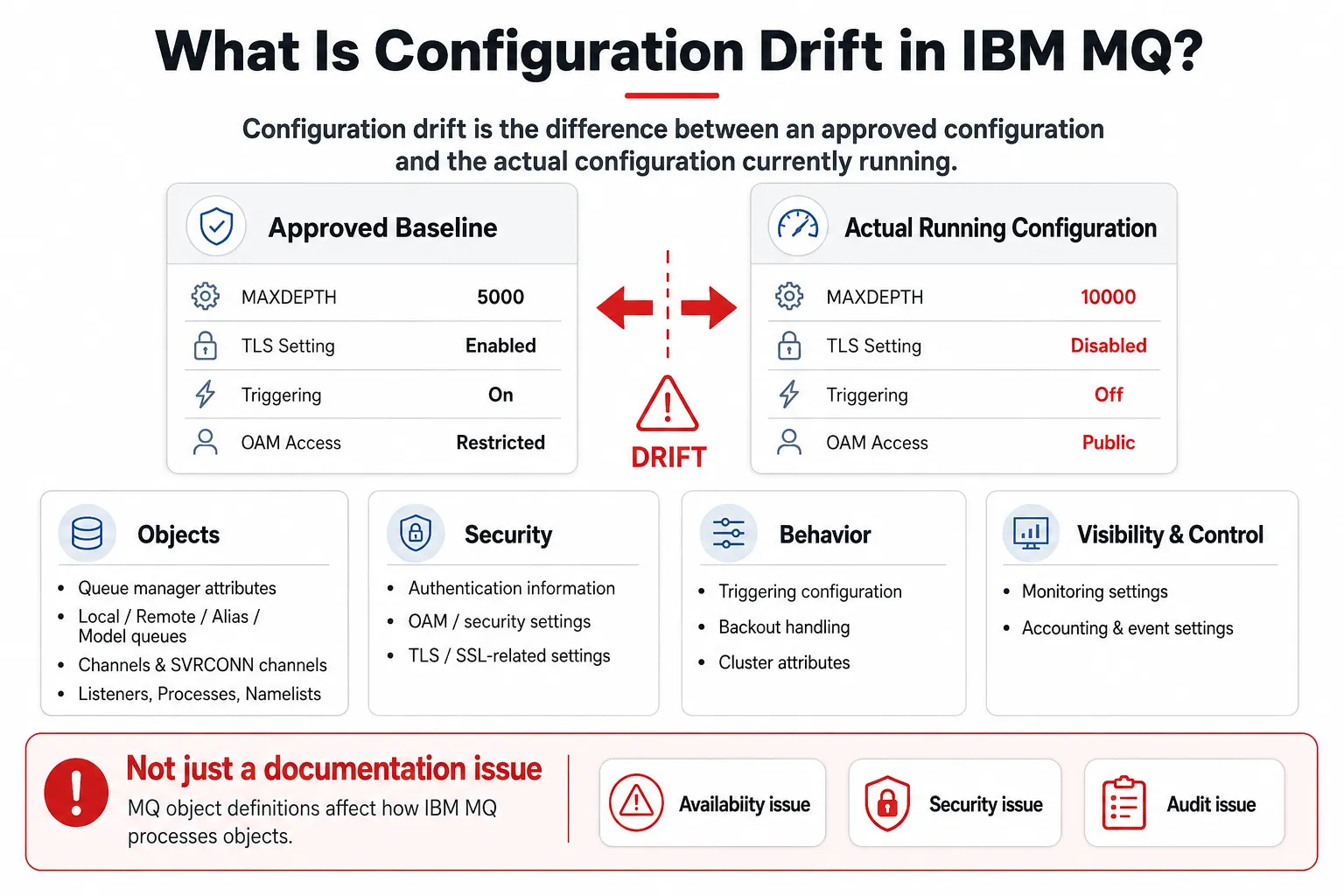
Configuration drift occurs when the actual IBM MQ configuration no longer matches the approved baseline.
In IBM MQ, configuration drift may include differences in:
- Queue manager attributes
- Local queue definitions
- Remote queue definitions
- Alias queues
- Model queues
- Channels
- Server connection channels
- Listeners
- Processes
- Namelists
- Authentication information
- OAM/security settings
- TLS/SSL-related settings
- Triggering configuration
- Backout handling
- Cluster attributes
- Monitoring, accounting, and event settings
IBM MQ object definitions matter because queue managers define the properties of MQ objects, and those properties affect how IBM MQ processes those objects.[1] IBM also notes that, with the exception of dynamic queues, objects must be defined to the queue manager before they can be used, and authority checks are performed when commands or applications attempt to operate on objects.[1]
That means IBM MQ configuration drift is not just a documentation issue. It can become an availability issue, a security issue, or an audit issue
Why IBM MQ Configuration Drift Is Risky
IBM MQ environments often support critical business processes. A small configuration difference can have a large operational effect.
| Drift Type | Example | Possible Impact |
|---|---|---|
| Queue attribute drift | MAXDEPTH differs between production queue managers | One queue fills sooner than another |
| Channel drift | TLS settings differ from the standard | Security exposure or failed connectivity |
| Security drift | OAM authority differs across environments | Excessive access or blocked support activity |
| Triggering drift | Triggering is disabled on one queue | Messages accumulate without expected processing |
| Backout drift | Backout queue or threshold differs | Poison messages loop or remain unresolved |
| Cluster drift | Cluster attributes differ | Routing imbalance or workload distribution issues |
| Monitoring drift | Event, accounting, or statistics settings differ | Blind spots in operational visibility |
NIST’s security-focused configuration management guidance emphasizes managing and monitoring configurations to achieve adequate security, minimize organizational risk, and support required business functionality.[2] That principle applies directly to IBM MQ. If the real configuration no longer matches the approved configuration, the organization’s operational and security assumptions may no longer be true.
How Infrared360 Helps Detect IBM MQ Configuration Drift
Infrared360 supports a practical configuration drift workflow for IBM MQ environments.
The workflow is not limited to one method. MQ teams can use several complementary approaches:
- Search and filter MQ objects across queue managers
- Compare MQ object definitions in the Infrared360 user interface
- Download MQSC for selected objects or broader review
- Create full queue manager backups when appropriate
- Create selected or fractional backups for only the objects that matter
- Save known-good object definitions as a reusable baseline
- Deploy approved definitions to another queue manager where appropriate
- Compare selected backup or MQSC files outside the Infrared360 user interface
- Review audit and change history
- Restrict administrative access with role-based controls
- Remediate drift using approved administrative processes
The most useful way to think about this is:
Find the objects. Compare the definitions. Preserve a known-good baseline. Review the audit context. Remediate through approved controls. Prevent recurrence with access control, monitoring, and standardization.
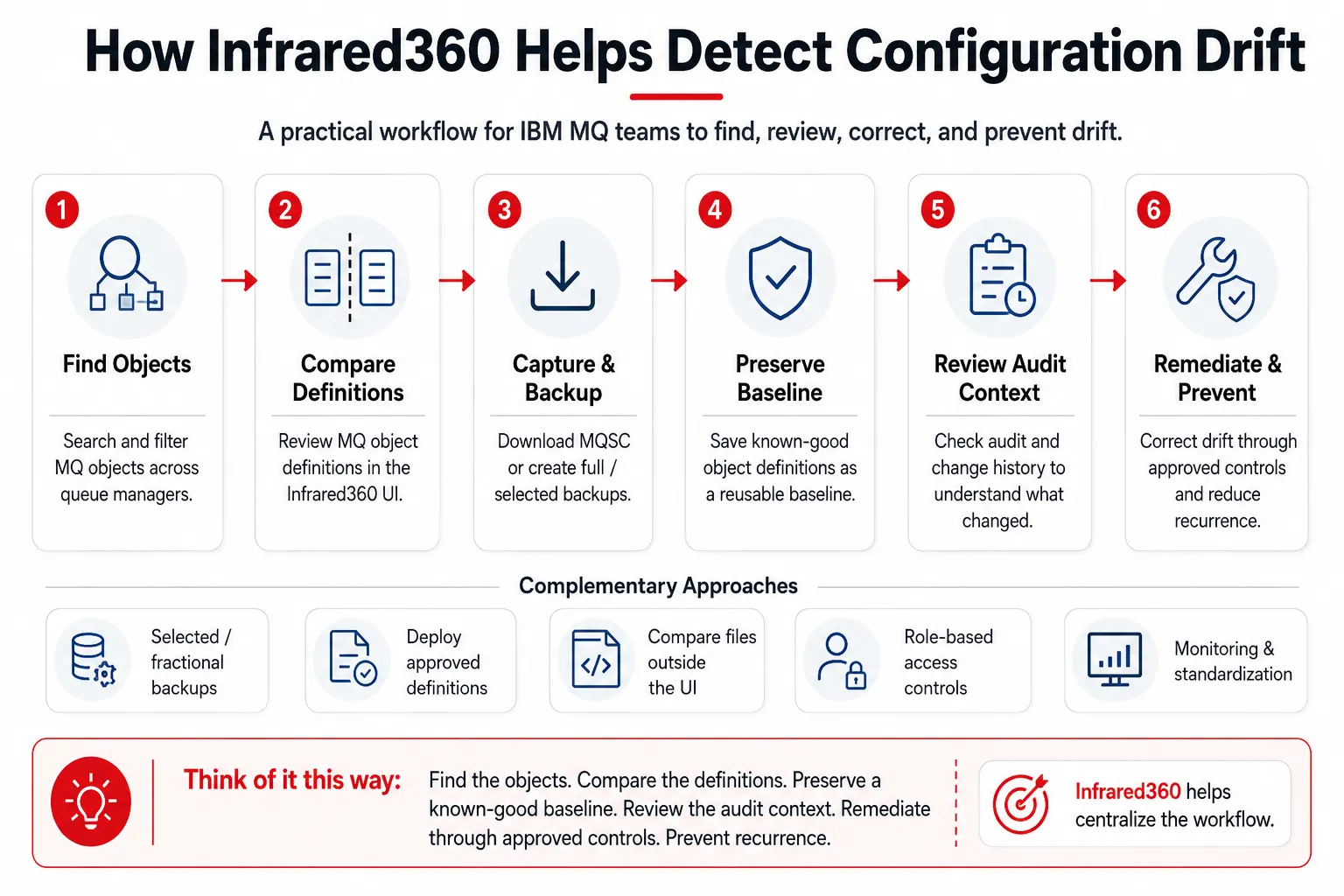
Infrared360 helps MQ teams follow a practical workflow to detect, review, correct, and prevent configuration drift.
Step-by-Step: Detecting IBM MQ Configuration Drift with Infrared360
Step 1: Define the Baseline
Before comparing anything, decide what “correct” means.
Your baseline might be:
- A known-good production queue manager
- A gold-standard queue manager template
- A documented set of MQSC definitions
- A full queue manager backup
- A selected or fractional backup of critical objects
- A standard for a specific application, business unit, or environment
- A naming, security, clustering, or monitoring standard
For example, you may decide that QM_PROD_A is the approved baseline for a production application, and that QM_PROD_B and QM_PROD_C should match it for key queues, channels, and related object definitions.
Document which differences are allowed. DEV and PROD may legitimately differ in queue depth, channel endpoints, or testing-related attributes. But two production queue managers supporting the same workload should usually be much more consistent.
Step 2: Locate Queue Managers and Objects in Infrared360
Start in Infrared360’s IBM MQ management view.
Use Infrared360 to locate the relevant queue managers, then search or filter for the object names or naming patterns you want to review.
Examples:
APP.PAYMENTS.REQUESTAPP.PAYMENTS.REPLYAPP.PAYMENTS.BACKOUTTO.PAYMENTS.*SYSTEM.ADMIN.*- Application-specific channels
- Cluster sender or receiver channels
- Server connection channels
- Process definitions
- Listener definitions
This is especially useful in large IBM MQ estates where objects are spread across many queue managers. Instead of signing into each platform separately or running repeated command-line checks, the MQ team can use a centralized interface to find the objects that matter.
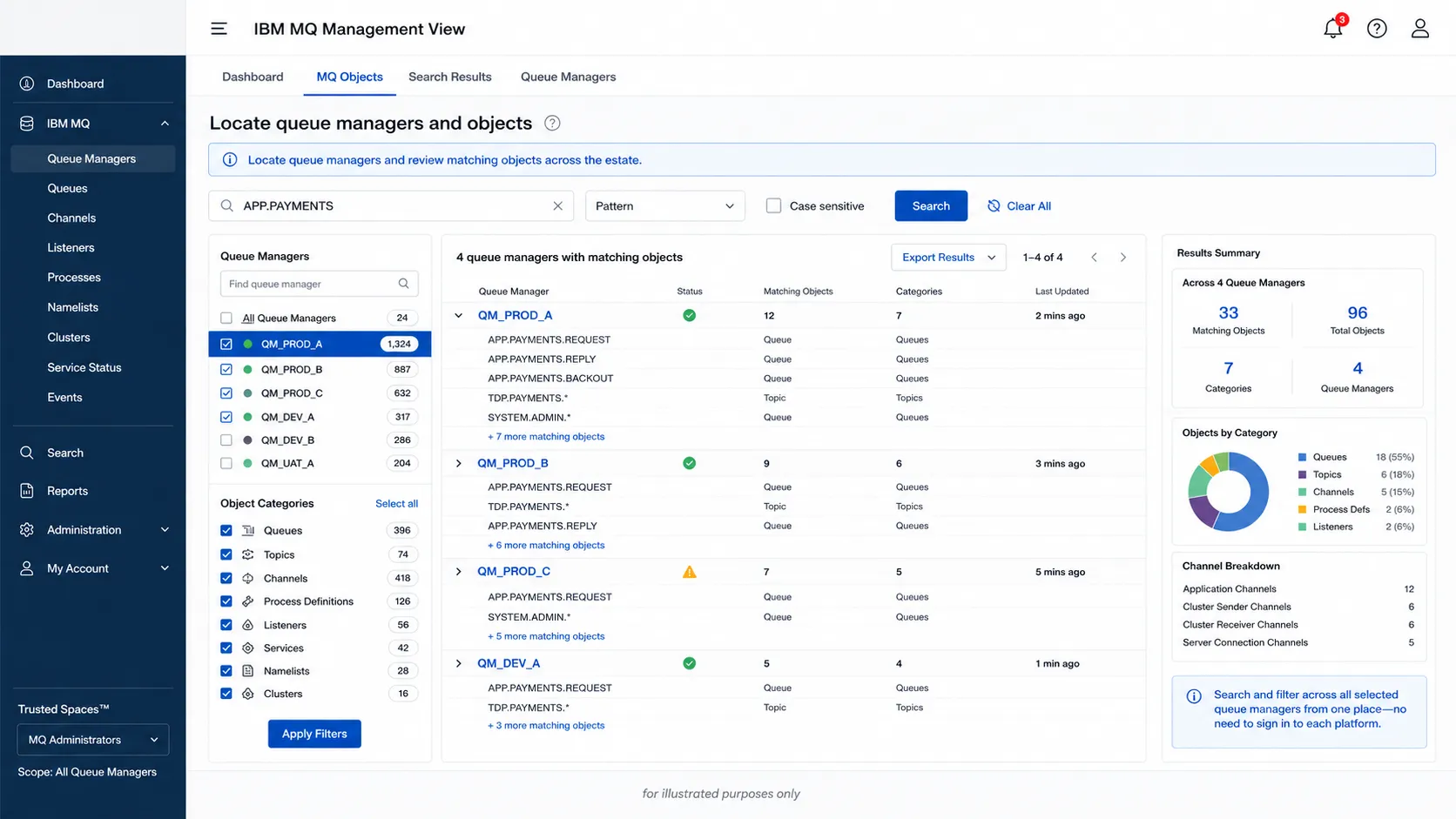
Infrared360 helps MQ teams search across queue managers to find the objects that matter.
Step 3: Compare Object Definitions in the Infrared360 UI
For a fast review, compare the object definition on the baseline queue manager against the same or equivalent object on another queue manager.
- Typical comparison candidates include:
- Queue managers
- Local queues
- Server connection channels
- Processes
- Other MQ object types supported by the organization’s Infrared360 configuration
For a queue comparison, review attributes such as:
MAXDEPTHMAXMSGLDEFPSISTDEFPRTYGETPUT- Backout threshold
- Backout requeue queue
- Trigger control
- Trigger depth
- Usage
- Cluster name
- Cluster workload settings
- Default binding
- Alteration date and time
For a channel comparison, review attributes such as:
- Channel type
- Connection name
- Transmission queue
- MCA user
- TLS settings
- Certificate label
- Cipher specification
- Channel authentication-related settings
- Max instances
- Heartbeat interval
- Sharing conversations
The goal is not to declare every difference bad. The goal is to separate approved environmental variation from unapproved configuration drift.
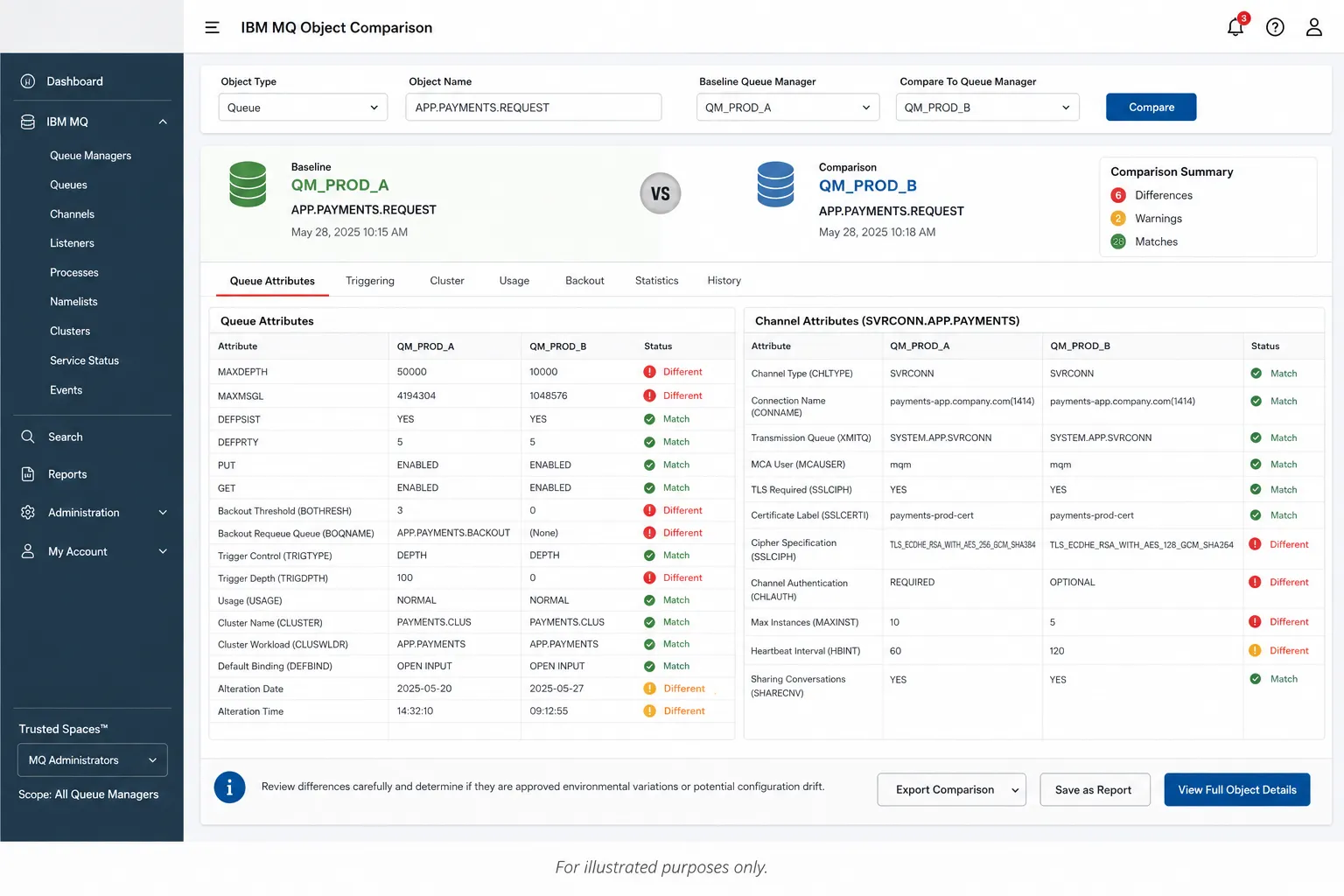
Comparing object definitions helps MQ teams separate approved differences from true configuration drift.
Step 4: Use Selected or Fractional Backups to Save a Known-Good Object Baseline
Configuration drift reviews do not always require a full queue manager backup.
In many cases, the MQ team only needs to preserve and compare a selected group of objects. This is where selected or fractional backups are especially useful.
For example, an application may depend on a defined set of:
- Local queues
- Remote queues
- Alias queues
- Backout queues
- Transmission queues
- Sender and receiver channels
- Server connection channels
- Process definitions
- Listeners
- Related security or configuration objects
Instead of backing up the entire queue manager, the administrator can create a selected backup of only the objects relevant to that application, service, change window, or standard.
That selected backup becomes a known-good baseline.
It can be used to:
- Preserve an approved version of critical MQ object definitions
- Compare selected objects against similar objects on another queue manager
- Support standardization across queue managers
- Recreate or deploy approved object definitions where appropriate
- Review differences outside the Infrared360 user interface when a file-based comparison is preferred
- Provide supporting evidence for change review, audit, or incident investigation
This is important because configuration drift is often application-specific. A queue manager may contain hundreds or thousands of objects, but a particular review may only care about the object set tied to one business application.
A selected backup keeps the review focused.
Step 5: Use Download MQSC for Point-in-Time Definition Capture
Infrared360’s Download MQSC capability can also support configuration drift detection by capturing MQ object definitions in MQSC format.
IBM MQSC commands are a standard administrative method for managing queue manager objects, including queue managers, queues, process definitions, channels, listeners, services, namelists, clusters, and authentication information objects.[3]
A practical MQSC capture workflow is:
- Select the baseline queue manager or object set.
- Download MQSC for the relevant definitions.
- Repeat the process for the queue manager or object set being reviewed.
- Compare the outputs.
- Flag differences that violate the approved standard.
- Validate whether those differences are approved exceptions.
This approach is useful for:
- Periodic drift reviews
- Pre-upgrade checks
- Post-change validation
- Disaster recovery preparation
- Standardization projects
- Compliance evidence
- File-based comparison outside the Infrared360 user interface
Step 6: Choose the Right Comparison Method
Infrared360 gives MQ teams more than one way to investigate configuration drift.
| Method | Best For | Example Use |
|---|---|---|
| UI-based object compare | Quick review of specific objects | Compare a local queue on two production queue managers |
| Download MQSC | Point-in-time capture and file-based review | Export selected queue or channel definitions for comparison |
| Selected or fractional backup | Preserving a known-good object set | Save only the queues and channels used by a critical application |
| Full queue manager backup | Broad baseline or recovery planning | Capture the complete queue manager object definition set |
| Deploy or recreate approved definitions | Standardization and remediation | Use a known-good selected object set on another queue manager |
| Audit and change review | Determining whether drift was authorized | Check who changed an object, when, and how |
This distinction matters. A full queue manager backup is valuable, but it is not always necessary. For many configuration drift reviews, a selected backup is more efficient because it focuses on the objects that should be standardized.
Step 7: Compare Full or Selected MQ Object Definitions Outside the UI When Needed
Some teams prefer to review definition differences outside the product interface, especially during formal audits, change reviews, or standardization projects.
In those cases, the MQ team can use selected backup files or MQSC captures as comparison artifacts.
For example:
- Save a known-good selected backup for an application’s MQ object set.
- Capture the comparable object set from another queue manager.
- Compare the files using the organization’s preferred file comparison process.
- Identify differences in object attributes.
- Decide whether each difference is approved, expected, unauthorized, or risky.
- Use the selected backup or approved MQSC as a standardization reference.
This gives teams flexibility. They can compare directly in Infrared360 for fast operational review, or use file-based artifacts for offline review, documentation, or formal evidence.
Step 8: Review Audit and Change Context
Once a difference is found, the next question is whether the change was expected.
IBM MQ configuration events are generated when an object is created, changed, or deleted, and they can also be generated by explicit requests.[4] IBM documentation notes that configuration event data can include origin information, object identity, and object attributes.[4]
Command events can also help generate an audit trail of commands that have run. IBM notes that when an MQSC or PCF command causes both a command event and a configuration event, both event messages share the same correlation identifier.[5]
This kind of context helps move the conversation from:
“This queue is different.”
to:
“This queue changed on this queue manager, by this user or process, through this type of command, and the resulting attributes no longer match the approved standard.”
Infrared360’s audit capabilities can help MQ teams review administrative activity and determine whether an object change aligns with approved work.
Step 9: Classify the Drift
After identifying the difference, classify it.
| Classification | Meaning | Action |
|---|---|---|
| Approved difference | Expected environmental variation | Document as accepted |
| Temporary difference | Approved for a short-term change window | Track and recheck |
| Unknown difference | No known approval or explanation | Investigate |
| Unauthorized change | Change violates policy or bypassed process | Escalate and remediate |
| Standardization issue | Object was created inconsistently | Correct and update provisioning process |
| Security drift | Access, TLS, channel, or authority setting differs | Prioritize review |
This classification step prevents teams from overreacting to harmless differences while still prioritizing changes that create risk.
Step 10: Remediate Through Approved Change Controls
When drift requires correction, use the organization’s normal change process.
Depending on the issue and the user’s permissions, remediation may involve:
- Changing the object definition
- Running an MQSC command
- Restoring a standard attribute
- Recreating an object from a known-good definition
- Deploying an approved selected object definition to another queue manager
- Updating OAM/security settings
- Adjusting channel or TLS settings
- Re-enabling triggering
- Updating monitoring or event settings
- Documenting an approved exception
The important point is control. Configuration drift prevention is not just about making changes easier. It is about making approved changes easier and unapproved changes harder.
Step-by-Step: Preventing IBM MQ Configuration Drift with Infrared360
Detection matters, but prevention is where MQ teams reduce recurring work.
Step 1: Restrict Who Can See and Change MQ Objects
Preventing configuration drift starts with access control.
Not every user who needs visibility into IBM MQ needs full administrative authority. Developers may need to browse messages in a test queue. Support teams may need to view queue depth or restart a channel. Application owners may need status visibility. MQ administrators may need full control.
Infrared360’s delegated access model helps teams provide the right level of access to the right users.
This reduces the risk of:
- Well-intentioned users changing the wrong object
- Broad administrative access being granted for convenience
- Teams bypassing formal MQ administration
- Untracked use of rogue tools
- Excessive access to sensitive queues or channels
Configuration drift often starts as an access problem. If too many people can change too many objects, drift becomes much harder to prevent.
Step 2: Use Standard Naming and Search Patterns
Standard naming makes drift easier to detect.
Define naming conventions for:
- Application queues
- Backout queues
- Dead-letter queues
- Transmission queues
- Sender and receiver channels
- Server connection channels
- Cluster channels
- Process objects
- Listeners
- Environment prefixes or suffixes
Then use Infrared360’s search and filtering capabilities to locate objects by pattern.
Examples:
APP.*.REQUEST*.BACKOUTTO.*FROM.*SVRCONN.*CLUSTER.*
When names are consistent, it becomes much easier to compare like-for-like objects across queue managers.
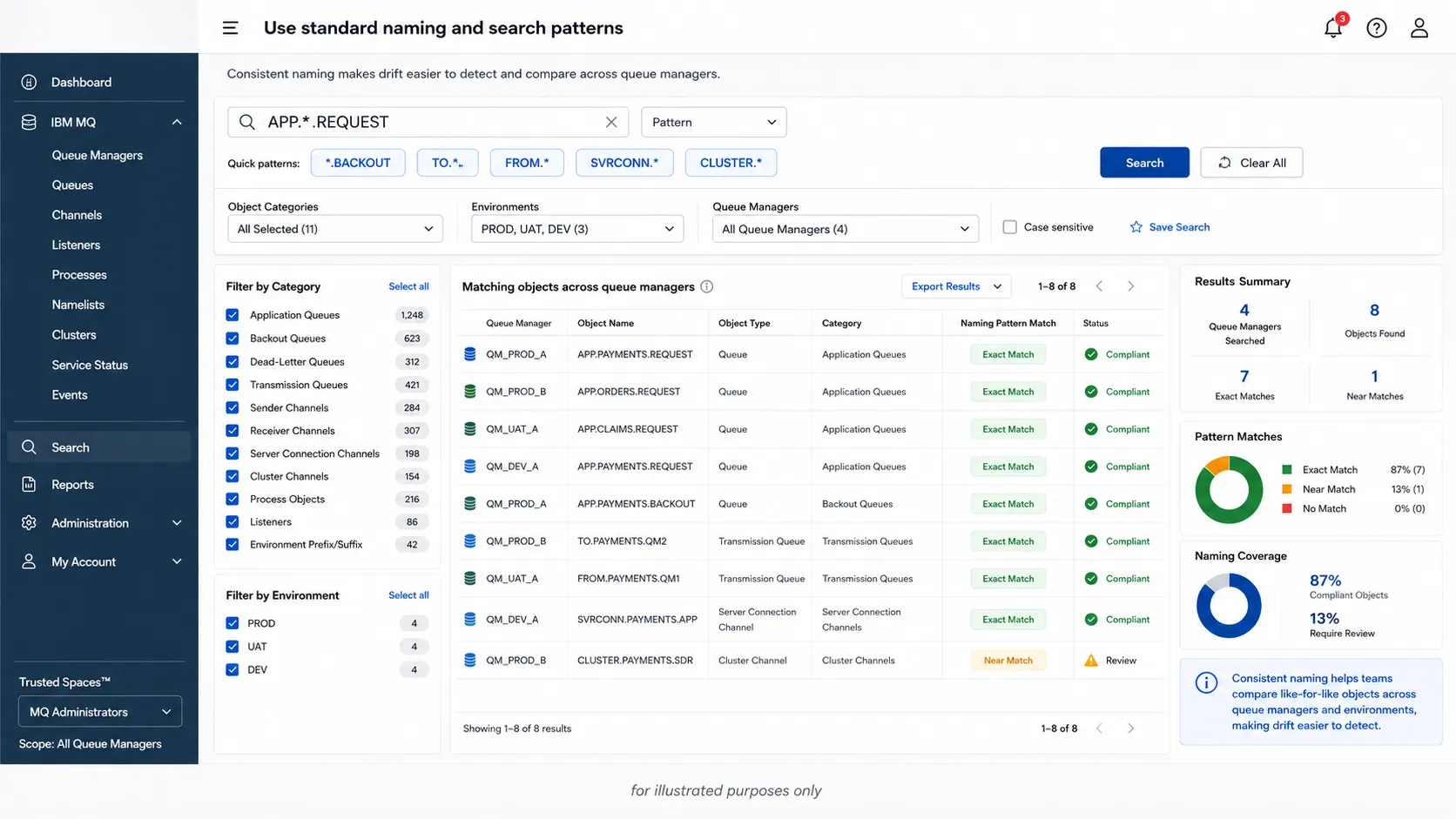
Standard naming and search patterns make configuration drift easier to detect.
Step 3: Save Known-Good Selected Backups
For critical applications, save selected backups of approved MQ object sets.
This can include:
- Standard queues
- Backout queues
- Related channels
- Process definitions
- Listener definitions
- Other objects tied to the application or standard
A selected backup can serve as a reusable baseline. It gives the team a reliable “good copy” to compare against, deploy where appropriate, or use as evidence during change review.
This is especially useful when multiple queue managers support the same application or business function. Instead of reviewing every object on every queue manager, the team can focus on the specific objects that should be consistent.
Step 4: Schedule Regular Definition Reviews
Configuration drift is easier to manage when reviews are routine.
Recommended review cycles might include:
- Weekly review for critical production queue managers
- Monthly review for standardization across application groups
- Pre- and post-change-window comparison
- Pre-upgrade comparison
- Post-incident comparison
- Quarterly access and security review
- Annual audit evidence capture
A repeatable drift review should include:
- Capture or review current object definitions.
- Compare against the approved baseline.
- Review audit history for changed objects.
- Classify differences.
- Remediate or document exceptions.
- Update the baseline if a change is approved and permanent.
Step 5: Monitor for Change Signals
IBM MQ instrumentation events provide information about errors, warnings, and other significant occurrences in a queue manager.[6] IBM documentation lists examples of conditions that can cause instrumentation events, including objects being created, deleted, changed, or refreshed, and successful MQSC or PCF command execution.[6]
For configuration drift programs, the most relevant MQ event types include:
- Configuration events
- Command events
- Authority configuration events
- Security-related events
- Queue manager events
- Channel events
These signals can help teams identify when a configuration change has occurred and whether it should be reviewed.
Step 6: Pay Special Attention to Security Drift
Security drift deserves special priority.
In IBM MQ, security-related drift may involve:
- OAM authority changes
- Authority records
- Channel authentication records
- Server connection channel settings
- MCA user changes
- TLS settings
- Cipher settings
- Certificate labels
- Authentication information objects
- Privileged access paths
IBM MQ authority configuration events are output when a change is made from security control operations through the command line, MQSC, PCF, or corresponding IBM i commands.[7] IBM documentation also notes that authority configuration event data can include origin information, authority record identity, and object attributes.[7]
For MQ teams, this means security drift should not be treated as routine cleanup. It should be investigated quickly, especially in regulated or high-risk environments.
Step 7: Use Baselines for Standardization, Not Just Audits
A good baseline is more than audit evidence. It is an operational standard.
Use baselines to define:
- Required queue attributes
- Required channel settings
- TLS and certificate standards
- Backout handling requirements
- Triggering standards
- Cluster participation rules
- Monitoring and event settings
- Naming conventions
- Required operational metadata
Then use Infrared360 to compare current definitions against those standards.
Selected backups are especially valuable here because they allow teams to preserve and reuse a known-good object set without treating the entire queue manager as the unit of comparison.
Step 8: Close the Loop After Remediation
After correcting drift, verify the correction.
A practical closure checklist:
- Recompare the object.
- Confirm the attribute now matches the baseline.
- Capture updated MQSC if needed.
- Update the selected backup if the approved baseline has changed.
- Confirm the audit record exists.
- Update the change ticket or internal record.
- Document approved exceptions.
- Adjust access or process controls if the drift was unauthorized.
- Add the object or pattern to future review reports.
Without this final verification step, teams may fix the immediate symptom but leave the drift process unresolved.
Example: Detecting Drift in a Payment Queue
Assume an application uses this queue across three production queue managers:
APP.PAYMENTS.REQUEST
The approved baseline on QM_PROD_A is:
MAXDEPTH: 50000MAXMSGL: 4194304DEFPSIST: YESBOQNAME: APP.PAYMENTS.BACKOUTBOTHRESH: 3TRIGGER: YESTRIGDPTH: 1GET: ENABLEDPUT: ENABLED
During a review, the MQ administrator uses Infrared360 to locate the queue across production queue managers and compare definitions.
The comparison shows:
| Attribute | Baseline | QM_PROD_B | Risk |
|---|---|---|---|
| MAXDEPTH | 50000 | 10000 | Queue may fill earlier |
| BOTHRESH | 3 | 0 | Backout handling may not work as intended |
| TRIGGER | YES | NO | Processing may not start automatically |
| PUT | ENABLED | ENABLED | No issue |
| GET | ENABLED | ENABLED | No issue |
The team then checks audit history. If the change was part of an approved temporary test, they document it and schedule reversion. If there is no approval, they escalate and remediate.
They may also save a selected backup of the approved payment-application object set. That backup can become the baseline for future reviews across all production queue managers that support the payment application.
Example: Detecting Security Drift in a Server Connection Channel
Now assume an MQ team has a standard for application server connection channels.
The approved baseline requires:
- Approved MCA user pattern
- Required TLS cipher
- Certificate label present
- Maximum channel instances set
- Channel authentication records aligned with policy
- No broad administrative access through application channels
An Infrared360 comparison shows that one queue manager has a different MCA user and missing certificate label.
That difference should be treated as security drift. The team should review the change history, verify whether it was approved, correct it through change control, and consider whether access controls need to be tightened.
A selected backup of approved server connection channel definitions can also help the team compare the standard channel set across other queue managers.
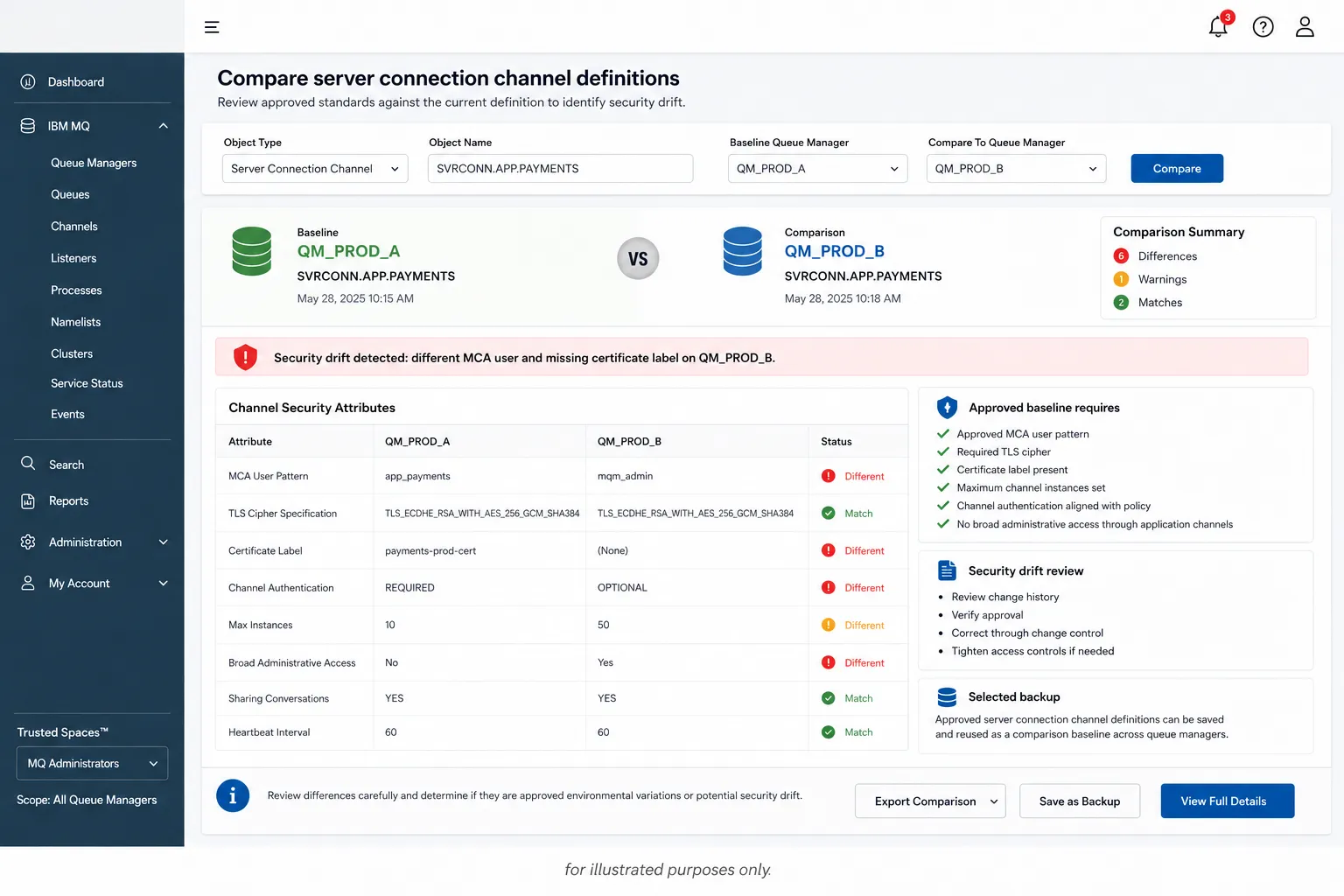
A different MCA user or missing certificate label should be treated as potential security drift.
What to Look for During an IBM MQ Configuration Drift Review
Use this checklist when reviewing IBM MQ configuration drift.
Queue Manager Settings
- Command server status
- Channel initiator status
- Dead-letter queue name
- Maximum message length
- Maximum handles
- Trigger interval
- Event settings
- Monitoring settings
- SSL/TLS settings
- Certificate label
- Authority and authentication-related settings
Queue Definitions
MAXDEPTHMAXMSGLDEFPSISTGETPUT- Trigger settings
- Backout queue
- Backout threshold
- Cluster attributes
- Usage
- Default binding
- Naming standard alignment
Channel Definitions
- Channel type
- Connection name
- Transmission queue
- MCA user
- TLS/cipher settings
- Certificate label
- Max instances
- Heartbeat interval
- Sharing conversations
- Channel authentication alignment
Security and Access
- OAM authorities
- Authority records
- Administrative users
- Server connection channel exposure
- Privileged access
- LDAP/SSO alignment
- Delegated access rules
- Audit history
Monitoring and Audit
- Configuration events
- Command events
- Authority events
- Alert associations
- Queue and channel monitoring
- Accounting/statistics settings
- Report schedules
- Exception documentation
How Infrared360 Reduces IBM MQ Configuration Drift Over Time
Infrared360 helps reduce IBM MQ configuration drift by making MQ administration more visible, searchable, controlled, and auditable.
Instead of relying on scattered scripts, direct server access, one-off commands, or manual comparisons, MQ teams can use a shared management layer to:
- Compare MQ objects across queue managers
- Capture MQSC definitions
- Save full or selected object backups
- Preserve known-good object baselines
- Deploy approved definitions where appropriate
- Review audit history
- Restrict access by role and object
- Standardize administrative workflows
- Generate reports
- Integrate alerts with existing operational processes
- Support approved remediation
That matters because configuration drift is rarely a one-time problem. It is usually a symptom of inconsistent access, inconsistent process, inconsistent standards, or insufficient visibility.
Infrared360 helps address those root causes.
FAQ
Endnotes
[1] IBM. “IBM MQ objects.” IBM Documentation, IBM MQ 9.4.x. Accessed May 27, 2026. URL: https://www.ibm.com/docs/en/ibm-mq/9.4.x?topic=overview-mq-objects
[2] National Institute of Standards and Technology. “Guide for Security-Focused Configuration Management of Information Systems.” NIST Special Publication 800-128, August 2011; includes updates as of October 10, 2019. Accessed May 27, 2026. URL: https://csrc.nist.gov/pubs/sp/800/128/upd1/final
[3] IBM. “MQSC commands reference.” IBM Documentation, IBM MQ 9.4.x. Accessed May 27, 2026. URL: https://www.ibm.com/docs/en/ibm-mq/9.4.x?topic=reference-mqsc-commands
[4] IBM. “Configuration events.” IBM Documentation, IBM MQ 9.4.x. Accessed May 27, 2026. URL: https://www.ibm.com/docs/en/ibm-mq/9.4.x?topic=monitoring-configuration-events
[5] IBM. “Command event usage.” IBM Documentation, IBM MQ 9.4.x. Accessed May 27, 2026. URL: https://www.ibm.com/docs/en/ibm-mq/9.4.x?topic=events-command-event-usage
[6] IBM. “Instrumentation events.” IBM Documentation, IBM MQ 9.2.x. Accessed May 27, 2026. URL: https://www.ibm.com/docs/en/ibm-mq/9.2.x?topic=monitoring-instrumentation-events
[7] IBM. “Authority configuration events.” IBM Documentation, IBM MQ 9.3.x. Accessed May 27, 2026. URL: https://www.ibm.com/docs/en/ibm-mq/9.3.x?topic=monitoring-authority-configuration-events
Related Posts


More Infrared360® Resources
About the Author: Scott Treggiari