On this page
Middleware problems do not always start with a major outage.
A queue may slowly start filling up. Messages may sit longer than usual. An application may stop reading messages. A channel may go down while new messages continue to arrive.
Each of those things tells you something. The real value comes from seeing how they connect.
That is what proactive middleware monitoring should help you do: spot the warning signs early, understand what is happening, and give your team enough context to decide what to do next.
The goal is not to create more alerts. It is to create better alerts.
Start With the Conditions That Actually Matter
A queue reaching a certain depth might be important. Or it might be completely normal.
For example, a queue with 5,000 messages could be expected during a busy batch process. Meanwhile, a queue with only 100 messages could be a bigger concern if those messages have been sitting there for an hour and no application is reading them.
That is why queue depth alone rarely tells the whole story.
With IBM MQ, teams may also want to look at things like:
- How old the messages are
- Whether messages are being put and removed at the expected rate
- When the last put or get occurred
- Whether readers or writers are connected
- Whether messages are building up faster than they are being processed
The right conditions will depend on the application and workload.
A high-volume transaction queue may need very different alerting rules from a low-volume queue that only receives a few important messages each day.
Combine Related Warning Signs
Sometimes one condition is enough to trigger an alert.
Other times, combining a few related conditions gives the team a much clearer picture.
For example:
Queue depth is increasing + no readers are connected
That tells you more than simply knowing the queue is getting deeper.
Or maybe:
Messages are building up + a related channel is stopped
Now the team has a stronger clue about where to start looking.
Infrared360 lets teams combine conditions when it makes sense, including conditions across supported middleware technologies.
The idea is simple: alert on the situation you care about, rather than treating every individual measurement as a separate problem.
That does not mean every alert needs to be complicated. If one condition is important enough on its own, keep it simple.
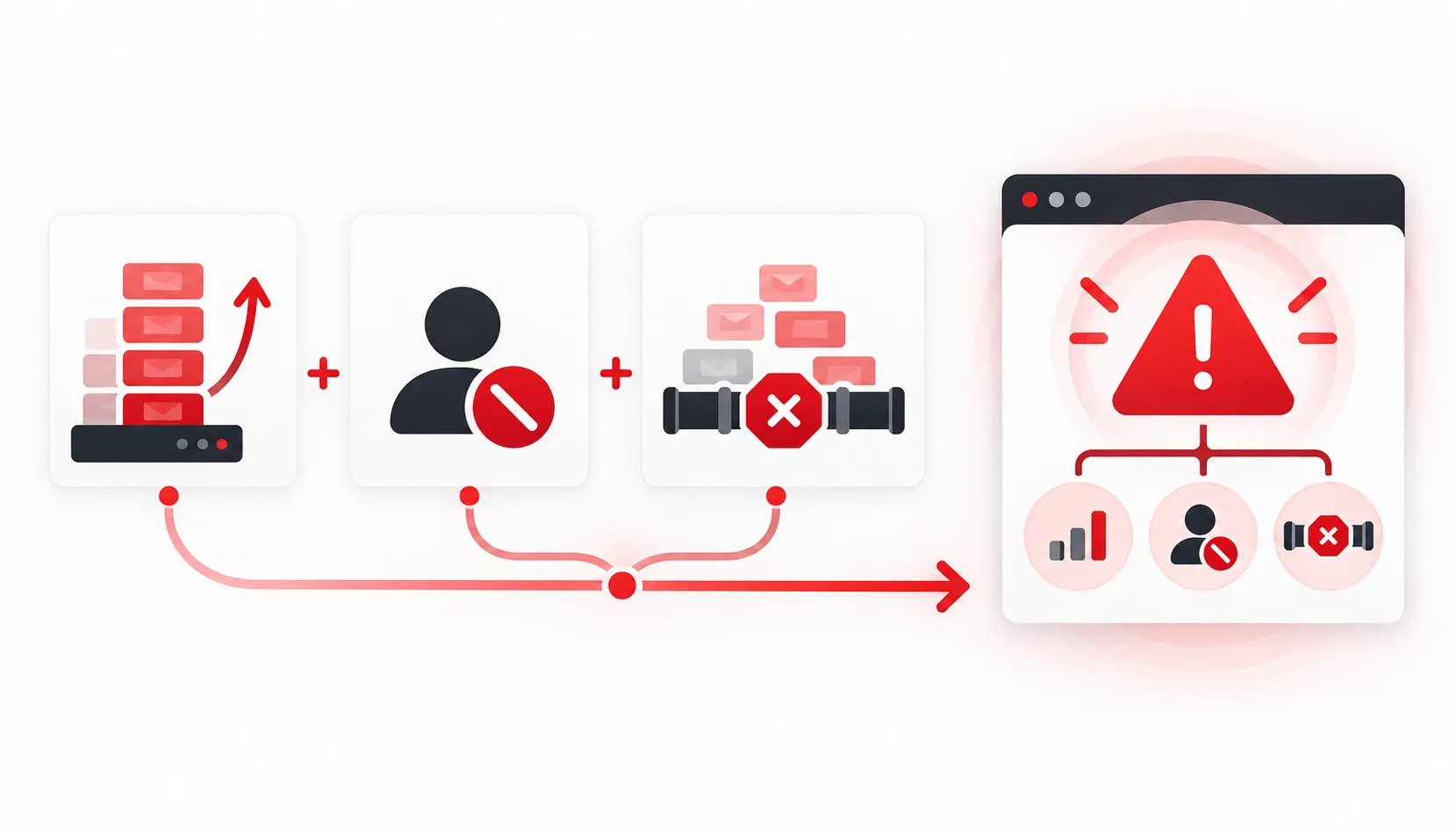
Combining related warning signs can give middleware teams a clearer picture of when an issue truly needs attention.
Give Short-Lived Problems a Chance to Clear
Middleware environments can be busy.
Sometimes a threshold is crossed for a few seconds and then everything returns to normal.
If the team gets an alert every time that happens, people can quickly start ignoring notifications.
Infrared360 allows alerts to wait for a condition to remain active for a set amount of time before firing.
That can be useful for conditions where a brief spike is normal but a sustained problem needs attention.
Of course, some situations should be reported immediately. The key is choosing the timing that makes sense for each alert.
Account for Maintenance and Known Activity
Timing matters for another reason too.
Maybe a queue manager is expected to be unavailable during maintenance. Maybe a nightly process creates a temporary spike in message volume. Maybe a team only needs to receive certain notifications during its support hours.
Those are all things your alerting strategy should take into account.
Infrared360 can temporarily pause alerts during planned periods and can also use time-based rules to help control when notifications are sent.
That helps prevent teams from being interrupted by conditions they already know about.
Avoid Sending the Same Alert Over and Over
An ongoing problem may take time to investigate.
The team probably needs to know that it is still happening. They probably do not need an unlimited stream of identical notifications.
Infrared360 lets teams control how often an alert repeats while the condition remains active and how many repeat notifications are sent.
You can also notify the team when the alert condition stops.
That creates a better balance: the issue stays visible without becoming background noise.
Tell People What They Need to Know
A useful alert should answer a few basic questions quickly:
What happened?
Where did it happen?
What condition triggered the alert?
Where should I look next?
Infrared360 alerts can include details about the affected queue manager, queue, channel, condition, and observed value.
That means the person receiving the alert has a better starting point for troubleshooting instead of getting a vague message that simply says something is wrong.
This is an important part of reducing alert fatigue.
Fewer alerts help. More useful alerts help too.
Turn Common Problems Into Repeatable Responses
Some middleware problems happen often enough that the response is already well understood.
In those cases, Infrared360 can connect an alert to a predefined service or action.
That does not mean every issue should automatically trigger a fix. Some situations still need someone to investigate and make a decision.
But when the next step is known and safe, having a repeatable process can save time and help teams respond more consistently.
For example, an alert might notify the team and also run an approved diagnostic or operational process that gives them more information.
The point is to make the response easier to repeat instead of rebuilding the same troubleshooting process each time.
Keep Reviewing What Works
Good alerting is never really “finished.”
Applications change. Traffic changes. New systems are added. Old thresholds stop making sense.
That is why teams should regularly look back at their alerts and ask:
Which alerts are useful?
Which ones fire too often?
Which ones are being ignored?
Are we missing warning signs that matter?
Historical middleware data can help give teams more context when reviewing those questions.
Over time, the goal is to keep improving the monitoring strategy so the alerts become more relevant to the environment.
Better Alerts Lead to Better Monitoring
Proactive monitoring is really about giving your team an earlier and clearer view of developing problems.
That may mean combining related warning signs. It may mean waiting to see whether a condition lasts. It may mean accounting for maintenance windows or limiting repeat notifications.
Most importantly, it means making sure the alert gives the person receiving it enough information to take the next step.
Infrared360 helps middleware teams build that kind of monitoring approach across IBM MQ and other supported technologies.
The result is a monitoring environment focused less on how many alerts you can create and more on whether those alerts actually help your team.
Make Your Middleware Alerts More Useful
Infrared360 gives middleware teams one place to monitor their environment, build alerts around the conditions that matter, control notifications, and connect common issues to repeatable actions.
The goal is simple: help your team recognize meaningful problems earlier and give them better information when something needs attention.
Frequently Asked Questions
What is proactive middleware monitoring?
Proactive middleware monitoring looks for signs that a problem may be developing before it becomes a larger disruption. That can include changes in message activity, queue depth, message age, application connections, channels, and other middleware conditions.
What makes a middleware alert useful?
A useful alert tells the team what happened, where it happened, and why the condition matters. It should give the person receiving it enough information to begin investigating without creating unnecessary noise.
How can teams reduce IBM MQ alert fatigue?
Start by reviewing which alerts actually require action. Teams can also combine related conditions, account for how long a problem lasts, avoid alerts during planned maintenance, limit repeated notifications, and send alerts only to the people who need them.
Can Infrared360 monitor more than queue depth?
Yes. Infrared360 can monitor IBM MQ conditions including message age, message activity, queue depth, last put and get activity, readers, writers, handles, and other queue and object conditions.
Can Infrared360 combine different alert conditions?
Yes. Infrared360 can combine related conditions using conditional logic. This can help teams create alerts around a broader operational situation instead of monitoring every condition separately.
Can Infrared360 account for maintenance windows?
Yes. Alerts can be paused during planned periods, and time-based rules can help control when certain notifications are delivered.
Can an alert trigger an automated action?
Yes. Infrared360 services can run as the result of an alert condition. Organizations can decide which situations are appropriate for an automated or predefined response and which should remain focused on notification and investigation.
Can teams review middleware activity over time?
Yes. Infrared360 can collect historical IBM MQ information for reporting when the appropriate data collection is configured. Teams can use that history to better understand behavior and review whether their monitoring strategy still makes sense.