Editable MQ-to-RAG Governance Template
Define Who Can See, Test, Alert On, and Manage Your MQ-to-RAG Pipeline
As IBM MQ becomes part of AI and RAG workflows, more teams need visibility into the same pipeline. But not every team needs the same level of access.
Download the editable MQ-to-RAG Governance & Access Matrix Template to document least-privilege visibility, alerting, testing, and administrative access across your IBM MQ-to-RAG environment.
- Map role-based access across MQ and downstream resources
- Define alert ownership, synthetic testing responsibilities, and escalation paths
- Document review checkpoints before access and ownership become unclear
Immediate access to the editable worksheet.
AI-Ready MQ Pipelines Create a New Governance Challenge
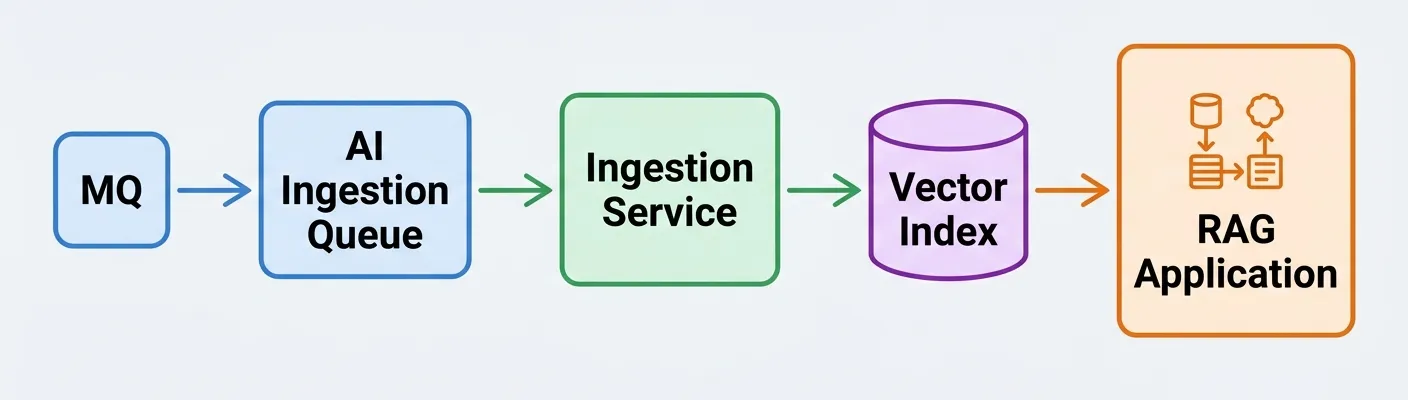
The template helps define who can see, test, alert on, or manage each part of this workflow.
When IBM MQ feeds a downstream AI or RAG pipeline, the environment quickly crosses team boundaries.
MQ administrators may own queue managers and channels. Integration teams may understand the source systems and payloads. AI platform teams may manage embeddings, vector indexes, or downstream services. Operations teams may need alerts and dashboard visibility. QA may need repeatable synthetic tests. Security and audit may need a reviewable access model.
Without a documented plan, teams can end up with one of two problems:
- Too much access, given too broadly
- Too little clarity around who owns visibility, alerts, tests, and exceptions
This template helps you make those decisions before access, ownership, and escalation paths become unclear.
A Practical Worksheet for Least-Privilege MQ-to-RAG Access Planning
The MQ-to-RAG Governance & Access Matrix Template helps your team define who can view, test, receive alerts for, or administer each part of the pipeline.
Use it to map access across:
- Queue managers
- Source queues
- AI ingestion queues
- DLQs and exception queues
- Channels and listeners
- Dashboards and reports
- Alerts and notifications
- Synthetic test cases
- Downstream dependencies
The goal is simple: give each team the access they need to support the pipeline without creating unnecessary risk.
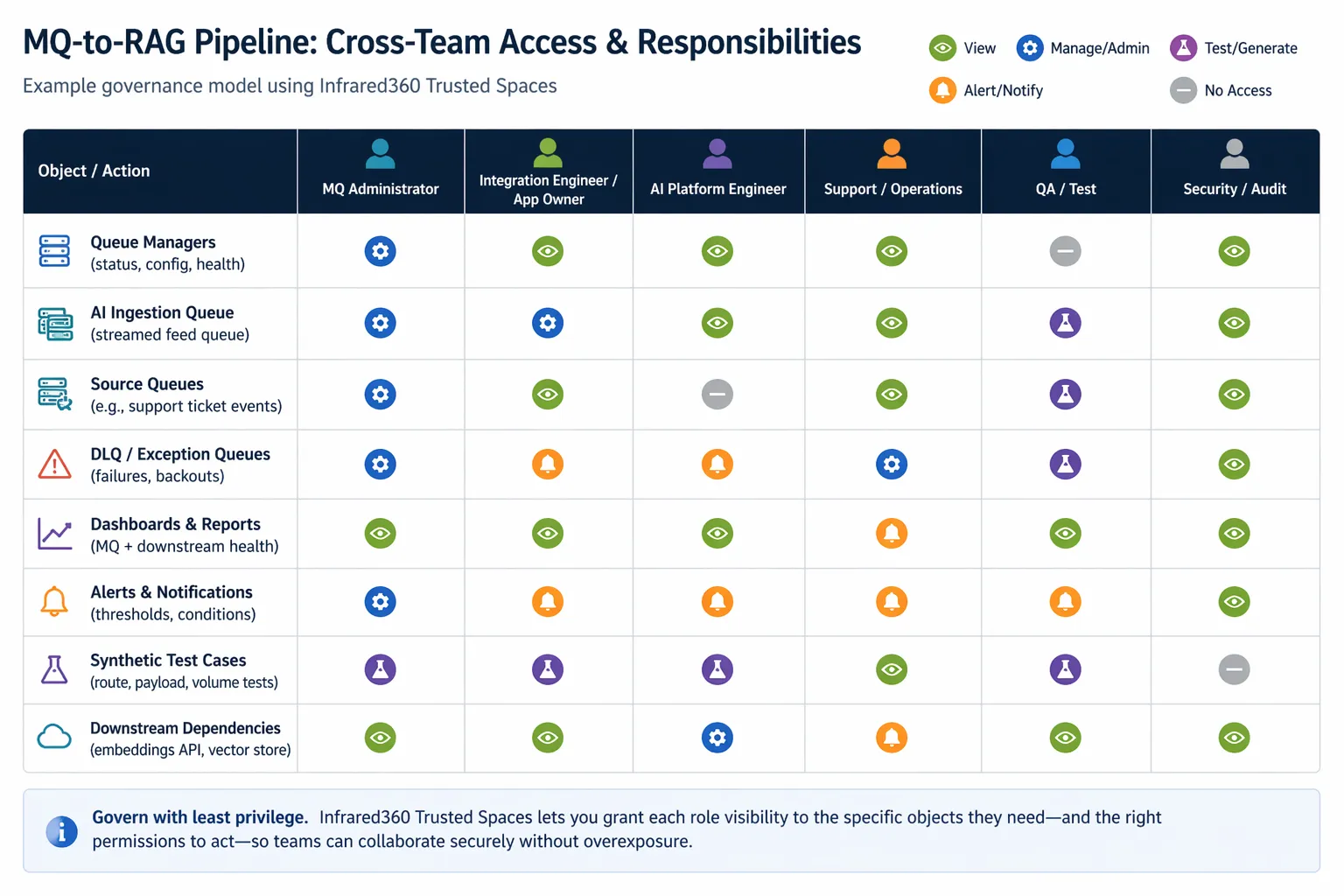
Inside the Template
The worksheet gives you a structured way to document the governance model around your MQ-to-RAG workflow.
You’ll be able to define:
- Pipeline scope, design guardrails, and review cadence
- Whether complete ingestion is required and how it should be validated
- Metadata that must be carried forward into downstream systems
- Sensitive data handling rules
- Role and team responsibilities
- View, alert, test, manage, or no-access permissions by object
- Alert ownership and escalation paths
- Synthetic testing ownership, cadence, and success criteria
- Exceptions to least-privilege access
- Review and sign-off checkpoints before go-live
Inside the Template
The worksheet gives you a structured way to document the governance model around your MQ-to-RAG workflow.
Built for the Teams Supporting MQ-to-RAG Environments
This template is designed for cross-functional teams responsible for building, operating, securing, or reviewing MQ-fed AI and RAG pipelines.
If your AI ingestion strategy depends on IBM MQ, this worksheet gives every team a shared planning model before the environment becomes harder to govern.
Resilience Is Not Just About Message Delivery
In a traditional MQ flow, teams may focus on whether a message arrived and whether the consumer processed it.
In an MQ-to-RAG pipeline, the operational question becomes broader:
- Did the AI ingestion feed receive the right messages?
- Was the content transformed correctly?
- Was important metadata preserved?
- Are downstream dependencies healthy?
- Are alerts routed to the right owners?
- Can synthetic tests validate the path after changes?
- Can each team support the workflow without excessive access?
The template helps turn those questions into a documented operating model.
Five Steps to Build Your Access Model
1. Name the roles
Identify the teams and owners involved in supporting the pipeline.
2. List the MQ and downstream objects
Document the queue managers, queues, DLQs, dashboards, alerts, synthetic tests, and dependencies that matter.
3. Assign access codes
Use view, alert, test, manage, or no-access codes to keep the model least-privilege by default.
4. Confirm alert and test ownership
Define who receives alerts, who runs synthetic tests, who approves changes, and who reviews results.
5. Review the model regularly
Update the worksheet after major architecture, ingestion, metadata, alerting, dependency, or team changes.
The completed worksheet can become the basis for team runbooks, audit review, implementation checkpoints, and Trusted Spaces™ setup in Infrared360.
Turn the Plan Into Controlled Visibility
Once your team has documented who needs access to what, the next step is putting that model into practice.
Infrared360’s Trusted Spaces™ can help teams provide delegated visibility and controlled access across complex MQ environments, so the right users can see, test, alert on, or manage the right resources without giving everyone unrestricted authority.
Use this template as a planning step before implementing shared dashboards, alert ownership, synthetic transaction coverage, and governed access in Infrared360.
Start With a Clear Access Model
MQ-to-RAG pipelines can involve multiple systems, dependencies, and teams. A simple access spreadsheet is not enough once visibility, alerting, testing, exceptions, and ownership all need to be governed.
Download the editable template to start documenting a least-privilege access and ownership model your teams can review, refine, and operationalize.
Registration gives you immediate access to the editable worksheet.