- What Is MQ Automation?
- A Brief Detour: What Are MQ PCF Commands (and Where Do MQSC/REST Fit)?
- Why Scripts, Programs, and Raw PCF Aren’t a Scalable Automation Strategy
- Core Automation Patterns for IBM MQ
- Using MQ as an Integration & Workload Automation Layer
- Real-World Scenarios
- MQ Automation in Modern Topologies
- Governance, Safety, and Approvals
- Building an MQ Automation Program
- KPIs and Reporting
- Frequently Asked Questions
- Implementation Checklist
- Conclusion and Next Steps
MQ Automation Guide
MQ Automation is the discipline of detecting conditions inside IBM MQ and executing safe, governed actions to maintain flow, protect SLAs, and reduce toil. Done well, it turns reactive firefighting into predictable, policy-driven operations: queues drain before they become emergencies, channels and listeners recover themselves, dead-letter messages are triaged and repaired, certificates are rotated on time, and the right reports quietly appear in the right inboxes, etc..
Across containerized, HA/RDMQ, and hybrid estates, intelligent automation shortens MTTR, reduces incident volume, and standardizes outcomes without the fragility of hand-written scripts.
What Is MQ Automation?
IBM MQ transports messages reliably between applications using queues, channels, listeners, and queue managers (QMs).
MQ Automation is the layer that watches the health and behavior of those components and then acts—through rules, policies, and playbooks—to keep message flow healthy.
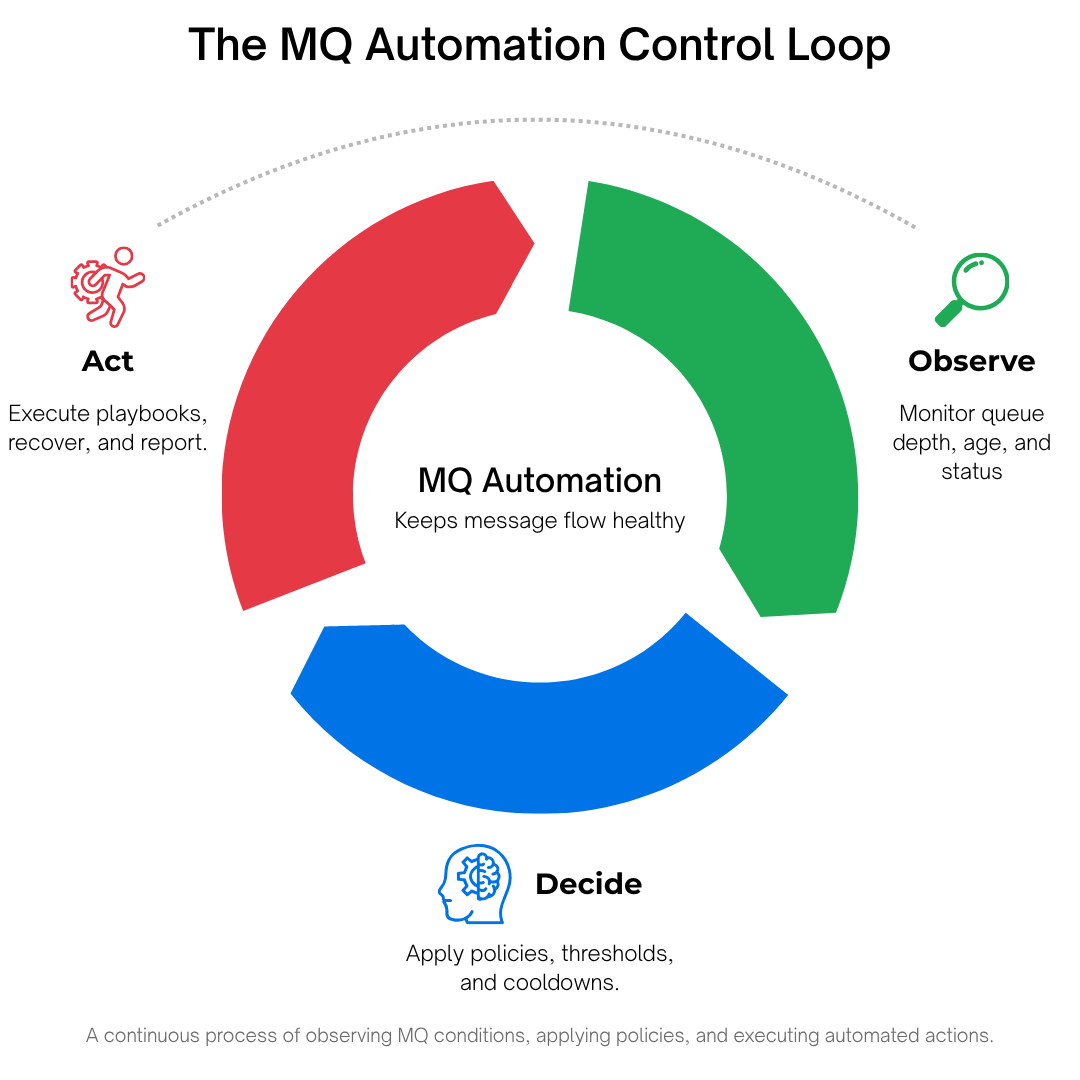
Think of it as a control system with three repeating phases:
- Observe conditions (queue depth and age, channel status, DLQ growth, certificate expiry windows, rate-of-change trends).
- Decide according to policy (thresholds, schedules, approvals, cool-downs, maximum-per-period run limits).
- Act via playbooks (restart channels/listeners, requeue or move messages, quarantine malformed ones, rotate certs, generate and send reports)—with prechecks, rollback steps, and a complete audit trail.
Two practical contexts for “MQ Automation”
- IBM MQ Administration Automation (primary focus of this page): automating the configuration, health, and maintenance of IBM MQ itself—queue managers, queues, channels, and certificates.
- Using MQ as an automation integration layer (adjacent): leveraging MQ events/messages to coordinate cross-system workflows (e.g., trigger jobs in a workload automation platform). We briefly acknowledge this adjacent use, but the scope here remains IBM MQ administration to align with enterprise buying decisions.
Foundations: decoupling, reliability, and scale
Message queuing exists to decouple producers and consumers, absorb failures, and scale horizontally. Automation reinforces those goals operationally: it removes manual bottlenecks, standardizes recovery, and keeps the fabric reliable during spikes, outages, and maintenance.
Key properties of mature MQ automation:
- Event-driven and continuous. No waiting for humans staring at dashboards.
- Declarative. You state the outcome you want; the platform sequences the safe steps.
- Guardrailed. Maintenance windows, cool-downs, run limits, and human approvals for high-impact actions.
- Governed. RBAC ensures least privilege; everything is logged for compliance.
- Composable. Reusable playbook steps apply consistently across environments.
Automation complements monitoring. Visibility tells you what is happening. Automation makes the right thing happen next.
A Brief Detour: What Are MQ PCF Commands (and Where Do MQSC/REST Fit)?
If you’ve administered IBM MQ, you’ve used MQSC, may have built tools that talk to the Command Server using Programmable Command Formats (PCF), and in newer releases may have tried the MQ REST management API.
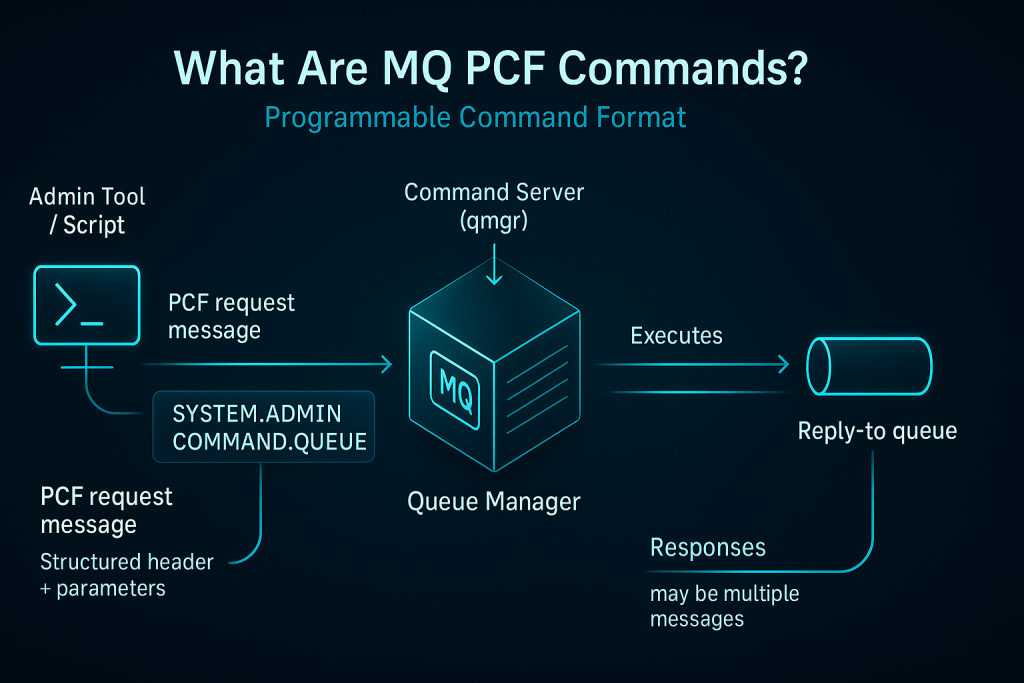
At a glance:
- MQSC is the human-friendly command language (e.g.,
DISPLAY QLOCAL(...), START CHANNEL(...)), typically run inrunmqscor via administrative consoles. - PCF commands are structured messages that applications send to the MQ Command Server queue to request administrative actions programmatically. They are the machine-oriented API behind much of MQ administration.
- MQ REST API (newer MQ versions) exposes selected administration over HTTP(S), which can simplify integration with pipelines—but its breadth and parity vary by version, so most deep administration still relies on MQSC/PCF.
Why PCF matters to automation: Almost any admin action you might script is, under the hood, a series of PCF commands (possibly mixed with OS commands). PCF is powerful and necessary—but using raw PCF messages or home-rolled programs as your primary automation strategy creates long-term risks that intelligent, policy-driven platforms are designed to avoid.
Why Scripts, Programs, and Raw PCF Aren’t a Scalable Automation Strategy
Scripts and custom programs (including those that generate or parse PCF messages) have helped many teams for years. They’re also the source of avoidable outages and hidden toil.
Here’s why.

1) Fragility Under Change

2) Poor Guardrails by Default

3) Incomplete Safety Checks

4) Audit and Compliance Gaps

5) Security and Secrets

6) Human Dependency and Knowledge Silos

7) Scaling Across Environments

8) Error Handling and Edge Cases

9) Reporting and Communication
Stakeholders need regular updates—what was fixed, when, and why. Scripts rarely generate audience-specific HTML/PDF/CSV/XLS reports on a schedule; platforms do.
Bottom line:
Keep PCF and scripting knowledge—it’s foundational. But for safety, scale, and sustainability, prefer policy-driven automation where scripts would otherwise become your “platform.”
Read more about intelligent automation here.
Core Automation Patterns for IBM MQ
Below are canonical patterns expressed in plain language. Each pattern describes signals, decision logic, and actions and maps cleanly to event-driven policies and playbooks.
Pattern 1: DLQ Auto-Triage and Repair
Context. The SYSTEM.DEAD.LETTER.QUEUE (DLQ) collects messages that could not be delivered. Left alone, it hides genuine incidents and slows recovery.
Signals. Depth threshold breached; depth rising at N msgs/min; specific reason codes dominate (e.g., 2085 unknown object, 2053 queue full, 2033 no message available due to expiry handling).
Decision. Classify messages by reason code, origin, and properties; identify recoverable vs. malformed vs. retry-later.
Actions.
- Requeue recoverable messages to original targets or designated backout queues.
- Quarantine malformed messages for investigation.
- Pace replays (batch size, max per cycle) to avoid new backlogs.
- Notify owners with a human-readable summary (counts by class, exceptions).
- Approvals required for purges or large replays during business hours.
Why not just script it? DLQ reason codes have edge cases; malformed messages might trip consumers; and replays at line-rate can create a fresh incident. A platform enforces pacing, approvals, and audit.
Pattern 2: Channel and Listener Self-Healing
Context. Channels can enter RETRYING due to peer or network issues; listeners can stop after host patches.
Signals. Channel moves to RETRYING or STOPPED for > X minutes; listener status not RUNNING; repeated short-term flaps within a period.
Decision. Distinguish transient blips (no action) from persistent failures (action). Consider business windows.
Actions. Prechecks (DNS/port/reachability) → restart → verify RUNNING → escalate with context.
Guardrails. Max two restarts/hour; maintenance windows; automatically disable the rule if a restart worsens status.

Pattern 3: Congestion Control (Depth, Age, Rate)
Context. Backlogs degrade latency and trigger timeouts; producers keep sending.
Signals. Absolute depth > threshold; oldest message age > target; depth increasing faster than consumers can drain.
Decision. Selective moves (e.g., non-priority or oldest batches), optional pause of non-critical producers, or route to backout queues.
Actions. Move in batches with confirmation; notify app team with trend charts and top offenders; auto-resume when healthy.
Pattern 4: Certificate Lifecycle Automation
Context. Certificates expire; mismatches or broken chains cause outages.
Signals. Expiry within 45/30/15 days; chain validation errors; keystore mismatch with policy.
Decision. Is this an auto-rotate candidate? Which listeners/channels depend on it? What’s the approved window?
Actions. Retrieve new cert → validate chain → import into MQ keystore (KDB/KS) → controlled restarts of dependents → verify TLS handshakes → produce compliance report.
Pattern 5: Scheduled Housekeeping & Change Windows
Context. Routine jobs are necessary but easy to forget.
Signals. Calendar schedules; end-of-month processing; pre-deployment windows.
Decision. Preflight checks (disk space, resource availability) and blackout date awareness.
Actions. Log rotation, selective channel recycles, report generation with before/after snapshots.
Using MQ as an Integration & Workload Automation Layer
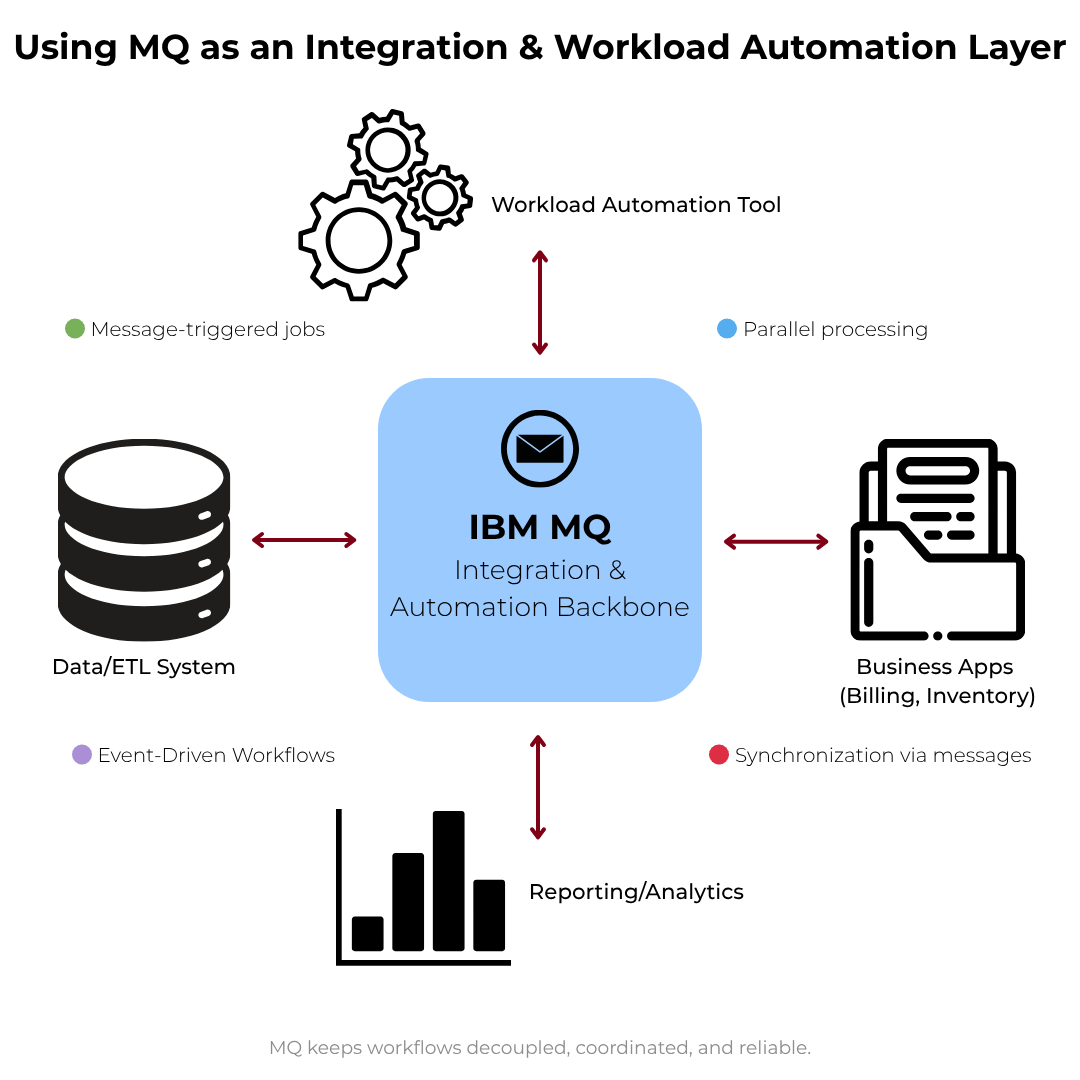
While this page focuses on IBM MQ administration automation, many enterprises also use MQ itself as a reliable integration backbone to coordinate business workflows:
- Message-triggered jobs: An inbound MQ message can start a downstream job (e.g., ETL, reporting) in a workload automation tool.
- Parallel processing: A single event fan-outs to multiple consumers (inventory, billing), each acting independently while the queue preserves order and resilience.
- Synchronization via messages: Producers/consumers exchange completion messages to keep systems in step without tight coupling.
This adjacent pattern underscores why decoupling and reliability are central to MQ—and why keeping the MQ layer healthy with administration automation is so valuable.
Real-World Scenarios
Scenario A: The Friday-Night DLQ Scare
It’s 19:20 on a Friday. Alerts indicate the DLQ is climbing.
Historically, someone RDPs into a jump box, runs a DLQ utility or a custom script, and hopes for the best. Tonight, the automation policy wakes up first.
It notices that 90% of entries share the same reason code tied to a recently shuffled alias. The policy classifies those messages as safe to requeue. It paces the replay—1,000 messages per batch, pausing between batches to watch downstream depth—and routes malformed messages to a quarantine queue. An approval pops up for purging only the quarantined messages older than seven days.
By 19:45 the system is green, and a report summarizing counts, reason codes, and actions taken lands in the app team’s mailbox. No war room, no guesswork, no weekend lost.
Scenario B: The Flapping Channel During Settlement
During a critical payment window, TO.PAYMENTS flips between RUNNING and RETRYING.
A legacy script would try restarts in a tight loop. The policy does better: it checks DNS and peer reachability, finds an intermittent network fault, and limits action to two restarts in the hour—then escalates with context if health doesn’t stabilize. The cool-down prevents a restart storm that could drop in-flight sessions.
Operations approves one final controlled recycle in the maintenance window; the issue clears without downstream fallout.
Scenario C: The Certificate That Didn’t Become an Incident
Two weeks before expiration, the policy flags a server certificate. It fetches the replacement from the approved store, validates the chain, and schedules the import for the weekend window with a required human approval.
After import, the automation restarts the dependent listeners, verifies TLS handshakes, and exports a brief PDF that auditors later use.
On Monday, nobody even remembers that a potential outage was avoided.
MQ Automation in Modern Topologies
Containerized Deployments
Containers magnify both the benefits and the risks of automation. You want declarative policies and parameterized playbooks that align with your cluster’s labeling (e.g., env=prod, app=orders). Rate-limits are essential: aggressive restart loops are louder in auto-scaled worlds. Store policies centrally so new pods inherit the correct behavior without manual scripting.
HA and RDMQ
In HA/RDMQ configurations, policies must be failover-aware: actions should target the active role and tolerate role changes mid-run. Idempotent steps (safe if retried) and post-failover verifications are essential. Pay special attention to drift prevention—labels/scopes help ensure you don’t accidentally run production actions on standbys.
Hybrid and Multi-Cloud
Network partitions and variable latency are facts of life. Thresholds should reflect regional realities. Keep certificate sources and secrets management consistent across clouds; centralize audit so a single pane shows what ran and where.
Governance, Safety, and Approvals
A credible automation program depends on governance as much as it does on clever playbooks.
- RBAC and least privilege. Assign roles for authors, approvers, executors, and auditors. Each policy should declare who can modify it and who must approve it.
- Human-in-the-loop when appropriate. For high-impact actions—purging queues, rotating production certificates, or wide-blast restarts—insert an approval step. Over time, as confidence grows, you can move selected actions to full auto.
- Change-safe operations. Prechecks prevent actions when prerequisites aren’t met. Dry-run/preview shows exactly what would happen. Rollback provides a way out when reality diverges from intent.
- Evidence by default. Every policy execution leaves behind structured evidence—who approved, what ran, counts affected, and outcomes. This is catnip for audit and post-incident reviews.
Building an MQ Automation Program
Step 1: Audit and Baseline
Inventory all queue managers, queues, channels, listeners, and certificates. Note versions, HA/RDMQ roles, and ownership. Identify repetitive tasks (channel restarts, backlog checks, DLQ hygiene, cert rotations) and rank by frequency × impact.
Step 2: Start with Visibility and Actionable Thresholds
Implement or refine visibility on queue depth/age, channel/listener states, DLQ entries, and certificate windows. Define actionable thresholds (with durations) that will back specific policies. The goal is to shift from reactive to proactive.
Step 3: Script the Simple Wins (Tightly Scoped)
For low-risk, repetitive tasks (e.g., nightly configuration exports), MQSC or PCF scripts can help—with clear limits. Avoid turning scripts into your platform; do not bypass approvals or audit for production-impacting actions.
Step 4: Implement Policy-Driven, Remediating Automation
Adopt a platform approach for actions that change runtime state (restarts, replays, rotations). Encode guardrails (cool-downs, maintenance windows, run-limits), require approvals for destructive steps, and capture audit by default. Connect policies to the thresholds from Step 2.
Step 5: Governance and Delegated Self-Service
Introduce RBAC and approvals. Provide role-appropriate self-service (e.g., a developer can safely drain a non-prod queue) without exposing full consoles or raw credentials.
Step 6: Measure, Report, and Iterate
Publish MTTR deltas, automated execution counts, incidents avoided, and compliance coverage (e.g., cert rotations on time). Review monthly and tune thresholds.
KPIs and Reporting
- Automation executions by class (DLQ repair, restart, move, cert rotation). Trend them; a healthy estate has frequent low-impact actions and fewer escalations.
- MTTR before/after per scenario. Publish wins to build support.
- Manual interventions avoided. Convert avoided pages and runbooks into hours saved.
- Incident severity distribution. Expect fewer SEV-1/SEV-2 as automation matures.
- Certificate compliance. % of certs rotated on or before policy window.
- Queue health trends. Depth and age distributions, DLQ entries per day, backout volumes.
- Policy reliability. Failure rate of actions, number of approvals requested vs. granted, and rollback frequency (should be low).
Reports should be role-appropriate: detailed for admins, concise for app owners, and outcome-focused for leadership.
Frequently Asked Questions
Implementation Checklist
Conclusion and Next Steps
MQ Automation is the simplest way to convert expert know-how into repeatable, guardrailed outcomes. It absorbs the complexity of PCF and scripting, scales across environments, and creates the operational confidence enterprises need. Whether your immediate pain is DLQ sprawl, channel flapping, certificate risk, or just the grind of weekly housekeeping, start with clear policies and grow from there.
Recommended next step: Connect with an MQ Automation expert.
Meet with a specialist who will map your top use cases (DLQ repair, channel/listener self‑healing, certificate rotations, scheduled housekeeping) to a policy‑driven MQ administration platform and show how to implement them safely with approvals, RBAC, and audit.
- See event‑driven rules and playbooks in action
- Review guardrails (maintenance windows, cool‑downs, run limits)
- Walk through reporting and compliance evidence
- Leave with a concrete rollout plan for your environments
Book a short session → We’ll align on 1–2 high‑impact scenarios and show you exactly how to automate them without writing or maintaining fragile scripts.